

Envision your home wrapped in a steady, invisible web of fast Wi‑Fi that never drops a call or buffers a stream; you’ll want that kind of reliability. You’ll compare coverage, backhaul options, device limits, and whether extra features like Thread, Zigbee, or multi‑gig ports matter to you. I’ll walk you through six solid mesh choices for 2026 and the tradeoffs you’ll need to weigh next.
| TP-Link Deco X20 WiFi 6 Mesh System (3-Pack) |

| Best for Large Homes | Wi‑Fi Generation: Wi‑Fi 6 (AX) | Coverage: Up to 5,800 sq. ft. | Device Capacity: Up to 150 devices | VIEW LATEST PRICE | Read Our Analysis |
| TP-Link Deco X15 AX1500 Wi‑Fi 6 Mesh System (2-Pack) |

| Best for Budget-Conscious | Wi‑Fi Generation: Wi‑Fi 6 (AX) | Coverage: Up to 3,900 sq. ft. | Device Capacity: Up to 120 devices | VIEW LATEST PRICE | Read Our Analysis |
| Amazon eero 6+ Mesh WiFi System 3-Pack |

| Best for Smart Homes | Wi‑Fi Generation: Wi‑Fi 6 (AX) | Coverage: Up to 4,500 sq. ft. | Device Capacity: 75+ devices | VIEW LATEST PRICE | Read Our Analysis |
| NETGEAR Orbi 370 WiFi 7 Mesh System (RBE373) |
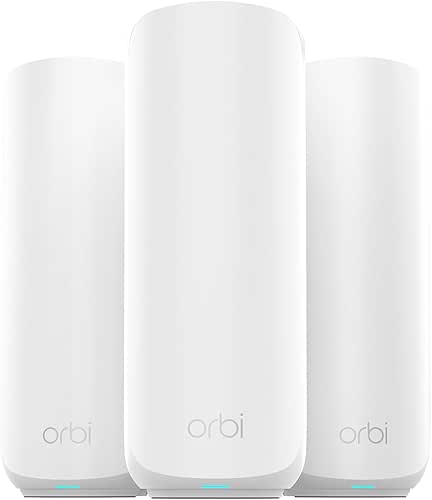
| Best for Future-Proofing | Wi‑Fi Generation: Wi‑Fi 7 | Coverage: Up to 6,000 sq. ft. | Device Capacity: Up to 70 devices | VIEW LATEST PRICE | Read Our Analysis |
| Amazon eero 6+ Mesh WiFi System (3-Pack) |
| Best for Easy Integration | Wi‑Fi Generation: Wi‑Fi 6 (AX) | Coverage: Up to 4,500 sq. ft. | Device Capacity: 75+ devices | VIEW LATEST PRICE | Read Our Analysis |
| NETGEAR Orbi 770 Tri-Band WiFi 7 Mesh System |

| Best for High Performance | Wi‑Fi Generation: Wi‑Fi 7 | Coverage: Up to 8,000 sq. ft. | Device Capacity: Up to 100 devices | VIEW LATEST PRICE | Read Our Analysis |
More Details on Our Top Picks
TP-Link Deco X20 WiFi 6 Mesh System (3-Pack)
In case you need reliable whole‑home Wi‑Fi for a busy household—think up to 150 devices and streaming on a 1 Gbps plan—the TP‑Link Deco X20 (3‑pack) delivers with Wi‑Fi 6 performance and mesh coverage up to 5,800 sq. ft. You’ll replace routers and extenders with AX1800 dual‑band mesh that cuts dead zones and buffering. Six Ethernet ports and wired backhaul support stable wired devices. Setup’s fast via the Deco app with visual guidance and remote control, and Alexa handles guest Wi‑Fi. HomeShield gives security, device ID, QoS, and parental controls, while most ISPs work with your modem.
- Wi‑Fi Generation:Wi‑Fi 6 (AX)
- Coverage:Up to 5,800 sq. ft.
- Device Capacity:Up to 150 devices
- Number of Units (Pack):3‑pack
- App Management:Deco app (setup, remote control)
- Security & Parental Controls:TP‑Link HomeShield (security scan, IoT ID, parental controls)
- Additional Feature:6 Ethernet ports total
- Additional Feature:Supports wired backhaul
- Additional Feature:Alexa guest Wi‑Fi control
TP-Link Deco X15 AX1500 Wi‑Fi 6 Mesh System (2-Pack)
Provided that you want reliable whole‑home coverage on a budget, the TP‑Link Deco X15 AX1500 (2‑pack) gives you Wi‑Fi 6 speeds, AI‑driven roaming, and support for up to 120 devices across roughly 3,900 sq.ft., all while using simple app setup and optional wired backhaul for stable connections. You’ll get AX1500 dual‑band throughput (1,201 Mbps on 5 GHz, 300 Mbps on 2.4 GHz), two Gigabit ports per unit, and any unit can act as the primary router. Deco Mesh’s AI‑roaming optimizes device handoffs, HomeShield provides layered security and parental controls, and Alexa/Google Assistant support makes management hands‑free.
- Wi‑Fi Generation:Wi‑Fi 6 (AX)
- Coverage:Up to 3,900 sq. ft.
- Device Capacity:Up to 120 devices
- Number of Units (Pack):2‑pack
- App Management:Deco app (setup, remote management)
- Security & Parental Controls:TP‑Link HomeShield (network/IoT protection, parental controls)
- Additional Feature:AI‑powered mesh optimization
- Additional Feature:Any unit as router
- Additional Feature:4 Gigabit Ethernet ports
Amazon eero 6+ Mesh WiFi System 3-Pack
Choose the eero 6+ 3‑pack provided you need simple, whole‑home Wi‑Fi that reliably covers about 4,500 sq. ft. and supports more than 75 devices at gigabit speeds. You’ll get Wi‑Fi 6 with a 160 MHz channel, TrueMesh routing to reduce drop‑offs, and backward compatibility with earlier eero units. A built‑in smart‑home hub handles Thread and Zigbee, and Alexa integration simplifies voice control. The eero app walks you through setup, offers remote management, and applies automatic updates. Optional subscription enables advanced security and network controls. US phone and email support are available for troubleshooting and guidance.
- Wi‑Fi Generation:Wi‑Fi 6 (AX)
- Coverage:Up to 4,500 sq. ft.
- Device Capacity:75+ devices
- Number of Units (Pack):3‑pack
- App Management:eero app (setup, remote management)
- Security & Parental Controls:Built‑in updates + optional subscription for advanced security/parental controls
- Additional Feature:160 MHz channel support
- Additional Feature:Built‑in Thread and Zigbee
- Additional Feature:eero TrueMesh routing
NETGEAR Orbi 370 WiFi 7 Mesh System (RBE373)
Should you need top-tier home coverage for 4K streaming, video calls, and gaming across large spaces, the NETGEAR Orbi 370 WiFi 7 Mesh System (RBE373) delivers up to 5 Gbps and coverage for about 6,000 sq. ft., making it a solid choice for busy households with up to 70 connected devices. You get a router plus two BE5000 extenders, dual-band WiFi 7 with improved backhaul, and a 2.5Gbps Internet port for faster wired links. It’s backward compatible, offers automatic firmware updates and Advanced Router Protection, and targets home entertainment, hybrid work, and smart-home setups with reliable, easy maintenance.
- Wi‑Fi Generation:Wi‑Fi 7
- Coverage:Up to 6,000 sq. ft.
- Device Capacity:Up to 70 devices
- Number of Units (Pack):Router + 2 extenders (3 units)
- App Management:App-based management with automatic updates/security
- Security & Parental Controls:Built‑in security, automatic firmware updates, Advanced Router Protection
- Additional Feature:WiFi 7 standard
- Additional Feature:2.5 Gigabit Internet port
- Additional Feature:Includes router + 2 extenders
Amazon eero 6+ Mesh WiFi System (3-Pack)
Should you want reliable whole‑home coverage with strong smart‑home support, the Amazon eero 6+ 3‑pack is a solid choice. It covers up to 4,500 sq. ft. and supports 75+ devices using Wi‑Fi 6 with a 160 MHz channel and TrueMesh to reduce drop‑offs. You’ll get backward compatibility with earlier eeros and eero Built‑in on select Echo devices. The units include a Thread and Zigbee smart‑home hub, so you can skip separate hubs and tie devices to Alexa. The eero app simplifies setup and remote management; optional eero Plus adds security, parental controls, and ad/tracker blocking.
- Wi‑Fi Generation:Wi‑Fi 6 (AX)
- Coverage:Up to 4,500 sq. ft.
- Device Capacity:75+ devices
- Number of Units (Pack):3‑pack
- App Management:eero app (setup, remote management)
- Security & Parental Controls:eero Plus subscription for advanced security/parental controls (basic controls available)
- Additional Feature:160 MHz channel support
- Additional Feature:Built‑in Thread and Zigbee
- Additional Feature:eero Plus subscription option
NETGEAR Orbi 770 Tri-Band WiFi 7 Mesh System
In case you need top-tier wireless capacity for a busy smart home or hybrid office, the NETGEAR Orbi 770 Series (RBE773) delivers WiFi 7 speeds up to 11 Gbps with a tri‑band design and improved backhaul so you can keep up to 100 devices streaming, gaming, and conferencing across roughly 8,000 sq. ft. You get a router plus two satellites (RBE773-100NAS) with high-performance antennas, 360° coverage, and a 2.5 GbE internet port for faster wired links. It’s backward compatible, offers automatic firmware updates and Advanced Router Protection, and ships in a compact package from NETGEAR with manufacturer support.
- Wi‑Fi Generation:Wi‑Fi 7
- Coverage:Up to 8,000 sq. ft.
- Device Capacity:Up to 100 devices
- Number of Units (Pack):Router + 2 satellites (3 units)
- App Management:App-based management with automatic updates/security
- Security & Parental Controls:Built‑in security, automatic firmware updates, Advanced Router Protection
- Additional Feature:Tri‑band WiFi 7 architecture
- Additional Feature:Up to 11 Gbps theoretical
- Additional Feature:2.5 Gig Internet port
Factors to Consider When Choosing a Mesh Wifi 6 System
Upon choosing a Mesh WiFi 6 system, you’ll want to weigh coverage and capacity, wireless performance standards, and whether it supports wired backhaul. Also check security features and parental controls to protect devices and manage access. Finally, pick a system with straightforward setup and a reliable app so you won’t fight the installation or ongoing management.
Coverage And Capacity
Although a mesh’s advertised square footage gives a quick estimate, you’ll want to match that coverage to your home’s layout and add margin for thick walls, multiple floors, or long corridors that cut effective range. Compare the system’s rated area to your floor plan and plan for overlap so dead zones don’t appear. Check maximum supported client counts and pick a system rated above your current device total—think 50–150+—to handle smart‑home growth and simultaneous streaming. Prefer platforms with multi‑band operation, band steering, or a dedicated backhaul to keep throughput high under load. Choose systems that support wired Ethernet backhaul or extra access points for dense environments, and confirm throughput ratings match your ISP plan (100 Mbps, 1 Gbps, or multi‑gig) so speeds stay consistent.
Wireless Performance Standards
Consider wireless performance as the engine of your mesh: it’s what determines real-world speeds, latency, and how many devices you can run at once. Wi‑Fi 6 (802.11ax) uses OFDMA and MU‑MIMO to serve multiple clients simultaneously, so systems handle dense device loads far better than Wi‑Fi 5. Check aggregate AX ratings (AX1500, AX1800) to compare combined 2.4 GHz and 5 GHz peak speeds, but don’t treat them as gospel. Channel width (20/40/80/160 MHz) and 160 MHz support matter for peak throughput on compatible clients, though wider channels suffer more interference. Look for OFDMA, TWT, and improved MU‑MIMO to cut latency and augment IoT battery life. Recall antenna quality, radios per unit, mesh backhaul, and interference often dictate your actual in‑home performance.
Wired Backhaul Support
Consider wired backhaul as the shortcut that offloads mesh traffic onto Ethernet so your Wi‑Fi radios can focus on clients. Whenever nodes are linked via Gigabit or 2.5 Gigabit Ethernet, you’ll get higher throughput, lower latency, and less packet loss than wireless backhaul—critical for gaming, 4K/8K streaming, and real‑time conferencing. Pick a system that lets any unit act as router or satellite over Ethernet so you can place nodes flexibly. Wired backhaul also preserves wireless airtime through removing relay duties from radios, improving performance in multi‑device homes. Prior to buying, confirm your cabling and switch ports support the advertised speeds and that the mesh firmware or management interface includes options to enable and optimize wired backhaul.
Security And Parental Controls
Whenever you’re picking a mesh Wi‑Fi 6 system, prioritize built‑in security and parental controls so your network and family stay protected without extra hassle. Look for automatic firmware updates, intrusion detection, and malware/blocking engines to safeguard devices and IoT endpoints. Choose granular parental controls that let you create user or device profiles, set schedules or time limits, and block content categories. Confirm which features are free versus subscription-based and compare basic reporting to premium threat protection. Verify device identification and network‑wide scanning so unknown or vulnerable devices can be detected and quarantined automatically. Should you want remote convenience, check for remote management and voice control options to toggle guest Wi‑Fi, pause profiles, or adjust security settings from your mobile app.
Setup And App Management
Security and parental controls are only as effective as the tools you use to manage them, so pick a mesh Wi‑Fi 6 system with an intuitive setup and a powerful app. You’ll want guided, step‑by‑step installation that shows topology and node status so you can place satellites correctly and confirm backhaul links. Prefer apps with remote access and real‑time monitoring to troubleshoot, reboot, and tweak settings offsite. Visual tools—signal heatmaps and connection maps—plus automated diagnostics help find dead zones and overloaded nodes quickly. Guarantee granular controls: guest networks, per‑device QoS, scheduled access, and device‑level parental controls for central bandwidth and access management. Finally, choose an app that pushes automatic firmware updates and security alerts but lets you schedule updates to avoid interruptions.
