

Like a reliable doorknob that knows your schedule, the right Kwikset smart lock can change how you manage home access. You’ll get options that balance security, convenience and smart‑home features without overcomplicating things. Whether you want motorized one‑touch latches, ANSI/BHMA ratings, Wi‑Fi remote control or easy re‑keying, there’s a fit — and the differences matter more than you could imagine.
| Kwikset Powerbolt 907 Keyless Electronic Deadbolt (Satin Nickel) |
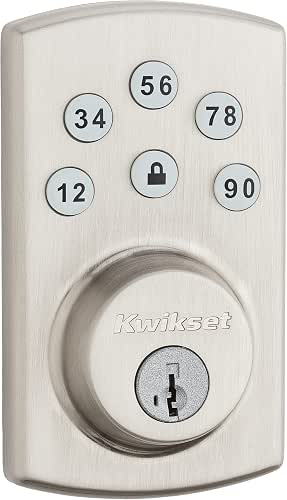
| Quick & Simple | Keyless Entry: 6-button illuminated keypad (keyless codes) | SmartKey / Re-keyable: SmartKey Security (re-key yourself) | Physical Key Backup: Includes 2 physical keys | VIEW LATEST PRICE | Read Our Analysis |
| Kwikset Juno Door Knob & Deadbolt Combo (Satin Nickel) |

| Complete Entry Set | Keyless Entry: Keyed entry knob + deadbolt (combo includes keyed knobs but supports SmartKey rekey; keyed primarily) | SmartKey / Re-keyable: SmartKey Security (re-key in three steps) | Physical Key Backup: Includes 2 keys (one-key convenience) | VIEW LATEST PRICE | Read Our Analysis |
| Kwikset SmartCode 955 Pembroke Keypad Lever (Satin Nickel) |

| Best for Multiple Users | Keyless Entry: Keypad entry (up to 30 user codes) | SmartKey / Re-keyable: SmartKey Security (re-key to KW1) | Physical Key Backup: Re-keyable to KW1 key; physical key backup supported (SmartKey) | VIEW LATEST PRICE | Read Our Analysis |
| Kwikset Halo Wi‑Fi Smart Lock Keyless Deadbolt |

| Smart Home Ready | Keyless Entry: Built-in backlit keypad + app (keypad codes) | SmartKey / Re-keyable: SmartKey Security included | Physical Key Backup: Includes 2 physical keys | VIEW LATEST PRICE | Read Our Analysis |
| Kwikset Halo Wi‑Fi Smart Lock Keyless Deadbolt |

| Remote Control Favorite | Keyless Entry: Backlit keypad + app access (keypad codes) | SmartKey / Re-keyable: SmartKey Security included | Physical Key Backup: Includes 2 physical keys | VIEW LATEST PRICE | Read Our Analysis |
| Kwikset SmartCode 917 Keyless Electronic Lever Lock |

| High-Security Lever | Keyless Entry: Keypad electronic lever (up to 30 codes) | SmartKey / Re-keyable: SmartKey Security (owner re-keying) | Physical Key Backup: Includes 2 keys | VIEW LATEST PRICE | Read Our Analysis |
More Details on Our Top Picks
Kwikset Powerbolt 907 Keyless Electronic Deadbolt (Satin Nickel)
Should you want a straightforward, budget-friendly smart deadbolt that’s easy to install and operate, the Kwikset Powerbolt 907 delivers: its motorized latch and one-touch locking give fast, quiet operation. You get a 6-button illuminated keypad for up to six unique user codes, plus two physical keys and SmartKey Security so you can re-key in seconds. Auto-locking offers multiple time settings. It fits standard 2-1/8″ crossbores and doors 1-3/8″ to 1-3/4″ thick, runs on four AA batteries with about 12 months’ life, and claims pick-resistant, improved break-in protection. Finish: satin nickel.
- Keyless Entry:6-button illuminated keypad (keyless codes)
- SmartKey / Re-keyable:SmartKey Security (re-key yourself)
- Physical Key Backup:Includes 2 physical keys
- Auto-lock Capability:Configurable auto-lock / relock timers
- DIY Installation / Door Fit:DIY install; fits 1-3/8″–1-3/4″ doors; 2-1/8″ cross bore
- Battery-powered Electronics:4 AA batteries (≈12 months)
- Additional Feature:Motorized quiet operation
- Additional Feature:6-button illuminated keypad
- Additional Feature:SmartKey quick re-key
Kwikset Juno Door Knob & Deadbolt Combo (Satin Nickel)
Should you want a straightforward, high-security upgrade for an exterior door that keeps key control simple, the Kwikset Juno door knob and deadbolt combo is a smart pick — it pairs a keyed knob with a single-cylinder deadbolt and SmartKey re-keying so you can change keys in seconds without removing the lock. You get two locking points, Satin Nickel finish, and ANSI Grade 1 security from patented side-locking bar and locking sidebar BumpGuard tech. Microban inhibits bacterial growth on hardware. Pre-assembled for screwdriver-only installation, it includes keys, adjustable latches, strike plate, SmartKey tool, template, and lifetime mechanical/finish warranty.
- Keyless Entry:Keyed entry knob + deadbolt (combo includes keyed knobs but supports SmartKey rekey; keyed primarily)
- SmartKey / Re-keyable:SmartKey Security (re-key in three steps)
- Physical Key Backup:Includes 2 keys (one-key convenience)
- Auto-lock Capability:Deadbolt provides standard locking (combo deadbolt supports auto-lock via lock type/features implied)
- DIY Installation / Door Fit:Pre-assembled, screwdriver installation; fits standard door prep (standard bore)
- Battery-powered Electronics:(Mechanical keyed combo; no primary electronics but includes components with no battery requirement)
- Additional Feature:ANSI Grade 1 deadbolt
- Additional Feature:Microban antimicrobial protection
- Additional Feature:Pre-assembled, screwdriver install
Kwikset SmartCode 955 Pembroke Keypad Lever (Satin Nickel)
Provided that you want a durable, easy-to-manage keyed entry that’s ideal for busy households or rental units, the SmartCode 955 Pembroke delivers with keypad access for up to 30 user codes plus a one-time code and SmartKey re-keying so you can change keys in seconds. You’ll get keypad entry with a bright LED backlight, a 3-year battery using one included 9V, and customizable lock modes—Auto-Lock, Passage, or disable the turnpiece. It’s BHMA Grade 2 and tested to 500,000 cycles for high-traffic use. Tamper protection locks out the keypad and sounds an alarm after repeated wrong codes.
- Keyless Entry:Keypad entry (up to 30 user codes)
- SmartKey / Re-keyable:SmartKey Security (re-key to KW1)
- Physical Key Backup:Re-keyable to KW1 key; physical key backup supported (SmartKey)
- Auto-lock Capability:Auto-Lock mode available (configurable)
- DIY Installation / Door Fit:DIY install (standard lever prep; details imply standard fit)
- Battery-powered Electronics:1×9V battery (≈3 years)
- Additional Feature:Up to 30 user codes
- Additional Feature:500,000-cycle durability
- Additional Feature:9V battery, 3‑year life
Kwikset Halo Wi‑Fi Smart Lock Keyless Deadbolt
Should you want a plug‑and‑play smart lock that skips a hub and gives reliable remote control, the Kwikset Halo Wi‑Fi is a strong pick—its built‑in Wi‑Fi, keypad, and app let you lock, share access, and get tamper alerts from anywhere, while features like geofence auto‑unlock and SmartKey security keep daily use simple and secure. You’ll get keyless entry via a backlit keypad or app, support for 250 codes, voice control with Alexa and Google, IFTTT automations, intrusion detection, and configurable auto‑lock. It installs in minutes, includes two keys and batteries, and carries sturdy warranties.
- Keyless Entry:Built-in backlit keypad + app (keypad codes)
- SmartKey / Re-keyable:SmartKey Security included
- Physical Key Backup:Includes 2 physical keys
- Auto-lock Capability:Configurable auto-lock duration
- DIY Installation / Door Fit:DIY install in minutes; fits 1-3/8″–1-3/4″ doors; adjustable backset 2-1/8″–2-3/4″
- Battery-powered Electronics:4 AA batteries included (electronic Wi‑Fi lock)
- Additional Feature:Built-in Wi‑Fi (no hub)
- Additional Feature:Up to 250 access codes
- Additional Feature:Geofence auto-unlock
Kwikset Halo Wi‑Fi Smart Lock Keyless Deadbolt
Supposing you want a straightforward, hub-free smart lock that you can control from anywhere, the Kwikset Halo Wi‑Fi Keyless Deadbolt is a strong pick — it connects directly to your home Wi‑Fi so you can lock or unbolt, share codes, and view activity from the Kwikset app without extra hardware. You’ll get a backlit keypad supporting up to 250 codes, plus temporary, scheduled, or permanent sharing. Use geofence auto‑unlock, set automations, or control it with Alexa or Google Home. Receive intrusion and invalid‑code alerts, enable auto‑lock, and install it yourself in minutes; lifetime mechanical warranty included.
- Keyless Entry:Backlit keypad + app access (keypad codes)
- SmartKey / Re-keyable:SmartKey Security included
- Physical Key Backup:Includes 2 physical keys
- Auto-lock Capability:Configurable auto-lock duration
- DIY Installation / Door Fit:DIY install; fits 1-3/8″–1-3/4″ doors; adjustable backset
- Battery-powered Electronics:4 AA batteries required/included (Wi‑Fi model)
- Additional Feature:Remote control via app
- Additional Feature:Voice assistant compatible
- Additional Feature:Instant tamper notifications
Kwikset SmartCode 917 Keyless Electronic Lever Lock
Choose the SmartCode 917 whenever you want a durable, keyless lever that balances residential-grade security with simple self-service setup; its SmartKey re-keying and BHMA AAA certification mean you can quickly change keys and trust top-tier mechanical protection without calling a locksmith. You get keypad access for up to 30 user codes, optional one-time codes, and a physical key backup. Modes include Auto Lock, Passage, and Disable Passage. The Halifax lever in matte iron black suits entry doors, home offices, and garages. It ships with hardware, SmartKey tool, two keys, and a 9V battery (≈3 years). Warranty covers mechanical/finish lifetime; electronics one year.
- Keyless Entry:Keypad electronic lever (up to 30 codes)
- SmartKey / Re-keyable:SmartKey Security (owner re-keying)
- Physical Key Backup:Includes 2 keys
- Auto-lock Capability:Auto Lock mode available
- DIY Installation / Door Fit:DIY install (standard lever fit; reversible handing included)
- Battery-powered Electronics:1×9V battery (≈3 years)
- Additional Feature:BHMA AAA certified
- Additional Feature:Reversible left/right levers
- Additional Feature:9V battery, long life
Factors to Consider When Choosing a Kwikset Smart Lock
Whenever choosing a Kwikset smart lock, you’ll want to weigh security and certification initially to make certain it meets your standards. Check connectivity and integration options, access methods offered, power and battery life, and whether the lock will fit your door and installation skill level. These factors determine convenience, reliability, and long-term value.
Security And Certification
Although smart locks add convenience, you should prioritize proven security and certification details to make certain real protection; check BHMA/BHMA Grade ratings (Grade 1 is best for residential strength) and favor higher grades. Inspect physical defenses—anti‑bump, pick‑resistant, and drill‑resistant features like hardened steel inserts, reinforced bolts, or sidebar mechanisms—to resist forced entry. Confirm tamper and intrusion protections such as keypad lockouts or alarms after repeated invalid attempts. Verify rekeying and key‑control options so you can prevent unauthorized duplicates and manage access yourself. For electronics, guarantee secure authentication, encrypted communications, and a clear warranty covering electronic failures to mitigate cyber or hardware compromise. Prioritize certified, well‑documented security over fancy but unproven features.
Connectivity And Integration
Security and certifications matter, but you’ll also want to ponder how the lock fits into your daily tech ecosystem: decide whether you want built‑in Wi‑Fi for direct remote control or a Z‑Wave/Zigbee model that works through a hub, verify compatibility with voice assistants and automation platforms you already use, and check how the lock handles user codes, geofencing, activity logs, and firmware updates so the device gives you the right mix of convenience, oversight, and maintainability. Next, confirm whether firmware updates arrive over Wi‑Fi or require a hub, since that affects how quickly security patches and features deploy. Check supported integrations so the lock joins routines and voice control. Finally, evaluate code management, auto‑unlock/geofencing, activity history, and push alerts to match your sharing and monitoring needs.
Access Methods Offered
How do you want to open your door? Decide which access methods fit your routine and backup needs: keypad PINs, a physical key, mobile app or Bluetooth releasing. Check how many unique user codes the model supports—some handle just a few, others several hundred—so you can cover family, guests, and contractors. Should you need time-limited access, pick locks that offer one-time, temporary, and scheduled codes. Verify whether the lock provides remote Wi‑Fi/cloud control versus local-only Bluetooth/keypad operation, since remote features need internet connectivity. Finally, confirm ancillary capabilities tied to access methods like geofencing auto-release, voice-assistant control, and alerts for invalid code attempts to get the automation and security notifications you want.
Power And Battery Life
Balancing battery choices and usage patterns is key while picking a Kwikset smart lock, because power-hungry features like built‑in Wi‑Fi, frequent remote access, geofencing, and heavy keypad use will drain cells far faster than a basic motorized deadbolt. You should use fresh, high-quality alkaline batteries (AA or 9V as specified) to maximize runtime; average life spans from several months up to about three years depending on features and use. Avoid rechargeable chemistries unless the manufacturer explicitly endorses them. Rely on keypad lights, tones, and mobile alerts to warn you before failure, and keep spares handy so you can swap cells promptly. Prioritize models with efficient radios or local-only operation when long battery life matters most to you.
Installation And Fit
Because a smart lock only protects what it can physically engage, you should confirm fit and installation specifics before buying a Kwikset model. Measure your door thickness — most Kwikset locks fit 1-3/8″ to 1-3/4″ — so the deadbolt or lever aligns and secures properly. Check the backset (usually 2-1/8″ or adjustable to 2-3/4″) and verify the latch assembly matches your bore and edge prep. Verify the cross bore diameter (commonly 2-1/8″) and that the edge bore for the latch is the correct size and shape. Confirm handing or reversible lever compatibility for right- or left-handed doors and that the latch and strike plate orient correctly. Finally, assess clearances for interior and exterior assemblies to avoid interference.
Smart Features And Automations
Consider how the lock’s smart features and automations will fit your daily habits and security needs: make sure it offers remote control and monitoring (so you can lock/unlock and check activity from anywhere), multiple access methods (keypad, app, and physical key) with plenty of unique codes, and automation options like geofencing, scheduled or temporary codes, and voice‑assistant or smart‑home integration. You’ll want push or email alerts for tamper attempts, invalid code entries, and low battery so you can respond quickly. Confirm configurable auto‑lock delays, passage mode, and one‑time or temporary codes to balance convenience and security. Also verify cloud or Wi‑Fi connectivity for real‑time logs and that the system supports enough unique user codes for your household or frequent guests.
Warranty And Support
Upon choosing a Kwikset smart lock, check warranty length and what it actually covers so you’re not surprised later; many models offer a lifetime mechanical/finish warranty but only a limited (often one‑year) warranty for electronics. You should confirm exclusions—misuse, commercial use, normal wear (scratches/abrasions), and chemical deterioration are commonly excluded. Verify whether battery failure, software bugs, or connectivity issues fall under the electronics warranty and for what duration. Look for strong customer support: phone, email, in-app help, firmware updates, and clear troubleshooting guides. Ask whether the warranty is transferable and whether registration or proof of purchase is required to activate or maintain coverage. These checks will protect your investment and reduce hassles when problems arise.
