

A thermostat earns its place on your wall by making daily temperature changes easier, whether you leave for work at dawn, return to a warm house after travel, or need a cooler bedroom at night. Internet-connected models add app control, schedules, occupancy features, and in some cases room sensors that help focus comfort beyond the hallway. Your HVAC wiring and system type matter just as much as the screen, so compatibility deserves attention before installation.
The Picks In Brief

Aqara Smart Thermostat W200

MOCREO WiFi Freezer Thermometer Alarm

ecobee Smart Thermostat Premium

ecobee Smart Thermostat Essential
Google Nest Thermostat Charcoal
ecobee Smart Thermostat Enhanced
Honeywell Home RTH9585WF Wi-Fi Smart Color Thermostat

Google Nest Learning Thermostat (4th gen) Obsidian

Sensi Smart Thermostat ST55
A Deeper Look At The Lineup
Aqara puts Apple Home routines at the center of the W200. Adaptive Temperature can respond to home, sleep, away, and extended-away activity states, which may suit a household that already relies on an iPhone or Apple Watch rather than manually building a weekly schedule.
Its stated HVAC coverage reaches about 85% of systems. The honest read is that this is a focused ecosystem pick, not a universal answer, because Apple Home features need a compatible home hub and current Apple software.
The Case For It
- Activity-based adjustments can reduce schedule maintenance.
- Apple Home control keeps temperature changes within a familiar app.
- Support for common HVAC setups broadens its household fit.
- Clean Energy Guidance can make small adjustments around cleaner grid periods in the contiguous United States.
Things To Consider
- Adaptive Temperature needs an Apple TV or HomePod home hub.
- Check HVAC compatibility before removing your existing thermostat.
MOCREO is the outlier here because it does not control home HVAC equipment. Instead, it monitors refrigerator or freezer temperatures through two remote sensors, making it relevant for a garage freezer, bulk-food storage, or a second refrigerator.
The local hub displays readings, trends, alerts, clock, calendar, and weather without opening the appliance door. You may find that hub especially handy in a utility room, while the remote mute feature avoids walking to the hub solely to silence an alert.
Where It Helps
- Two sensors can watch separate cold-storage areas.
- App, email, and hub alerts provide several notice paths.
- The 80 dB hub alarm gives an audible local signal.
Worth Noting
- It monitors appliance temperature rather than controlling a furnace or air conditioner.
- Wi-Fi setup uses a 2.4 GHz network.
- Sensor placement needs planning around your refrigerator or freezer layout.
Who It Suits Best
Households keeping a chest freezer, garage refrigerator, or temperature-sensitive stored food benefit most.
Where Another Pick Suits Better
ecobee Smart Thermostat Essential suits your wall-mounted HVAC temperature control needs far better.
Room comfort is the point of the ecobee Smart Thermostat Premium. Its included SmartSensor measures conditions in another room, allowing the thermostat to account for a bedroom, office, or living space that differs from the hallway location.
That separates it from the Aqara W200’s Apple-led automation and from basic schedule-first designs. For homes with a consistently warmer upstairs room, the sensor is the meaningful upgrade, though placement still determines how useful that extra reading becomes.
The Practical Payoff
- Included SmartSensor supports comfort decisions beyond the thermostat wall.
- Built-in occupancy awareness can align operation with household presence.
- Air-quality monitoring adds another indoor reading at the thermostat.
- Compatibility reaches 95% of systems.
- Apple Home, Google Assistant, and SmartThings support suit mixed smart-home setups.
Trade Offs
- Sensor placement deserves thought before relying on a distant room reading.
ecobee Smart Thermostat Essential keeps the connected thermostat concept straightforward: use the color touchscreen or app, set a schedule, and let that routine guide your home’s heating and cooling. Nothing flashy, but the direct controls make sense for a first replacement.
Compared with the Premium model, it trims the room-sensor emphasis and wider monitoring features. For a small home or apartment with consistent temperatures between rooms, that simpler direction may be enough.
A Few Highlights
- Color touchscreen offers direct temperature changes at the wall.
- App access lets you adjust settings away from home.
- Schedules can match regular workday and weekend routines.
Minor Gripes
- Compatibility reaches 85% of systems, so check your wiring first.
- Homes with difficult hot or cold rooms may prefer ecobee Smart Thermostat Premium.
Made For
First-time smart thermostat owners with regular schedules and relatively even room temperatures fit this model well.
Consider Something Else When
Google Nest Learning Thermostat (4th gen) Obsidian suits homes where routines change from week to week.
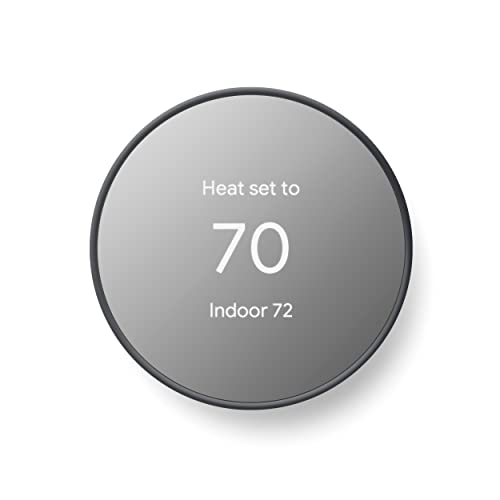
The Google Nest Thermostat Charcoal is built around uncomplicated remote control through the Google Home app. You can alter the setpoint while in bed, at work, or traveling, and its away behavior can lower heating or cooling activity while your home is empty.
Its stated self-install approach suits a hands-on household, though your existing HVAC wiring still sets the boundary. Compared with the Nest Learning Thermostat, this model favors a more direct programmable experience over learning-based adjustments.
Strengths Worth Knowing
- Remote app access supports adjustments away from the thermostat.
- Away behavior can reduce needless conditioning in an empty home.
- DIY-oriented setup keeps the installation path approachable.
- Charcoal finish gives you a darker wall-control option.
Room For Improvement
- Remote controls and notifications depend on working internet and Wi-Fi.
- Confirm compatibility before planning a self-install.
- Changing routines benefit more from the learning model.
Right Fit For
Google Home households wanting app-based temperature control without a room-sensor bundle fit this model.
Not Your Match When
Honeywell Home RTH9585WF Wi-Fi Smart Color Thermostat suits you better for detailed seven-day programming.
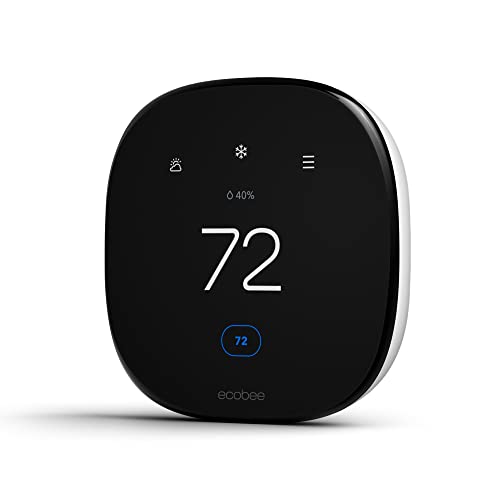
Busy homes often have schedules that look tidy on paper but change in real life. The ecobee Smart Thermostat Enhanced uses built-in radar occupancy sensing to recognize presence, then adjusts settings around occupied and empty periods.
It sits between ecobee Essential’s straightforward schedule controls and Premium’s included room sensor. Its 90% stated compatibility and included Power Extender Kit make it particularly worth a look for a DIY project where a C-wire, the common wire that supplies continuous power, is absent.
Bright Spots
- Radar occupancy sensing reacts to presence in your home.
- Schedule suggestions can help refine a routine over time.
- Power Extender Kit is included for compatible no-C-wire installations.
- Apple Home, Google Assistant, and SmartThings fit varied connected setups.
Points To Note
- Compatibility still needs confirmation before installation.
- Occupancy-driven changes suit active households more than homes with fixed schedules.
Honeywell Home RTH9585WF makes the thermostat screen part of your home’s visible design. Its color touchscreen can be adjusted to suit your wall color or preference, while seven-day programming gives you separate control over the rhythm of each day.
Unlike the learning-oriented Nest model, this one asks you to define the plan. That approach may appeal to households with a predictable workweek, but a C-wire is required and line-voltage heating is excluded.
Useful Touches
- Customizable color screen can blend with your interior.
- Seven-day programming accommodates different weekday and weekend habits.
- Automatic heat-to-cool changeover reduces manual seasonal switching.
- On-screen weather information offers useful context before leaving home.
- Filter and humidifier-pad reminders support routine equipment care.
Softer Spots
- A C-wire is required for installation.
- It does not work with line-voltage heating.
Changing routines are where Google Nest Learning Thermostat (4th gen) Obsidian earns its upgrade status. It learns temperature preferences over time rather than requiring every adjustment to be written into a fixed schedule, and the included second-generation temperature sensor extends attention beyond the main thermostat location.
Compared with Google Nest Thermostat Charcoal, it brings broader 24V system support and usually does not require a C-wire. For a household with shifting commutes, school breaks, or irregular work hours, that adaptive approach may be more useful than rigid programming.
Notable Gains
- Learning behavior can adapt as household patterns change.
- Included temperature sensor supports room-focused comfort decisions.
- Works with many 24V systems, including forced-air, heat-pump, radiant, gas, electric, and oil setups.
- Most installations do not need a C-wire.
- Google Home app allows remote temperature changes.
- Obsidian finish gives you a dark, modern-looking option.
Small Caveats
- System compatibility still deserves a check, especially with older equipment.
Sensi Smart Thermostat ST55 leans into a guided DIY path. A built-in level helps align the thermostat on your wall, while step-by-step app guidance can make the wiring process less intimidating for a careful first-time installer.
The privacy position is also unusually direct: Sensi states that personal information is not sold to third parties. That may matter in a connected home, although your system compatibility remains the practical question to settle first.
Everyday Wins
- Built-in level helps you mount the thermostat straight.
- App-guided setup can clarify each installation step.
- Remote Wi-Fi control supports adjustments from away home.
- Stated privacy policy avoids selling personal information to third parties.
Areas To Watch
- Confirm your HVAC equipment works with the ST55 before installation.
- DIY installation still involves safely identifying existing thermostat wires.
Built With In Mind
Hands-on homeowners wanting app guidance and a level-assisted wall installation will appreciate this approach.
A Better Fit Elsewhere
Aqara Smart Thermostat W200 better suits an Apple Home household seeking activity-based automation.
What Matters Before Installing an Internet-Connected Thermostat
Confirm Your HVAC System
Start with your heating and cooling equipment, not the app screen. Check the thermostat manufacturer’s compatibility tool, identify your existing wires, and note whether your home uses a 24V system or line-voltage heating. A C-wire supplies steady power to many connected thermostats, while models such as the Nest Learning Thermostat may work without one in many homes.
Match Controls to Your Routine
A fixed seven-day schedule suits predictable wake, work, and sleep times. Occupancy sensing or learning controls make more sense for changing shifts, travel, and families with inconsistent daily patterns. Avoid paying for adaptive behavior that your household will never use.
Think Beyond the Hallway
A thermostat mounted near a kitchen, entryway, or sunny window may not represent the bedroom where you spend the evening. A remote sensor reads temperature in another location and can help prioritize that room. ecobee Smart Thermostat Premium and Google Nest Learning Thermostat (4th gen) include that capability.
Plan Your Connected Setup
Remote controls require dependable home Wi-Fi and internet access. Apple-focused features can need a home hub, while some thermostat platforms work across several smart-home systems. Keep your preferred app and household devices in mind before selecting a model.
Details That Separate These Thermostats
Common Shopping Slip Ups
Skipping compatibility checks can turn a simple wall replacement into an installation problem. Check C-wire needs, system voltage, and heat-pump or radiant compatibility before selecting a thermostat.
Where the Extra Money Goes
Higher-tier models often add remote sensors, occupancy detection, learning behavior, wider compatibility, or more connected-home support. The upgrade makes sense when your rooms vary in temperature or your schedule rarely follows the same pattern twice.
Frequently Asked Questions
Do internet-connected thermostats need Wi-Fi?
Yes, Wi-Fi enables app-based remote control and internet features. Basic heating and cooling control can still depend on the thermostat and HVAC connection itself.
What is a C-wire on a thermostat?
A C-wire is a common wire that provides continuous power to the thermostat. Some models need it, while others include an adapter solution or may work without one.
Can a thermostat sensor help a bedroom feel more comfortable?
Yes, a separate sensor can measure conditions in a bedroom or office instead of relying only on the hallway thermostat. Your thermostat must support using that sensor for comfort adjustments.
Does a smart thermostat work with every HVAC system?
No, compatibility varies by thermostat and heating or cooling system. Check your equipment type, wiring, and manufacturer compatibility guidance before installation.
Is a programmable thermostat better than a learning thermostat?
A programmable model suits a stable weekly routine because you set the schedule directly. A learning model suits changing patterns because it can adapt based on your adjustments and household behavior.
