

You want a quiet, compact workhorse, not a noisy, bulky paperweight, and 2026 finally gives you both. You’ll get options that balance security, upgradability and everyday speed, so you can handle meetings, multitasking and light content work without compromise. I’ll outline six standout desktops and what matters most while picking one, so you can match features to your workflow.
| HP ProDesk 400 G9 SFF Business Desktop (32GB,1TB) |

| Reliable Business Workhorse | Processor: Intel Celeron G6900 (dual-core, 3.4 GHz) | Memory (RAM): 32 GB (configurable up to 64 GB DDR4) | Primary Storage: 1 TB PCIe M.2 SSD (up to 2 TB) | VIEW LATEST PRICE | Read Our Analysis |
| Dell Vostro Desktop PC — 14th Gen 16GB 1TB |

| Balanced Small-Business Performer | Processor: Intel Core i3-14100 (14th Gen, 4 cores / 8 threads) | Memory (RAM): 16 GB DDR5 | Primary Storage: 1 TB PCIe SSD | VIEW LATEST PRICE | Read Our Analysis |
| Dell Pro Slim QCS1250 Business Desktop i7-14700 32GB |

| Powerhouse Productivity | Processor: Intel Core i7-14700 (14th Gen, 20 cores / 28 threads) | Memory (RAM): 32 GB DDR5 (up to 64 GB) | Primary Storage: PCIe SSD (up to 4 TB; shipped config implied) | VIEW LATEST PRICE | Read Our Analysis |
| Dell OptiPlex 7020 SFF Desktop i5-14500 16GB 512GB |

| Enterprise-Grade Compact | Processor: Intel Core i5-14500 vPro (14th Gen, 14 cores / 20 threads) | Memory (RAM): 16 GB DDR5 | Primary Storage: 512 GB PCIe SSD | VIEW LATEST PRICE | Read Our Analysis |
| Dell ECT1250 Tower PC — 14th Gen 16GB 512GB |

| Budget Office Tower | Processor: Intel Core i3-14100 (14th Gen, 4 cores / 8 threads) | Memory (RAM): 16 GB DDR5 | Primary Storage: 512 GB PCIe SSD | VIEW LATEST PRICE | Read Our Analysis |
| HP Desktop Tower PC i5-13500 32GB 1TB SSD |
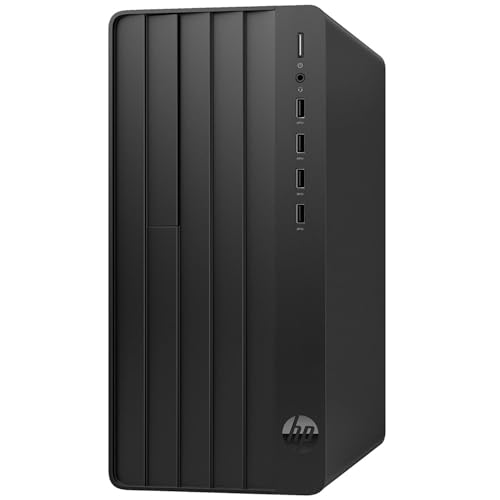
| Home Office Multitasker | Processor: Intel Core i5-13500 (13th Gen, 14 cores / 20 threads) | Memory (RAM): 32 GB DDR4 | Primary Storage: 1 TB PCIe SSD | VIEW LATEST PRICE | Read Our Analysis |
More Details on Our Top Picks
HP ProDesk 400 G9 SFF Business Desktop (32GB,1TB)
Should you need a compact, business-ready PC that handles heavy multitasking without taking up desk space, the HP ProDesk 400 G9 SFF is a smart pick—its default 32GB RAM and 1TB PCIe SSD let you jump between apps and large files instantly, while the small-form-factor chassis fits neatly into any home office. You get an Intel Celeron G6900 for reliable everyday performance, Intel UHD Graphics for crisp displays, and Windows 11 Pro for organized workflows. Ports include USB-C, multiple USB-A, HDMI and DisplayPort for dual 4K, plus RJ-45 and Wi‑Fi. Enterprise security (TPM 2.0, HP Wolf) rounds it out.
- Processor:Intel Celeron G6900 (dual-core, 3.4 GHz)
- Memory (RAM):32 GB (configurable up to 64 GB DDR4)
- Primary Storage:1 TB PCIe M.2 SSD (up to 2 TB)
- Graphics (Integrated):Intel UHD Graphics (integrated)
- Operating System:Windows 11 Pro
- Networking (Wi‑Fi + Ethernet):Wi‑Fi (unspecified) + RJ‑45 Ethernet
- Additional Feature:Small Form Factor
- Additional Feature:TPM 2.0 security
- Additional Feature:Included wired peripherals
Dell Vostro Desktop PC — 14th Gen 16GB 1TB
Should you need a reliable, budget-conscious tower that handles everyday business workloads and multitasking, the Dell Vostro with a 14th Gen Intel Core i3 and 16 GB DDR5 is a smart pick for small business owners and remote workers. You get a Core i3-14100 (4 cores, 8 threads) with 3.5–4.7 GHz turboing and 12 MB cache for responsive office apps. The 16 GB DDR5 and 1 TB PCIe SSD speed multitasking and storage. Integrated Intel UHD 730 supports multiple monitors (up to four FHD or dual 4K). Wi‑Fi 6, Bluetooth, Type-C, and Windows 11 Pro round it out.
- Processor:Intel Core i3-14100 (14th Gen, 4 cores / 8 threads)
- Memory (RAM):16 GB DDR5
- Primary Storage:1 TB PCIe SSD
- Graphics (Integrated):Intel UHD 730 (integrated)
- Operating System:Windows 11 Professional (64-bit)
- Networking (Wi‑Fi + Ethernet):MediaTek Wi‑Fi 6 (MT7920) + Bluetooth + Ethernet
- Additional Feature:Wi‑Fi 6 (MT7920)
- Additional Feature:HDMI 2.1 output
- Additional Feature:USB Type‑C port
Dell Pro Slim QCS1250 Business Desktop i7-14700 32GB
Should you need a compact workhorse that handles heavy multitasking without taking up much desk space, the Dell Pro Slim QCS1250 with an i7-14700 and 32GB of DDR5 is a smart pick—it’s built for fast office workflows, remote meetings, and light creative work while supporting dual 4K monitors for expansive productivity setups. You’ll get a 14th Gen Core i7 with 20 cores and 28 threads, up to 5.6 GHz turbo, plus PCIe SSD options to 4 TB for quick file access. It includes HDMI 2.1, DisplayPort 1.4a, USB-C, Wi‑Fi, Windows 11 Pro, and a quiet slim design for home business use.
- Processor:Intel Core i7-14700 (14th Gen, 20 cores / 28 threads)
- Memory (RAM):32 GB DDR5 (up to 64 GB)
- Primary Storage:PCIe SSD (up to 4 TB; shipped config implied)
- Graphics (Integrated):Integrated graphics (supports dual 4K; likely Intel UHD-class)
- Operating System:Windows 11 Pro
- Networking (Wi‑Fi + Ethernet):Wi‑Fi + Bluetooth implied + Ethernet (expandable)
- Additional Feature:Ultra‑quiet operation
- Additional Feature:Compact slim design
- Additional Feature:Dual 4K support
Dell OptiPlex 7020 SFF Desktop i5-14500 16GB 512GB
Provided you need a compact, business‑ready PC that balances multi‑tasking power and space savings, the Dell OptiPlex 7020 SFF with an Intel Core i5‑14500, 16GB RAM and a 512GB PCIe SSD delivers—its 14th‑gen hybrid CPU and Wi‑Fi 6E make it ideal for running multiple productivity apps, video calls, and up to four displays from a small footprint that fits on or under your desk. You’ll get Windows 11 Pro, wired keyboard/mouse, Intel UHD 770 graphics, HDMI, two DisplayPorts and a Type‑C 4K@60 output. DDR5 memory and NVMe storage keep workflows responsive; ports and GigE cover office networking.
- Processor:Intel Core i5-14500 vPro (14th Gen, 14 cores / 20 threads)
- Memory (RAM):16 GB DDR5
- Primary Storage:512 GB PCIe SSD
- Graphics (Integrated):Intel UHD Graphics 770 (integrated)
- Operating System:Windows 11 Professional (64-bit)
- Networking (Wi‑Fi + Ethernet):Intel Wi‑Fi 6E (AX210) + Bluetooth + RJ‑45
- Additional Feature:vPro management
- Additional Feature:Wi‑Fi 6E AX210
- Additional Feature:Front USB Type‑C
Dell ECT1250 Tower PC — 14th Gen 16GB 512GB
In case you need a reliable everyday business PC that balances modern performance with energy‑efficient components, the Dell ECT1250 Tower is a solid pick — its 14th Gen Intel Core i3-14100 and 16 GB DDR5 handle typical office apps, web conferencing, and light multitasking without fuss. You get a 512 GB PCIe SSD for fast boot and file access, integrated Intel UHD 730 graphics supporting two displays via DisplayPort 1.4 and HDMI 2.1, plus Wi‑Fi 6 and Gigabit Ethernet. Front Type‑C and multiple USB ports ease peripherals, Windows 11 Pro arrives preinstalled, and the chassis uses recycled materials for sustainability.
- Processor:Intel Core i3-14100 (14th Gen, 4 cores / 8 threads)
- Memory (RAM):16 GB DDR5
- Primary Storage:512 GB PCIe SSD
- Graphics (Integrated):Intel UHD 730 (integrated)
- Operating System:Windows 11 Professional (64-bit)
- Networking (Wi‑Fi + Ethernet):MediaTek Wi‑Fi 6 (MT7920) + Bluetooth + RJ‑45
- Additional Feature:Media card reader
- Additional Feature:Recycled materials chassis
- Additional Feature:Front USB Type‑C
HP Desktop Tower PC i5-13500 32GB 1TB SSD
Should you need a reliable workhorse for multitasking and light content creation, the HP Desktop Tower with a 13th Gen Core i5‑13500, 32 GB RAM and 1 TB PCIe SSD delivers responsive performance without overkill. You’ll get 14 cores (20 threads), up to 4.8 GHz on P‑cores, and 24 MB cache for smooth spreadsheets, web conferencing, and photo edits. Integrated Intel UHD 770 handles casual media, while 32 GB DDR4 and fast storage cut load times. Connectivity includes Wi‑Fi 6, Bluetooth 5.3, Ethernet, multiple USB ports, HDMI and VGA. It ships with Windows 11 and a wired keyboard and mouse.
- Processor:Intel Core i5-13500 (13th Gen, 14 cores / 20 threads)
- Memory (RAM):32 GB DDR4
- Primary Storage:1 TB PCIe SSD
- Graphics (Integrated):Intel UHD Graphics 770 (integrated)
- Operating System:Windows 11 Home (64-bit)
- Networking (Wi‑Fi + Ethernet):Realtek Wi‑Fi 6 (RTL8852BE) + Bluetooth 5.3 + RJ‑45
- Additional Feature:VGA legacy port
- Additional Feature:Front high‑speed USBs
- Additional Feature:Bluetooth 5.3
Factors to Consider When Choosing a Desktop Computer For Home Business
Upon choosing a desktop for your home business, you’ll want to prioritize performance and a capable CPU so apps run smoothly. Make sure you get enough memory and fast storage, plus the right connectivity and ports for your peripherals and network. Consider graphics and displays for any visual work, and pick systems with strong security and manageability features to protect your data.
Performance And CPU
Although you could be swayed via core counts and marketing, pick a CPU based on the actual workloads you’ll run: light office work and web tasks are fine with dual‑ to quad‑core chips at roughly 3.0–4.0 GHz, while heavy multitasking, virtual machines, and content creation benefit from eight or more cores and higher turbo clocks. Choose newer generations for better IPC, power efficiency, and platform features like faster memory and I/O. Prioritize single‑thread surge and IPC for snappy everyday responsiveness; favor core/thread count for parallel jobs like rendering or large data processing. Check TDP and cooling needs—higher core counts need better airflow or you’ll throttle sustained performance. Finally, balance the CPU with adequate RAM and fast storage to avoid bottlenecks.
Memory And Storage
After you pick a CPU that matches your workload, make sure memory and storage keep up so the system doesn’t bottleneck. For smooth multitasking and business apps, aim for at least 16 GB of RAM; choose 32 GB in case you run VMs, huge spreadsheets, or creative software. Prefer DDR5 whenever available for better bandwidth, or fast DDR4, and confirm the motherboard supports upgrades to 32–64 GB. Use an NVMe PCIe M.2 SSD as your primary drive—256–512 GB minimum for OS and apps, 1 TB+ in case you store many programs or datasets. Balance cost and speed with a fast SSD for system files plus a larger HDD or secondary SSD for archives and backups. Check available M.2 slots, SATA ports, and max supported capacities.
Connectivity And Ports
For reliable peripherals and future-proofing, prioritize a desktop with at least one high‑speed USB‑C (10 Gbps or better) plus multiple USB‑A ports (fast USB 3.2 and some USB 2.0 for legacy gear), clear video outputs like HDMI 2.0/2.1 or DisplayPort 1.4 for 4K monitors, and both Gigabit Ethernet and Wi‑Fi 6/6E for stable networking; also check Bluetooth and proper audio jacks so your headset, mic, or speakers plug in without adapters. Beyond basics, verify you have enough ports for daily workflows: spare front USBs for quick access, multiple rear outputs for dual or triple monitors, and a reliable RJ‑45 for wired backups. Look for internal expansion—extra M.2/SATA slots and unused USB headers—so you can add drives, cards, or ports as needs grow.
Graphics And Displays
Whenever you pick a desktop, match the GPU and display outputs to the work you do: integrated graphics are fine for email, spreadsheets, and streaming, but choose a discrete GPU with enough VRAM and bandwidth in case you’ll edit video, render 3D, or drive multiple high‑resolution monitors. Check HDMI, DisplayPort, and USB‑C ports and their versions so your monitor’s resolution and refresh rate aren’t limited—HDMI 2.1 and DisplayPort 1.4a handle dual 4K or high‑refresh 1440p. Match pixel density and refresh targets (4K@60Hz, 1440p@120Hz) to avoid bottlenecks. Should color fidelity matter, pick GPUs and pipelines with wide‑gamut and hardware HDR support. Finally, verify GPU memory, bandwidth, and expansion options (PCIe, eGPU/M.2 docks) for future upgrades.
Security And Manageability
Because small-business data is a target, pick a desktop that gives you hardware-backed protections and easy manageability so you can prevent breaches and recover quickly. Make certain the PC includes TPM 2.0 for disk encryption and secure boot to protect credentials and system integrity. Choose systems with OS-level update management (Windows Update for Business or equivalent) to push timely patches. Look for out-of-band or firmware-based remote management (Intel AMT or modern UEFI tools) so you can diagnose, update, and recover devices without visiting them. Confirm support for strong authentication—Windows Hello, biometrics, smart cards, or FIDO2/WebAuthn—and require multifactor authentication. Finally, prioritize endpoints that integrate EDR, application whitelisting, and MDM/endpoint management for centralized policy enforcement and incident response.
Form Factor And Noise
Beyond security and manageability, how a desktop fits into your workspace and how quietly it runs can matter just as much for productivity. Choose between small form factor (SFF) or mini-tower models whether space is tight, but know that cramped internals often raise temps and force higher fan speeds—more noise. Tower chassis give better airflow and allow larger heatsinks and slow-spinning fans, so you’ll usually get comparable performance with less audible distraction. Check reported dBA figures; aim for idle noise under 25–30 dBA. Prefer NVMe/SATA SSDs and efficient, lower‑TDP CPUs to eliminate HDD rumble and reduce cooling needs. Should silence matter most, pick cases with sound‑dampening, large fans, and firmware or OS options for quiet fan curves.
