

For 2026, the six best copyholders include versatile picks like the Lawei and OSPNIEEK adjustable metal-backed stands that hold up to 150 sheets, and Hanghs’s stylish holder that suits tablets and books. The Fellowes non-magnetic option offers lightweight, 125-sheet capacity, while Kensington adds flexible mounting near monitors. All prioritize ergonomic angles, secure clips, and fold-flat design for comfort and portability. Investigate these options to find the ideal balance of stability, adjustability, and style that fits your workspace perfectly.
| Lawei 2 Pack Adjustable Desktop Document Holders |

| Ergonomic & Portable | Adjustability: 7 tilt angles with seven grooves for adjustable eye-level viewing | Material Construction: Iron and plastic, metal backplate | Document Capacity: Clip holds up to 150 sheets | VIEW LATEST PRICE | Read Our Analysis |
| Hanghs Adjustable Desktop Document and Book Holder |
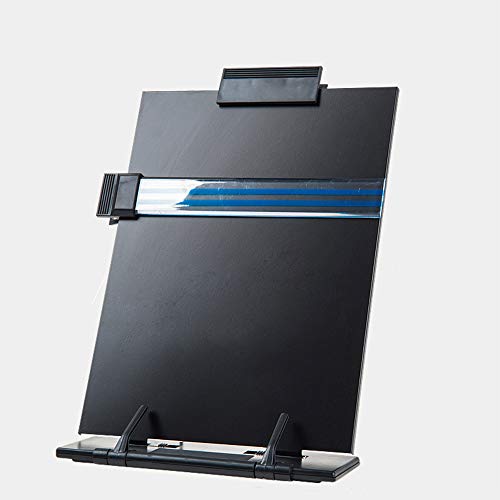
| Sturdy & Elegant | Adjustability: 7 adjustable positions for multiple reading angles | Material Construction: Metal, stainless steel, plastic, paper | Document Capacity: Not specified, but holds multiple sheets securely with clips | VIEW LATEST PRICE | Read Our Analysis |
| Desktop Document Holder Stand with Adjustable Positions |

| Durable & Versatile | Adjustability: 7 adjustable backstand positions for height and angle | Material Construction: High-quality metal and ABS | Document Capacity: Supports multiple paper sizes; clips keep pages open | VIEW LATEST PRICE | Read Our Analysis |
| Fellowes Non-Magnetic Desktop Copyholder 125 Sheet Capacity |

| Lightweight & Simple | Adjustability: Not adjustable (fixed position) | Material Construction: Plastic | Document Capacity: Holds up to 125 sheets | VIEW LATEST PRICE | Read Our Analysis |
| OSPNIEEK 2-Pack Adjustable Desktop Document Holders |

| Adjustable Dual Pack | Adjustability: 7 adjustable backstand positions for height/angle adjustment | Material Construction: Metal and ABS, polished baked-on finish | Document Capacity: Supports multiple paper sizes; clips keep pages open | VIEW LATEST PRICE | Read Our Analysis |
| Kensington Document Holder for Typing and Monitors |
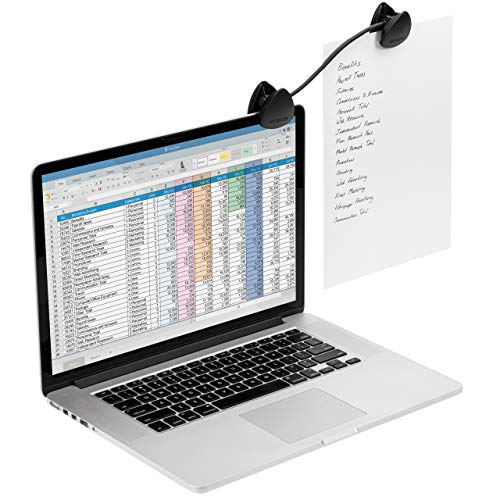
| Flexible Clip Holder | Adjustability: Flexible gooseneck for customizable document placement | Material Construction: High-impact molded plastic | Document Capacity: Holds single sheets clipped on gooseneck clip (no large capacity) | VIEW LATEST PRICE | Read Our Analysis |
More Details on Our Top Picks
Lawei 2 Pack Adjustable Desktop Document Holders
In case you need a versatile and portable solution to keep your documents organized and easily readable, the Lawei 2 Pack Adjustable Desktop Document Holders are made for you. Each holder folds flat for easy storage and transport, measuring 8.3 by 2.6 by 12.2 inches once set up. Made of sturdy iron and plastic, they feature a metal backplate and removable clip that holds up to 150 sheets. With seven tilt angles, you can adjust the holders to your eye level, reducing neck and eye strain. They’re perfect for papers, books, recipes, and more.
- Adjustability:7 tilt angles with seven grooves for adjustable eye-level viewing
- Material Construction:Iron and plastic, metal backplate
- Document Capacity:Clip holds up to 150 sheets
- Portability / Foldability:Folds flat for storage and transport; portable
- Document/page securing features:Removable document clip plus two bottom clips to prevent slipping
- Intended Use / Compatibility:Fits legal, letter, A4 documents; papers, recipes, books, magazines, textbooks, catalogs
- Additional Feature:Clear line guide included
- Additional Feature:Two bottom clips secure
- Additional Feature:Stylish, easy-clean design
Hanghs Adjustable Desktop Document and Book Holder
Should you need a copyholder that easily adjusts to your preferred reading angle, the Hanghs Adjustable Desktop Document and Book Holder has you covered with its seven customizable positions. This sturdy, lightweight stand fits sheet music, cookbooks, documents, iPads, and laptops, folding almost flat for tight spaces. Its metal base and acrylic holder plate provide excellent balance, while clips and prongs keep pages secure. You’ll appreciate its space-saving design that helps reduce neck strain and supports better posture. With a classy black finish and a 4.6-star rating, it’s a reliable choice for office, study, or travel.
- Adjustability:7 adjustable positions for multiple reading angles
- Material Construction:Metal, stainless steel, plastic, paper
- Document Capacity:Not specified, but holds multiple sheets securely with clips
- Portability / Foldability:Folds almost flat; lightweight and portable
- Document/page securing features:Top clip, two bottom paper holders, highlighting side clip, prongs and textured base prevent sliding
- Intended Use / Compatibility:For sheet music, cookbooks, books, documents, iPads, laptops
- Additional Feature:Highlighting side clip
- Additional Feature:Prongs/textured base prevent sliding
- Additional Feature:Suitable for iPads/laptops
Desktop Document Holder Stand with Adjustable Positions
In case you spend long hours typing, reading, or transcribing, the Desktop Document Holder Stand with Adjustable Positions keeps your documents perfectly angled to reduce neck and shoulder strain. You’ll appreciate its seven adjustable backstand positions that promote proper posture and might improve spinal health. The stand holds A4 and Letter-sized papers securely with page clips and features a highlighting line guide to help track your reading. Made from durable metal and ABS with a polished finish, it’s sturdy yet lightweight. Plus, it folds compactly for easy portability, making it ideal for office, home, or library use.
- Adjustability:7 adjustable backstand positions for height and angle
- Material Construction:High-quality metal and ABS
- Document Capacity:Supports multiple paper sizes; clips keep pages open
- Portability / Foldability:Foldable, compact, lightweight, portable
- Document/page securing features:Page holder clip plus bottom page support clip to keep pages open and prevent sliding
- Intended Use / Compatibility:For typing, speech, reading, transcription, music books, tablets, office use
- Additional Feature:Rounded corners protect hands
- Additional Feature:Polished, baked-on finish
- Additional Feature:Suitable for outdoor use
Fellowes Non-Magnetic Desktop Copyholder 125 Sheet Capacity
Provided you handle a high volume of documents, the Fellowes Non-Magnetic Desktop Copyholder stands out with its impressive 125-sheet capacity. You’ll appreciate its sturdy plastic build and non-magnetic design, which keeps papers securely in place without interfering with electronics. Measuring 7.38 by 10.13 by 11.25 inches and tipping just under 10 ounces, it’s compact yet durable. The platinum color adds a sleek touch to your workspace. Manufactured by Fellowes, this model has earned a solid reputation since 2010. Should you spot a better price, you may easily report it through their website, ensuring you get the best deal.
- Adjustability:Not adjustable (fixed position)
- Material Construction:Plastic
- Document Capacity:Holds up to 125 sheets
- Portability / Foldability:Not foldable; desktop use only
- Document/page securing features:Non-magnetic clip to hold documents (single clip)
- Intended Use / Compatibility:Desktop copyholder for papers/documents up to 125 sheets
- Additional Feature:Non-magnetic design
- Additional Feature:Lightweight at 9.9 ounces
- Additional Feature:Platinum color option
OSPNIEEK 2-Pack Adjustable Desktop Document Holders
Provided you need a versatile copyholder that adapts to various reading materials, the OSPNIEEK 2-Pack Adjustable Desktop Document Holders deliver just that with seven adjustable positions to reduce strain and promote better posture. These sturdy, black stands feature a metal backplate and ABS build, supporting books, magazines, and tablets securely. You’ll appreciate the page support clip that keeps materials open and the highlighting line guide to track reading effortlessly. Portable and foldable, they’re perfect for your office, home, or library. Plus, you get two stands-one for yourself and one as a gift-making this pack a smart buy.
- Adjustability:7 adjustable backstand positions for height/angle adjustment
- Material Construction:Metal and ABS, polished baked-on finish
- Document Capacity:Supports multiple paper sizes; clips keep pages open
- Portability / Foldability:Foldable, lightweight, portable
- Document/page securing features:Page support clip to keep book open and prevent sliding
- Intended Use / Compatibility:For A4/letter papers, music books, tablets; office, library, home, outdoor
- Additional Feature:Polished, baked-on finish
- Additional Feature:Rounded corners prevent scratches
- Additional Feature:Supports music books/tablets
Kensington Document Holder for Typing and Monitors
Suppose you need a compact and flexible document holder that attaches easily to your laptop or monitor, the Kensington Document Holder for Typing is a solid choice. Its flexible gooseneck lets you position your documents for comfortable viewing, reducing neck strain while typing. This lightweight, high-impact molded plastic clip fits laptops, CRTs, and flat panel monitors, making it versatile for any workspace or on the go. Measuring just under 10 inches wide, it holds papers securely without taking up desk space. Although discontinued, it still earns solid reviews for reliability and ease of use, making it a dependable accessory for your setup.
- Adjustability:Flexible gooseneck for customizable document placement
- Material Construction:High-impact molded plastic
- Document Capacity:Holds single sheets clipped on gooseneck clip (no large capacity)
- Portability / Foldability:Small, compact, easy to carry
- Document/page securing features:Copyholder clip attaches to monitor or laptop; flexible clip secures documents
- Intended Use / Compatibility:Attaches to laptops and monitors; holds documents for typing and reference
- Additional Feature:Flexible gooseneck arm
- Additional Feature:Attaches to monitors/laptops
- Additional Feature:Compact, high-impact plastic
Factors to Consider When Choosing Copyholders
Whenever choosing a copyholder, you’ll want to focus on material durability and whether its size fits your workspace and documents. Consider how adjustable it is to make certain comfortable viewing angles, along with its weight for easy portability. Don’t forget stability and grip, so your papers stay put while you work.
Material Durability
Choosing a copyholder with durable materials guarantees it can handle heavy use without warping or breaking. Look for metal backplates and stainless steel parts-they resist bending and support heavy stacks or thick books better than plastic. While ABS and high-impact plastics offer lightweight portability and decent impact resistance, they might scratch or crack provided flexed or dropped often. Pay attention to finishes, too; powder-coated or baked-on metals and polished plastics resist corrosion and stains, keeping your copyholder looking new longer. Hinges, clips, and adjustment grooves made from reinforced metal last longer than molded plastic, preventing failure at stress points. Finally, heavier stands with thicker builds, rounded and reinforced edges usually mean better stability and durability, so select accordingly for long-lasting performance.
Size And Compatibility
Although durability is crucial, you also need to make certain your copyholder fits the size and type of documents you use regularly. Check that it supports common paper sizes like letter, A4, legal, or even music-book dimensions as required. Confirm the clip capacity suits your typical thickness, whether that’s a single sheet, multiple pages, or books. Consider the folded and set-up dimensions to guarantee it fits your desk depth and won’t obstruct your monitors or workspace. In case you use tablets or laptops on the holder, verify the platform is wide and deep enough to hold them with cases. Finally, should portability matter, look at the weight and bulk when folded so you can easily carry it between locations without hassle.
Adjustability Options
Since you’ll be spending long hours referencing documents, having a copyholder with multiple tilt and height adjustments can make a huge difference in comfort and posture. Look for models offering seven or more tilt positions and adjustable height or gooseneck mounts that align your documents with your monitor. This setup helps reduce neck strain and keeps a neutral head position. Removable clips or page holders let you secure anything from single sheets to thick books without losing your preferred angle. Durable materials like metal hinges and reinforced plastic guarantee your adjustments stay put during typing or page turning. Also, consider fold-flat or collapsible mechanisms so you can switch between flat storage and upright angles effortlessly, enhancing usability without sacrificing stability.
Weight And Portability
Adjustability is key for comfort, but you’ll also want to take into account how much your copyholder weighs and how easy it is to carry. Lightweight models, typically between 3 to 12 ounces (85–340 grams), are ideal provided you frequently move between workspaces or commute. Foldable or flat-packing designs further improve portability through fitting easily into backpacks or laptop sleeves without adding bulk. On the other hand, heavier metal-based holders, usually 1 to 3 pounds (0.45–1.36 kg), provide extra sturdiness but aren’t as travel-friendly. To strike a balance, consider models under 1 pound (450 grams) assuming you split time between home, office, and public spaces. Keep in mind, plastic or thin-sheet constructions favor portability, while built-in metal bases increase weight but add durability.
Stability And Grip
Choose a copyholder with a stable, well-designed base to keep your documents secure and your workspace organized. Look for one featuring a wide, weighted base or a metal backplate; these lower the center of gravity and resist tipping whenever you turn pages. Non-slip elements like rubber feet, textured surfaces, or prongs help the stand grip smooth desks, preventing unwanted sliding. Be certain it includes page-holding clips or bottom retention tabs to keep your documents from shifting, especially with thicker stacks up to 100–150 sheets. A balanced design combining a rigid support plate and secure clips guarantees stability even for heavier items like books or tablets. Finally, check the hinge or backstand locking mechanism for firm detents or grooves so your chosen tilt angle stays put under document weight.
Ergonomic Benefits
Whenever you position your documents at eye level using an adjustable-height, multi-angle copyholder, you reduce neck flexion and lower the risk of strain in your neck and upper back. Look for copyholders offering seven or more tilt positions to customize document angles for comfort. A stable base and secure page clips minimize reaching and page adjustments, cutting down on repetitive arm movements that lead to fatigue. Features like a clear line guide or highlighting strip help you keep your eyes steady and avoid unnecessary head movement, reducing visual strain. Positioning copies at the same plane as your monitor supports a neutral head posture, promoting spinal alignment. Lightweight, foldable designs let you maintain proper ergonomics whether you’re at home or on the go.
Design And Aesthetics
While comfort and function are essential, the design and aesthetics of your copyholder play a significant role in how it fits into your workspace. Choose a finish and color that complement your surroundings-matte or baked-on finishes reduce glare and hide fingerprints better than glossy surfaces. Should you prefer a clutter-free desk, opt for slim, foldable models that store and travel easily. Make sure the base is well-balanced with a low center of gravity to keep your documents stable. Integrated features like page clips, line guides, or top clamps can improve visual flow without adding bulk. Finally, pick materials such as metal, acrylic, or high-quality ABS plastic with rounded or polished edges for a sleek, modern look that’s also comfortable to handle.
Price And Value
Even though price often takes center stage while picking a copyholder, you should weigh cost against features and durability to get the best value. Compare upfront costs with what’s offered: adjustable angles, metal builds, and sturdy clips usually cost more but last longer and improve ergonomics. Consider capacity too-higher-priced holders tend to handle thicker books and more sheets without sagging. If you travel or use multiple stations, consider foldable designs or multi-packs for better per-unit value. Don’t overlook material quality; metal or ABS options outlast cheap plastic, saving replacement costs. Finally, check return policies and warranties to protect your investment. A solid warranty reduces risk should the copyholder not meet your expectations, ensuring you get true value for your money.
