

You want a smarter, tougher way to secure your home without juggling keys, and biometric locks do that with fingerprints, codes, and app control. These five options mix convenience, weather‑proof metal builds, and backup power so you won’t get locked out. I’ll compare capacities, installation needs, and smart features so you can pick the right fit for your doors—but initially, consider how you actually use your entries.
| Smart Keypad Door Knob Lock 4-Pack (Matte Black) |

| Best for Multi-Unit Needs | Access Methods: Keypad + mechanical key (keypad mechanical knob) | Auto-lock: Auto-lock capability | Backup Power (Type-C): Type-C USB backup for emergency power | VIEW LATEST PRICE | Our Analysis |
| Lockin 4-in-1 Smart Fingerprint Door Lock |

| Best Smart-Home Integration | Access Methods: Fingerprint + passcode + app + physical key | Auto-lock: Auto-lock within 5 seconds after close/use | Backup Power (Type-C): Emergency USB / Type-C power support | VIEW LATEST PRICE | Our Analysis |
| Smart Biometric Fingerprint Door Knob with Keypad |
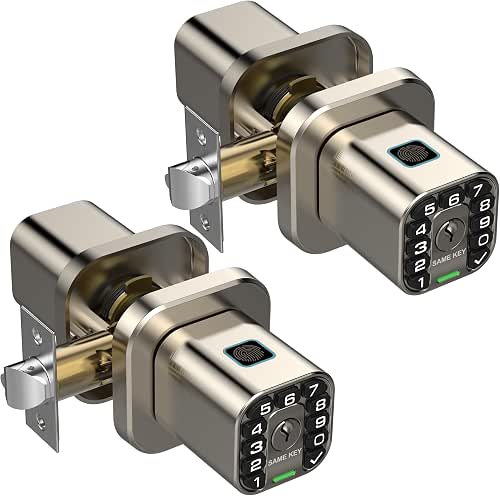
| Best for High Capacity | Access Methods: Fingerprint + keypad + mechanical key | Auto-lock: Auto-lock feature | Backup Power (Type-C): Type-C port for backup power | VIEW LATEST PRICE | Our Analysis |
| Smart Fingerprint Keyless Door Knob with Keypad |
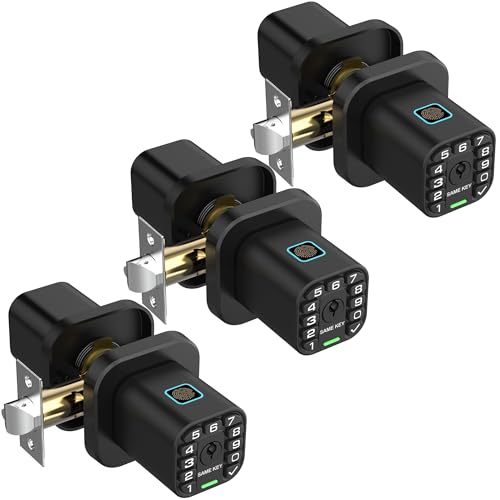
| Best All-Weather Durability | Access Methods: Fingerprint + keypad + mechanical key | Auto-lock: Auto-lock feature | Backup Power (Type-C): Type-C port for external backup power | VIEW LATEST PRICE | Our Analysis |
| Keypad Keyless Electric Door Knob for Interior Doors |
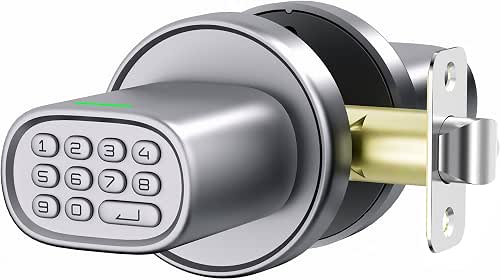
| Best Interior/Value Pick | Access Methods: Passcode + physical key (keypad + key) | Auto-lock: Auto-lock after 5 seconds (instant via Enter) | Backup Power (Type-C): Type-C port for external power when batteries depleted | VIEW LATEST PRICE | Our Analysis |
More Details on Our Top Picks
Smart Keypad Door Knob Lock 4-Pack (Matte Black)
Should you manage multiple doors—like in a rental property, office, or multi-room home—the Smart Keypad Door Knob 4‑Pack (Matte Black) is a practical choice: you get four keyed‑alike, heavy‑duty keypad knobs that let up to 50 unique codes control entry, so tenants or staff can use PINs while you keep a single physical key for backups. You’ll install these modern zinc‑alloy knobs with a screwdriver on 1-3/8″–2-1/2″ doors; latches adjust to 2-3/8″ or 2-3/4″. They resist weather (IP65), work −22°F to 176°F, offer auto‑lock, silent and passage modes, Type‑C emergency power, and two keys each.
- Access Methods:Keypad + mechanical key (keypad mechanical knob)
- Auto-lock:Auto-lock capability
- Backup Power (Type-C):Type-C USB backup for emergency power
- Weather / Indoor-Outdoor Use:IP65 weather resistant; outdoor tolerant (-22°F to 176°F)
- Installation Ease / Fits Standard Doors:DIY install with screwdriver; fits 1-3/8″–2-1/2″ door thickness; adjustable latch (2-3/8″ or 2-3/4″)
- Low-battery / Battery Alerts:4 AAA battery operation (~18 months); low-battery alarm
- Additional Feature:Keyed-alike 4-pack
- Additional Feature:Up to 50 codes
- Additional Feature:IP65 weather resistance
Lockin 4-in-1 Smart Fingerprint Door Lock
Should you want fast, flexible access control for an interior door—whether it’s a bedroom, rental, or office—the Lockin 4-in-1 Smart Fingerprint Door Lock is a strong choice because it combines 0.2‑second fingerprint recognition with passcodes, app control, and a backup physical key for reliability. You’ll register up to 20 fingerprints and codes, use anti-peep passcodes, and enable privacy or passage mode. A 400 mAh rechargeable battery charges via Type-C in 3–5 hours, offers low-battery alerts, and supports emergency USB power. Use the Lockin Home App to manage users, share access, review history, and enable remote control with an optional gateway.
- Access Methods:Fingerprint + passcode + app + physical key
- Auto-lock:Auto-lock within 5 seconds after close/use
- Backup Power (Type-C):Emergency USB / Type-C power support
- Weather / Indoor-Outdoor Use:Intended for indoor use (listed for entry/rooms) — smart-home compatible (limited outdoor use)
- Installation Ease / Fits Standard Doors:Easy installation; intended for standard doors (handle attaches by screw)
- Low-battery / Battery Alerts:Rechargeable battery with low-battery alerts; Type-C recharge
- Additional Feature:0.2s fingerprint speed
- Additional Feature:App user management
- Additional Feature:Rechargeable 400mAh battery
Smart Biometric Fingerprint Door Knob with Keypad
Should you want a compact, easy-to-install smart lock that balances convenience and security, the biometric fingerprint door knob with keypad is a great pick—especially for homeowners who frequently grant temporary access. You’ll get a square knob with rounded edges, illuminated keypad, and two identical-key locks that fit standard US backsets without extra drilling. Release with fingerprint (stores 100), keypad (up to 50 codes), or key; guest and manual modes add flexibility. AI improves fingerprint accuracy, auto-lock and silent mode boost usability, and voice prompts guide setup. Zinc-alloy build, waterproof electronics, wide temperature range, AAA power with Type-C backup guarantee durability.
- Access Methods:Fingerprint + keypad + mechanical key
- Auto-lock:Auto-lock feature
- Backup Power (Type-C):Type-C port for backup power
- Weather / Indoor-Outdoor Use:Weather-resistant / waterproof electronics; rated -22°F to 176°F (indoor/outdoor)
- Installation Ease / Fits Standard Doors:Installs with Phillips screwdriver; fits standard US doors with 2-3/4″ or 2-3/8″ backsets; no extra drilling
- Low-battery / Battery Alerts:2 AAA batteries (over a year); low-battery alerts; Type-C backup
- Additional Feature:Stores 100 fingerprints
- Additional Feature:AI fingerprint learning
- Additional Feature:Voice navigation guidance
Smart Fingerprint Keyless Door Knob with Keypad
In case you want quick, secure access without fumbling for keys, the Richelock Smart Fingerprint Keyless Door Knob with Keypad is built for busy homeowners and small offices that value convenience and reliability. You get fingerprint, 1–15 digit keypad, and mechanical key entry, with storage for up to 100 fingerprints and 50 passcodes; AI learning enhances recognition. It’s weather-resistant zinc alloy, fits standard US backsets, installs with a Phillips screwdriver, and runs on 2 AAA batteries with Type-C backup. Features include auto-lock, guest and silent modes, voice guidance, low-battery alerts, and durability from -22°F to 176°F.
- Access Methods:Fingerprint + keypad + mechanical key
- Auto-lock:Auto-lock feature
- Backup Power (Type-C):Type-C port for external backup power
- Weather / Indoor-Outdoor Use:Weather-resistant / waterproof electronics; rated -22°F to 176°F (indoor/outdoor)
- Installation Ease / Fits Standard Doors:Installs with Phillips screwdriver; fits standard US doors with 2-3/4″ or 2-3/8″ backsets; no extra drilling
- Low-battery / Battery Alerts:2 AAA batteries (over a year); low-battery alerts; Type-C backup
- Additional Feature:Guest mode available
- Additional Feature:Stores 100 fingerprints
- Additional Feature:Same-key two-lock set
Keypad Keyless Electric Door Knob for Interior Doors
Should you want a straightforward, secure option for interior doors, the ThorBolt M1 keypad knob gives you keyless convenience plus backup keys for peace of mind. You’ll use passcodes or a physical key; an admin code manages up to 100 user codes. Auto-lock engages after five seconds or instantly with Enter, and Anti-Peep scramble thwarts shoulder-snoopers. Powered four AA batteries (Type-C emergency power), it claims long battery life. Zinc-alloy, powder-coated construction fits most US doors and installs in four DIY steps with included hardware. Passage and Silent modes add flexible control for bedrooms, offices, dorms, and storage rooms.
- Access Methods:Passcode + physical key (keypad + key)
- Auto-lock:Auto-lock after 5 seconds (instant via Enter)
- Backup Power (Type-C):Type-C port for external power when batteries depleted
- Weather / Indoor-Outdoor Use:Water-resistant design but intended for interior doors (avoid rain/moisture on main exterior doors)
- Installation Ease / Fits Standard Doors:DIY 4-step setup with Phillips screwdriver; fits most US doors; includes installation hardware
- Low-battery / Battery Alerts:4 AA batteries (up to ~2 years recommended); low-battery / emergency Type-C support
- Additional Feature:Manages 100 passcodes
- Additional Feature:Uses 4×AA batteries
- Additional Feature:Anti-peep random scramble
Factors to Consider When Choosing a Biometric Door Lock
When picking a biometric door lock, you’ll want to compare authentication methods and how many fingerprints or faces it can store to match your household’s needs. Check power options and emergency overrides, plus weatherproofing and build quality in case it’s for an exterior door. Finally, confirm the lock’s installation requirements and compatibility with your door and existing smart home systems.
Security & Authentication Methods
Although biometric locks can streamline entry, you should weigh their security and authentication features carefully: choose systems that support multi-factor setups (e.g., fingerprint plus PIN or mechanical key), check published sensor accuracy (FAR/FRR) and anti-spoof measures like liveness detection and encrypted template storage, guarantee reliable backup access (physical key or emergency power), and confirm administrative controls for user limits, guest modes, and audit/deletion capabilities. Whenever evaluating locks, prefer models that let you require two independent credentials for sensitive access, reducing single-point failures. Inspect sensor specs—lower FAR and acceptable FRR matter for everyday use—and verify liveness detection and encrypted templates to prevent cloning. Make certain clear backup methods and resilient admin controls so you can manage occupants, grant temporary access, and review or revoke credentials securely.
Biometric Capacity Limits
Scalability matters: check how many fingerprint templates and passcodes a lock can hold so you don’t outgrow it as occupants, contractors, or temporary guests change. You should verify the maximum fingerprint capacity (commonly 20–100) to make certain all authorized users fit and future additions are possible. Confirm how many unique passcodes the system supports, since combined credential limits shape multi-user setups. Look for per-user template allowances so each person can register multiple fingers for reliable recognition. Check limits on administrative accounts and guest/temporary slots to manage short-term or restricted access effectively. Finally, confirm whether larger fingerprint databases affect performance—recognition speed and search time can slow as capacity increases—so choose a model that balances size with responsiveness.
Power & Emergency Options
Capacity limits matter, but power and emergency features determine whether those credentials actually get you in. Check the primary power source and typical runtime: AA/AAA cells can last months to years; rechargeables list dozens to hundreds of cycles. Make sure the lock provides at least one emergency power option—Type‑C/USB external port or an external battery terminal—so you can temporarily power electronics should internal power dies. Look for clear low‑battery alerts (audible, visual, or app) and easy battery access to avoid unexpected lockouts. Prefer dual power redundancy (replaceable batteries plus rechargeable/internal battery or external input) to reduce single‑point failures. Finally, verify a mechanical bypass (physical key or manual override) and practice using it safely before relying solely on electronics.
Weatherproofing And Durability
Because outdoor conditions can quickly defeat cheap electronics, prioritize locks engineered for weather resistance and durable construction. Choose models with an IP rating (IP65 or higher) so dust and water won’t compromise sensors or circuits. Verify operating temperature ranges—commonly around -22°F to 176°F—to make certain fingerprint readers and batteries work in your climate. Favor solid-metal housings like zinc or aluminum alloys with electroplated or powder-coated finishes to resist corrosion, wear, and UV degradation. Check for sealed keypads, rubber gaskets or rosette seals, and waterproof USB/Type‑C backup ports to keep moisture out of critical components. Finally, consider battery type and longevity, plus low‑battery alerts and external power/reset options to prevent unexpected failures in extreme conditions.
Installation And Compatibility
Upon choosing a biometric door lock, make sure it physically fits your door and works with your existing latch and handing—most US locks fit 1-3/8″–1-3/4″ doors with 2-3/8″ or 2-3/4″ backsets, but some require handing or an adjustable latch. Verify thickness and backset, and confirm whether the model is universal or needs specific left/right handing. Check installation method and tools—many units mount with just a Phillips screwdriver, while others demand extra drilling or routing. Match power and wiring to the location: battery access should be interior-facing, and exterior installs benefit from Type‑C/USB emergency power. Finally, confirm the lock’s weatherproof rating and intended interior/exterior use so electronics and finish withstand your door’s exposure.
