

Once your mini-split finally cools the bedroom after a long, hot day, you’ll want that comfort to stick. You’ll learn which controllers like Breez Max, Sensibo, Nest, and Inkbird give reliable schedules, accurate sensors, and useful integrations. You’ll see trade-offs between cloud features and local control, and what matters most for energy savings and consistent performance—so you can pick the right fit for your home.
| Breez Max Smart AC Controller for Mini-Split & Window |

| Best for Mini‑splits | Compatibility with existing AC units: IR-controlled mini‑split, window, portable ACs/heating units (auto-detects 20,000+ models) | Wi‑Fi or network control: 2.4 GHz Wi‑Fi connection | App-based remote control: Free Cielo app for setup, control, scheduling | VIEW LATEST PRICE | Read Our Analysis |
| Sensibo Sky Smart Wi‑Fi Air Conditioner Controller |

| Best Budget Smart | Compatibility with existing AC units: Remote-controlled ACs, mini‑splits, ductless systems, heat pumps, window/portable ACs | Wi‑Fi or network control: Wi‑Fi connection (pairs to cloud/app) | App-based remote control: Sensibo Mobile app (iOS/Android) and web apps | VIEW LATEST PRICE | Read Our Analysis |
| Smart WiFi Air Conditioner Controller with Temp/Humidity |

| Best Smart Home Starter | Compatibility with existing AC units: 229+ brands / 8,000+ models of window, portable, mini‑split ACs and heat pumps (IR) | Wi‑Fi or network control: Wi‑Fi control via Tuya/Smart Life apps | App-based remote control: Tuya Smart App or Smart Life App | VIEW LATEST PRICE | Read Our Analysis |
| Google Nest Thermostat Smart Wi‑Fi Programmable (Snow) |

| Best Whole‑Home Thermostat | Compatibility with existing AC units: Designed for whole-home HVAC systems (standard thermostats; compatibility depends on wiring/C‑wire and system type) | Wi‑Fi or network control: Wi‑Fi (works with Google Home app and cloud services) | App-based remote control: Google Home app (remote control and scheduling) | VIEW LATEST PRICE | Read Our Analysis |
| Sensibo Air PRO Smart AC Controller & Air Sensor |

| Best for Air Quality | Compatibility with existing AC units: Remote-controlled ACs, mini‑splits, window/portable ACs, ductless and heat pumps | Wi‑Fi or network control: Wi‑Fi (and Bluetooth for sensor pairing) | App-based remote control: Sensibo app (mobile) for control and sensors | VIEW LATEST PRICE | Read Our Analysis |
| Inkbird Digital Temperature Probe Thermostat Timer (110V) |
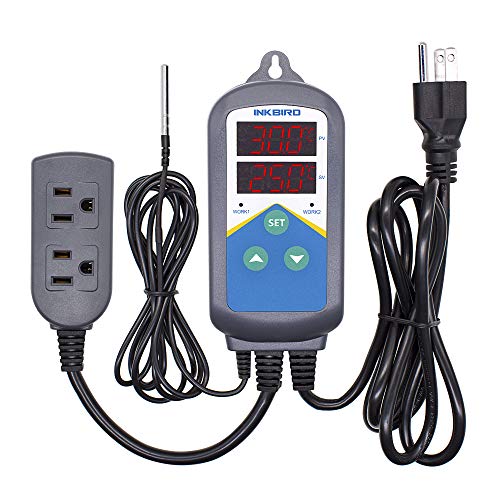
| Best for Heating Projects | Compatibility with existing AC units: Heating devices only (thermostat probe for heating appliances; not for AC cooling) | Wi‑Fi or network control: Not Wi‑Fi; plug‑and‑play electrical thermostat (no network connectivity) | App-based remote control: No app; local control via device interface and settings | VIEW LATEST PRICE | Read Our Analysis |
More Details on Our Top Picks
Breez Max Smart AC Controller for Mini-Split & Window
In case you want an easy, no‑fuss way to make a mini‑split or window AC feel like a true thermostat, the Breez Max is built for you. You’ll connect it to 2.4 GHz Wi‑Fi, place it 6–12 feet away with line‑of‑sight, and let its auto‑detection handle over 20,000 IR models. Built‑in temp and humidity sensors are calibratable in the app; touch buttons give local control. AI Comfy Max, geofencing, weekly schedules, presets, and local schedule execution prevent overcooling and keep comfort consistent. It supports multi‑zone setups, Alexa/Google/Siri, has a free app, and award‑winning support.
- Compatibility with existing AC units:IR-controlled mini‑split, window, portable ACs/heating units (auto-detects 20,000+ models)
- Wi‑Fi or network control:2.4 GHz Wi‑Fi connection
- App-based remote control:Free Cielo app for setup, control, scheduling
- Scheduling & automation:Weekly scheduling (one‑time or repeat), presets, local schedule execution
- Temperature sensing / sensors:Built‑in temperature and humidity sensors (calibratable)
- Voice / smart‑home integration:Alexa, Google Assistant, Siri Shortcuts, SmartThings, IFTTT, Cielo Linked
- Additional Feature:Built‑in temp/humidity sensors
- Additional Feature:AI Comfy Max algorithm
- Additional Feature:Local schedules run offline
Sensibo Sky Smart Wi‑Fi Air Conditioner Controller
In case you want to turn an existing remote‑controlled AC or mini‑split into a smart unit without replacing hardware, the Sensibo Sky is a compact, easy‑to‑set‑up controller that connects to your Wi‑Fi and brings remote, scheduled, and voice control to almost any model. You’ll mount the lightweight device, plug it in, pair it with your unit, and use the Sensibo app or web interface. Features include geofencing, 7‑day scheduling, Climate React humidity/dual setpoint control, and integrations with Alexa, Google, Siri, and Nest. Expect up to 40% energy savings and responsive customer support.
- Compatibility with existing AC units:Remote-controlled ACs, mini‑splits, ductless systems, heat pumps, window/portable ACs
- Wi‑Fi or network control:Wi‑Fi connection (pairs to cloud/app)
- App-based remote control:Sensibo Mobile app (iOS/Android) and web apps
- Scheduling & automation:7‑day programming and conditional scheduling, geofencing
- Temperature sensing / sensors:Temperature and humidity monitoring (Climate React)
- Voice / smart‑home integration:Google Assistant, Amazon Alexa, Nest (voice integration)
- Additional Feature:Lightweight wall‑mountable design
- Additional Feature:Climate React dual‑setpoint
- Additional Feature:Eco‑friendly packaging
Smart WiFi Air Conditioner Controller with Temp/Humidity
Should you want a simple way to turn a window, portable, or mini‑split AC into a smart unit, this WiFi controller with built‑in temp and humidity sensors is a perfect fit. You’ll convert 229+ major brands and 8,000+ models into smart units using infrared commands. Use Tuya Smart or Smart Life apps for remote control and Alexa or Google Home for voice. Program daily schedules, automations, and scenes like Goodnight Mode, and group devices for coordinated control. Built‑in sensors show real‑time temp (±0.5°C) and humidity (±5% RH). Intelligent scheduling cuts energy use with pre‑cool/pre‑heat and auto shutoff.
- Compatibility with existing AC units:229+ brands / 8,000+ models of window, portable, mini‑split ACs and heat pumps (IR)
- Wi‑Fi or network control:Wi‑Fi control via Tuya/Smart Life apps
- App-based remote control:Tuya Smart App or Smart Life App
- Scheduling & automation:Daily programmable schedules, automation and scenes
- Temperature sensing / sensors:Built‑in temperature and humidity sensor (±0.5°C / ±5% RH)
- Voice / smart‑home integration:Alexa and Google Home voice control
- Additional Feature:±0.5°C temperature accuracy
- Additional Feature:Tuya/Smart Life ecosystem
- Additional Feature:Custom smart scenes
Google Nest Thermostat Smart Wi‑Fi Programmable (Snow)
Should you want a straightforward, energy‑focused smart thermostat that works with most homes’ wiring, the Google Nest Thermostat (Snow) is a strong choice — it’s ENERGY STAR certified, can run without a C‑wire in many setups, and suggests schedule tweaks via the app to help cut your bills. You’ll control it over Wi‑Fi from the Google Home app on phone, tablet, or laptop, set efficient schedules, and let it lower temps when you leave. It links with Google Assistant, Alexa, Matter devices, and Nest Renew for cleaner energy prioritization, offers HVAC monitoring and maintenance alerts, and might qualify for rebates.
- Compatibility with existing AC units:Designed for whole-home HVAC systems (standard thermostats; compatibility depends on wiring/C‑wire and system type)
- Wi‑Fi or network control:Wi‑Fi (works with Google Home app and cloud services)
- App-based remote control:Google Home app (remote control and scheduling)
- Scheduling & automation:Energy‑efficient scheduling via app and auto adjustments (Savings Finder)
- Temperature sensing / sensors:Built‑in HVAC sensors and system monitoring (thermostat sensors)
- Voice / smart‑home integration:Google Assistant, Google Home, Alexa, Matter‑certified assistants
- Additional Feature:ENERGY STAR certified
- Additional Feature:Nest Renew cleaner‑energy prioritization
- Additional Feature:HVAC issue alerts
Sensibo Air PRO Smart AC Controller & Air Sensor
Should you want a plug-and-play way to turn any remote-controlled AC into a smart, sensor-driven system, the Sensibo Air PRO is a strong pick—its built-in air quality, temperature, and humidity sensors give you continuous feedback so you can keep rooms comfortable and healthy without constant tweaking. You’ll convert window, portable, mini-split, ductless, or heat-pump units to connected devices via Wi‑Fi or Bluetooth, then use the app for easy setup. Climate React and dual set-point control stabilize “real feel” comfort while cutting cooling costs up to 40%. Pair Room Sensors, use geofencing, and integrate with HomeKit, Google, Alexa, or Siri.
- Compatibility with existing AC units:Remote-controlled ACs, mini‑splits, window/portable ACs, ductless and heat pumps
- Wi‑Fi or network control:Wi‑Fi (and Bluetooth for sensor pairing)
- App-based remote control:Sensibo app (mobile) for control and sensors
- Scheduling & automation:Scheduling, Climate React, geofencing, room sensor automations
- Temperature sensing / sensors:Temperature, humidity and air quality sensors; supports external room sensor
- Voice / smart‑home integration:Apple HomeKit, Google Home, Amazon Alexa, Siri
- Additional Feature:Built‑in air‑quality sensor
- Additional Feature:Supports Sensibo Room Sensor
- Additional Feature:Bluetooth + Wi‑Fi connectivity
Inkbird Digital Temperature Probe Thermostat Timer (110V)
Should you need a simple, plug-and-play heater controller that switches two heating outlets and runs separate day/night temperature schedules, the Inkbird Digital Temperature Probe Thermostat Timer (110V) is a solid choice — it gives you dual time-cycle programming, temperature calibration, and adjustable hysteresis so you can precisely control incubation, reptile brooding, greenhouse heating, or fermenting without a complex setup. You get a dual LCD with C/F option, a single heating relay (no cooling), and two heating plugs. It runs on AC 110V, supports up to 1,200W, and offers programmable day/night temps, clear readouts, and easy installation for pets, seeds, or aquarium protection.
- Compatibility with existing AC units:Heating devices only (thermostat probe for heating appliances; not for AC cooling)
- Wi‑Fi or network control:Not Wi‑Fi; plug‑and‑play electrical thermostat (no network connectivity)
- App-based remote control:No app; local control via device interface and settings
- Scheduling & automation:Dual time cycle (day/night) programmable schedules for heating
- Temperature sensing / sensors:External temperature probe (accurate probe sensing, calibration and hysteresis)
- Voice / smart‑home integration:No voice or smart‑home integration (standalone electrical thermostat timer)
- Additional Feature:Dual time cycle scheduling
- Additional Feature:Heating‑only relay output
- Additional Feature:1,200W maximum output
Factors to Consider When Choosing an AC Controller
When choosing an AC controller, you’ll want to check compatibility with your unit and the connectivity options it offers. Consider smart home integration versus reliable local control, and ponder about where sensors will sit. Sensor accuracy and proper placement can make or break temperature regulation.
Compatibility With Units
Because AC controllers vary in how they communicate and what models they support, you’ll want to confirm the controller matches your unit’s connection type (IR vs. wired protocol), brand/model compatibility or IR library coverage, multi‑zone control capability for mini‑splits, sensor options (built‑in or external), and network and placement requirements like 2.4 GHz Wi‑Fi and clear IR line‑of‑sight. Check that it supports the communication method your AC uses so commands transmit reliably. Verify brand/model support or a large IR database and auto‑detect feature, since not every controller covers all units. Should you have a multi‑head mini‑split, confirm per‑head control or grouping options. Match sensor capabilities to where you’ll measure temperature. Finally, make sure IR placement and required Wi‑Fi band fit your space for consistent operation.
Connectivity Options Available
How will your AC controller connect to your home and unit? Initially, confirm the network band: many controllers need 2.4 GHz Wi‑Fi for reliable pairing and range, not 5 GHz. Next, check whether it supports the voice assistants or automation protocols you want—Google Assistant, Alexa, HomeKit, Matter, IFTTT, SmartThings—in case you plan voice control or routines. Verify how the controller talks to the AC: infrared, Bluetooth, or wired; IR needs line‑of‑sight, while Bluetooth or wired connections work through walls and without the original remote. Confirm local control and offline scheduling so the unit runs during outages and with lower latency. Finally, consider companion or room sensors and whether they use Wi‑Fi, Bluetooth, or proprietary RF for placement flexibility.
Smart Home Integration
Why should smart home integration matter to you? You want seamless control and reliable automation. To begin, check compatibility with your ecosystem and supported protocols (Wi‑Fi, Matter, Thread, Zigbee, Z‑Wave, Bluetooth) so your hub or voice assistant uncovers the controller. Verify voice assistant and platform support (Alexa, Google, Siri/HomeKit) to use voice commands and include the AC in routines. Confirm integration depth: does it expose only on/off and setpoint or full controls—mode, fan speed, swing, humidity, and sensor data—for richer automations? Look for platform features like geofencing, presence‑based triggers, multi‑zone grouping, and API/IFTTT or webhook support for custom flows. Prefer controllers that offer local control and fallback scheduling to keep basic functions running during outages.
Local Control Reliability
Prioritizing local control guarantees your AC keeps running predictably whenever the internet or vendor cloud fails. Make sure the controller can execute scheduled routines locally so timers, safety cutoffs, and basic automations continue during outages. Favor devices that process key logic on‑device—temperature‑based on/off and geofence fallback—to cut latency and cloud dependence. Check for physical controls or a built‑in thermostat interface so you can adjust settings should the app or network be down. Confirm support for local network protocols like LAN or MQTT and direct Wi‑Fi control so third‑party hubs and home automation systems can take over without vendor servers. Finally, look for onboard sensors with local calibration to maintain accurate control whenever external data or internet access isn’t available.
Sensor Accuracy & Placement
Local control only helps provided the controller senses the room correctly, so pay attention to both sensor accuracy and placement. Look for sensors with specified accuracy (for example ±0.5°C and ±5% RH) so you know expected error and can compare models. Mount sensors 6–12 feet from the AC unit, keeping line-of-sight where applicable to avoid direct cold or warm airflow that skews readings. Don’t place sensors near windows, doors, heat sources, or in direct sun; instead position them in the room’s breathing zone (about 3–6 feet high) for representative ambient data. Should it be available, add external or remote sensors in occupied or far-end rooms to prevent localized overcooling. Choose controllers that let you calibrate or set sensor offsets after verifying with a reference device.
Automation And Scheduling
Often you’ll want your AC to run on a predictable schedule, but modern controllers should do more than simple timers — they should keep working whenever the internet’s down, let you create weekly, one‑time and day/night profiles, and support geofencing or presence-based actions to pre‑condition spaces and shut off whenever nobody’s home. Check that scheduling runs locally so presets and timers remain active during outages. Choose controllers offering weekly repeats, one‑time events, and separate day/night profiles for flexibility. Prefer geofencing and presence automations to pre‑cool or shut off based on occupancy. Use conditional, sensor‑based automations (temperature, humidity, motion, air quality) to maintain comfort and avoid unnecessary runtime. Make certain you can edit schedules remotely, group scenes, and set local fallback or priority rules to prevent conflicting actions.
Energy Savings Potential
Usually, you’ll want a controller that actually reduces energy use rather than just adding smart features: look for scheduling, geofencing, pre‑cool/pre‑heat, and local automation so the unit stops wasting runtime during outages. You’ll cut cooling costs roughly 20–40% through automated on/off and timed setpoints whenever used properly. Prefer controllers that hold tighter temperature and humidity with dual setpoints or “real‑feel” algorithms to avoid overshoot and short cycling. Local execution of automations keeps savings consistent during internet outages. Built‑in or external occupancy/room sensors let you condition only occupied zones, lowering whole‑home consumption. Finally, choose a controller that logs usage and gives energy reports so you can spot wasteful patterns and fine‑tune setpoints for maximum savings.
Frequently Asked Questions
Can AC Controllers Work With Window Units Without Wi‑Fi Connectivity?
Yes — you can use AC controllers with window units without Wi‑Fi. You’ll rely on IR, RF, or hardwired interfaces; they’ll let you automate temperature and schedules locally, though remote cloud control and voice assistants won’t work.
Do Smart AC Controllers Increase Energy Bills When Idle?
Picture a tiny diva smart controller lounging on a chaise, sipping electrons. No, it won’t spike bills; it uses minimal standby power. You’ll see tiny phantom watts, but savings from smarter cycles usually outweigh that idle trickle.
Can Multiple Controllers Be Grouped for a Single Large Space?
Yes — you can group multiple controllers for one large space. You’ll link them via a hub, Wi‑Fi mesh, or cloud account so they coordinate setpoints, zoning, and schedules, ensuring balanced cooling and reduced short‑cycling.
Are There Privacy Concerns With Cloud‑Connected AC Controllers?
Yes — about 70% of smart‑home breaches involve cloud services, so you should expect data exposure risks. You’ll mitigate them through using strong passwords, two‑factor authentication, firmware updates, and selecting vendors with end‑to‑end encryption.
Do Smart AC Controllers Require Professional Installation?
Usually no — you can install most smart AC controllers yourself using instructions and basic tools, but you’ll want a pro for complex HVAC systems, line-voltage units, or warranty requirements; professionals guarantee safety and proper wiring.
Final Thoughts
You’ve seen solid options—from Breez Max’s broad IR support to Nest’s ENERGY STAR smarts—so pick a controller that matches your AC type and habits. One neat stat: smart thermostats can cut HVAC energy use about 10–12%, so the right controller pays back fast through lower bills and steadier comfort. Prioritize accurate sensors, 2.4 GHz Wi‑Fi, local schedules, and external sensors to keep your home reliably cool and efficient.
