

You want smart plugs that just work on a 5GHz network, cut down pairing headaches, and respond instantly whenever you ask Alexa or Google to act. These picks focus on dual‑band reliability, compact designs that save outlet space, and models rated for heavier loads or outdoor use. Keep scrolling to see options that match your router, amperage needs, and certification requirements so you don’t end up swapping devices later.
| Eightree Smart WiFi Plug 4-Pack (2.4 & 5GHz) |

| Best Multi-Pack | Wi‑Fi Compatibility: 2.4 GHz & 5 GHz dual‑band | App Control: Smart Life app remote control | Voice Assistant Support: Alexa & Google Home | VIEW LATEST PRICE | Read Our Analysis |
| EIGHTREE 5GHz Smart Plug Compatible with Alexa & Google |

| Reliable Everyday Pick | Wi‑Fi Compatibility: 2.4 GHz & 5 GHz dual‑band | App Control: Smart Life app remote control | Voice Assistant Support: Alexa & Google Home | VIEW LATEST PRICE | Read Our Analysis |
| NOUS Smart Wi‑Fi Plug 15A with Energy Monitoring |

| Energy Monitoring Pro | Wi‑Fi Compatibility: 2.4 GHz & 5 GHz dual‑band | App Control: Tuya Smart app remote control | Voice Assistant Support: Alexa & Google Assistant | VIEW LATEST PRICE | Read Our Analysis |
| EIGHTREE Mini Smart Plug 5GHz (2 Round 2 Square) |
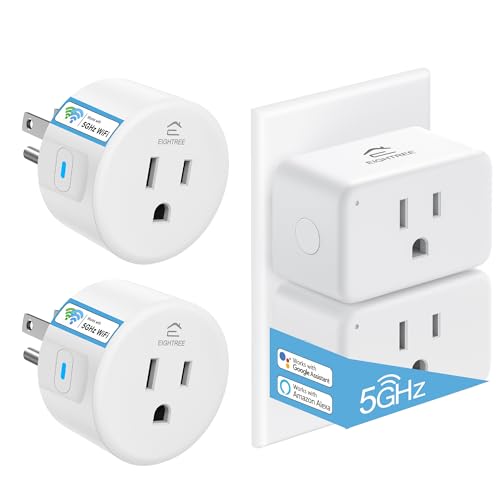
| Space-Saving Bundle | Wi‑Fi Compatibility: 2.4 GHz & 5 GHz dual‑band | App Control: Smart Life app remote control | Voice Assistant Support: Alexa, Google Home, SmartThings | VIEW LATEST PRICE | Read Our Analysis |
| GHome Mini WiFi Smart Plug (4-Pack) |
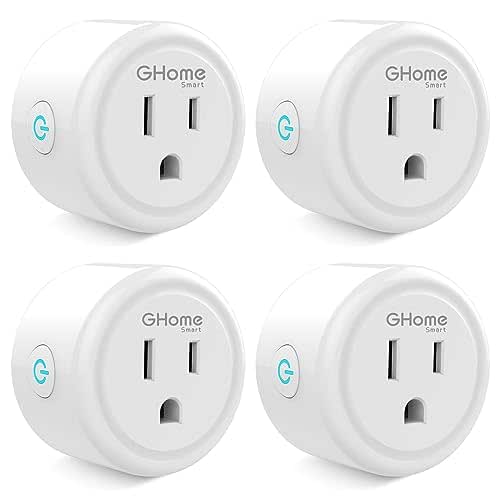
| App-Centric Value | Wi‑Fi Compatibility: 2.4 GHz only (note: still Wi‑Fi connectivity) | App Control: GHome app remote control | Voice Assistant Support: Alexa & Google Home Assistant | VIEW LATEST PRICE | Read Our Analysis |
| HBN Outdoor Smart Wi‑Fi Grounded Plug (1-Pack) |

| Weatherproof Outdoor Pick | Wi‑Fi Compatibility: 2.4 GHz only (outdoor; no 5 GHz) | App Control: BN‑HUB or HBN Smart app remote control | Voice Assistant Support: Amazon Alexa & Google Assistant | VIEW LATEST PRICE | Read Our Analysis |
More Details on Our Top Picks
Eightree Smart WiFi Plug 4-Pack (2.4 & 5GHz)
Should you need smart plugs that reliably join either your 5GHz or 2.4GHz Wi‑Fi, the Eightree Smart WiFi Plug 4‑Pack is a solid pick—its dual‑band compatibility removes the usual router‑band headaches so you can set up and control devices without juggling network settings. You’ll control gadgets remotely via the Smart Life app, then enable Alexa or Google Home for voice commands. Set timers and routines to automate lights and save energy. The mini round design won’t block outlets, and ETL/FCC certification plus two‑year coverage give peace of mind. Follow the setup video for SmartThings integration and get support should the need arise.
- Wi‑Fi Compatibility:2.4 GHz & 5 GHz dual‑band
- App Control:Smart Life app remote control
- Voice Assistant Support:Alexa & Google Home
- Scheduling/Timers:Timers and scheduling for automation
- Certifications/Safety Listing:ETL and FCC certified
- Compact/Space‑Saving Design:Mini round compact design
- Additional Feature:2‑year coverage
- Additional Feature:SmartThings compatible
- Additional Feature:Mini round compact
EIGHTREE 5GHz Smart Plug Compatible with Alexa & Google
Should you’re juggling multiple devices on a crowded home network, the EIGHTREE 5GHz smart plug is a great pick — it connects to both 5GHz and 2.4GHz Wi‑Fi to cut down on pairing headaches and router conflicts. You’ll control appliances remotely via the Smart Life app, turning devices on or off from anywhere. Set timers and personalized schedules to automate routines and save energy. Voice control works with Alexa and Google Home after you link the plug in the Smart Life app. The compact, round design keeps outlets usable, and ETL/FCC certification offers basic safety and compliance peace of mind.
- Wi‑Fi Compatibility:2.4 GHz & 5 GHz dual‑band
- App Control:Smart Life app remote control
- Voice Assistant Support:Alexa & Google Home
- Scheduling/Timers:Timers and personalized schedules
- Certifications/Safety Listing:ETL and FCC certified
- Compact/Space‑Saving Design:Compact mini round form factor
- Additional Feature:Smart Life integration
- Additional Feature:Space‑saving mini form
- Additional Feature:Dual‑band reliability focus
NOUS Smart Wi‑Fi Plug 15A with Energy Monitoring
Should you want a fast, reliable smart plug that won’t choke on high-draw appliances, the NOUS 15A Wi‑Fi Plug with energy monitoring is a strong pick — supporting both 2.4 GHz and 5 GHz networks for steadier connections and offering real‑time energy data so you can spot and manage power‑hungry devices. You’ll enjoy quick, hub-free setup via the Tuya Smart App, remote on/off, timers, and scheduling. It’s compact enough to leave the adjacent outlet free, rated for 15A, and works with Alexa and Google Assistant for voice control. The energy reports help you optimize usage and cut phantom loads.
- Wi‑Fi Compatibility:2.4 GHz & 5 GHz dual‑band
- App Control:Tuya Smart app remote control
- Voice Assistant Support:Alexa & Google Assistant
- Scheduling/Timers:Timer and scheduling functions
- Certifications/Safety Listing:(Not explicitly listed) — compact design; no specific ETL/FCC note in summary
- Compact/Space‑Saving Design:Compact design fits one outlet without blocking adjacent
- Additional Feature:Real‑time energy monitoring
- Additional Feature:15A current rating
- Additional Feature:Fits one outlet only
EIGHTREE Mini Smart Plug 5GHz (2 Round 2 Square)
In case you want a compact, travel‑friendly smart plug that works on both 5 GHz and 2.4 GHz networks, the EIGHTREE Mini Smart Plug is a strong choice — the four‑pack includes two round and two square plugs so you can fit more devices into tight outlets. You plug in, join your Wi‑Fi, enable Bluetooth, and use the Smart Life app for quick auto‑detection and setup. You’ll get Alexa, Google Home, and SmartThings control, plus manual toggles. Schedule, timer, and remote app access let you automate lamps, fans, or humidifiers. ETL/FCC certified with two‑year support.
- Wi‑Fi Compatibility:2.4 GHz & 5 GHz dual‑band
- App Control:Smart Life app remote control
- Voice Assistant Support:Alexa, Google Home, SmartThings
- Scheduling/Timers:Scheduling and timer features
- Certifications/Safety Listing:ETL and FCC certified
- Compact/Space‑Saving Design:Mini form factor allows two plugs per outlet
- Additional Feature:2 round + 2 square
- Additional Feature:Auto device detection
- Additional Feature:Manual physical toggle
GHome Mini WiFi Smart Plug (4-Pack)
In case you want an affordable, no-hub solution that’s easy to set up for voice control, the GHome Smart Plug Mini (4-pack) is a solid pick — just keep in mind it uses 2.4 GHz Wi‑Fi only. You’ll connect through the GHome app initially, then link Alexa or Google Assistant for hands-free commands. Each compact Type B plug handles 10 A/1200 W and includes ETL and FCC certifications. Use schedules, group control, and random timing for convenience and security. The pack of four fits tight spaces, weighs 6.4 oz total per item, and keeps everything simple without needing a hub.
- Wi‑Fi Compatibility:2.4 GHz only (note: still Wi‑Fi connectivity)
- App Control:GHome app remote control
- Voice Assistant Support:Alexa & Google Home Assistant
- Scheduling/Timers:Schedules, circular/random timing, auto timers
- Certifications/Safety Listing:ETL and FCC certified
- Compact/Space‑Saving Design:Mini plug dimensions 2 x 2 x 1 inches (compact)
- Additional Feature:Group control support
- Additional Feature:10A / 1200W rating
- Additional Feature:Circular & random timing
HBN Outdoor Smart Wi‑Fi Grounded Plug (1-Pack)
In case you need a heavy‑duty, weatherproof smart outlet for outdoor lights or appliances, the HBN Outdoor Smart Wi‑Fi Grounded Plug delivers reliable remote and voice control while handling up to 15 A (1875 W) of resistive load. You’ll control a single grounded outlet via the BN‑HUB or HBN Smart app and with Amazon Alexa or Google Assistant. It needs a secured 2.4 GHz Wi‑Fi network (AP mode helps provided setup stalls). Weatherproof construction suits rain and harsh conditions; mount at least 2 feet off the ground with the plug facing down. Ratings include 625 W tungsten and 1/2 HP motor support.
- Wi‑Fi Compatibility:2.4 GHz only (outdoor; no 5 GHz)
- App Control:BN‑HUB or HBN Smart app remote control
- Voice Assistant Support:Amazon Alexa & Google Assistant
- Scheduling/Timers:Scheduling for automatic on/off
- Certifications/Safety Listing:ETL listed
- Compact/Space‑Saving Design:Outdoor single grounded outlet (bulky compared to indoor minis but intended space-conscious weatherproof design)
- Additional Feature:Weatherproof outdoor design
- Additional Feature:Heavy‑duty 15A load
- Additional Feature:AP mode troubleshooting
Factors to Consider When Choosing a 5ghz Smart Plug
Whenever choosing a 5GHz smart plug, you’ll want to confirm network band compatibility so it actually works with your router. Check setup and app support, plus voice assistant integration, to make certain control fits your workflow. Also review scheduling and automation features and the plug’s power and load rating to guarantee safety and the functionality you need.
Network Band Compatibility
Although 5 GHz offers faster speeds and less interference, you’ll want to confirm a smart plug explicitly supports that band (and 2.4 GHz) because many models only work on 2.4 GHz. Check whether the plug needs initial setup on 2.4 GHz even should it later join 5 GHz—some require it. Bear in mind 5 GHz gives higher throughput but shorter range and poorer wall penetration, so place plugs accordingly. Verify compatibility with your router’s SSID and security (WPA2/WPA3) and confirm any VLAN or guest‑network restrictions won’t block the device. In case you run a mesh or extenders that use a single SSID or band‑steering, test the plug for stability; automatic switching between bands can cause dropouts when the device doesn’t handle roaming well.
Setup And App Support
After you’ve confirmed a plug will reliably join your 5 GHz network, look closely at setup and app support because a smooth app experience determines how usable the device will be day to day. You’ll want an app that walks you through initial Wi‑Fi connection, account linking, and ongoing remote control with clear steps or video walkthroughs. Verify compatibility with your smartphone OS and whether it documents dual‑band behavior or network restrictions. Prefer apps offering built‑in automations—schedules, timers, routines, and group control—so you avoid third‑party workarounds. Check whether the app needs to pair before enabling integrations and that firmware updates arrive reliably. Finally, prioritize vendors with responsive customer support and strong security: encrypted communications and secure account authentication.
Voice Assistant Integration
Because voice control often becomes the primary way you interact with smart plugs, confirm compatibility with your preferred assistant (Alexa, Google Assistant, Siri) so you get direct, reliable commands without extra bridges. Next, check whether voice activation needs initial setup through the plug’s companion app; many require linking accounts before the assistant can control the device. Verify the extent of voice functionality — simple on/off, scene activation, timers, or full routine support — and whether the plug can join multi-device groups. Look for explicit ecosystem compatibility and local detection/control over your network to reduce latency and dependency on cloud services. Finally, review privacy and security: know whether voice commands are processed locally or in the cloud and what account permissions are requested.
Scheduling And Automation
As you pick a 5 GHz smart plug, prioritize flexible scheduling and resilient automation so your devices run exactly whenever you want without constant oversight. Look for daily, weekly, and custom recurrence options so routines—like lights on weekdays and off weekends—don’t require manual tweaks. Make sure the app provides both countdown timers for one‑offs and multi‑event schedules for complex sequences. Use scene or routine creation to trigger multiple devices together or react to conditions such as sunrise/sunset and device states. Prefer plugs that combine time‑based automation with remote overrides so you can pause or adjust schedules from anywhere. Finally, confirm the scheduling system auto‑handles timezones and daylight‑saving changes to avoid mistimed actions.
Power And Load Rating
Upon choosing a 5 GHz smart plug, check its power and load ratings so it can safely handle your device’s startup and continuous demands; common limits are 10 A (≈1200 W) or 15 A (≈1875 W), but motors, heaters, and incandescent loads often have lower allowable wattage and higher inrush currents that you must account for. You should verify maximum current and wattage, plus motor and tungsten load ratings in case you plan to connect pumps, refrigerators, or heaters. Confirm surge/startup (inrush) capacity so high initial draws don’t trip the plug. Make certain the continuous load rating exceeds your appliance’s running draw about 20–25% to prevent overheating. Lastly, look for ETL/UL/FCC certifications and specified wire/connector types that prove the ratings were tested.
Physical Size And Design
After you’ve confirmed power and load specs, consider the plug’s physical size and design: a compact, low‑profile model can let you use both sockets on a duplex outlet and keep the unit from jutting into walkways or behind furniture. Choose round or square shapes and check depth so it won’t hit furniture or protrude into paths. Look for a clearly placed physical toggle or button so you can operate the plug manually in tight or hard‑to‑reach spots. Evaluate materials, finish, and weight—light plastic might wobble under heavier cords, while sturdier housings sit solidly. Also observe ventilation gaps on the casing; they aid heat dissipation in compact enclosures and reflect thoughtful design choices.
Safety Certifications And Warranty
While shopping, prioritize verified safety certifications and clear warranty terms so you’re protected from electrical faults and premature failures. Check for third‑party markings like ETL, UL, or FCC to make certain independent testing for electrical and electromagnetic compliance. Verify the plug’s voltage, amperage, and wattage ratings match or exceed your devices to avoid overheating or fire risk. Should you’ll use it outdoors, confirm IP or weatherproof ratings for moisture and debris protection. Review product docs for built‑in safety features—overload, surge protection, and thermal shutoff—to reduce hazards. Finally, verify warranty length and coverage details for defects, electrical failures, and potential damage so you can get repairs or replacements without surprises.
Frequently Asked Questions
Do 5GHZ Smart Plugs Support Zigbee or Z-Wave Devices?
No, 5GHz smart plugs typically don’t support Zigbee or Z-Wave, since those use separate radio protocols. You’ll need a hub or bridge that supports Zigbee/Z-Wave to integrate those devices with your Wi‑Fi smart plug ecosystem.
Can 5GHZ Plugs Work With Wi‑Fi Extenders or Mesh Systems?
They can, provided the extender or mesh broadcasts a true 5GHz SSID and passes client traffic; you’ll want compatible security, stable backhaul, and consistent signal strength because some extenders separate bands or isolate clients, which can break plug connectivity.
Are Firmware Updates Automated or Manual for These Plugs?
They’re usually mixed: some plugs update automatically, others let you choose manual installs in the app. You’ll want to check each brand’s settings because automatic updates can be enabled or disabled, and manual prompts might appear.
Do 5GHZ Smart Plugs Increase Household Wi‑Fi Congestion?
Like a telegram sent from a steampunk clocktower, no — 5GHz smart plugs generally won’t increase household Wi‑Fi congestion much because they use less crowded frequency range, but dense device counts or weak routers can still cause localized slowdowns.
Can 5GHZ Plugs Operate in Countries With Different Wi‑Fi Regulations?
Yes — they can, but you’ll need to check each plug’s supported channels and local regulations, because some countries restrict certain 5GHz bands. You should buy region-specific models or enable region settings to stay compliant.
Final Thoughts
You’ve seen options that skip the usual headaches—pick an Eightree pack should you want fuss‑free dual‑band reliability, the NOUS for heavier loads, or the HBN should rain’s a regular guest. Don’t sweat the tech jargon: focus on certified safety, router fit, and amperage. These plugs quietly do the heavy lifting, letting your home behave a little more like the future—without making you feel like you’ve signed up for one.
