

Recall the time you fumbled for keys in the rain and swore there had to be a better way? Biometric deadbolts cut that scene down to a fingerprint or tap, giving you speed, backup options, and smart integrations so you don’t get stranded—yet not all models are equal. Keep going to compare sensor speed, installation ease, weather resistance, and emergency fail-safes so you can pick the one that truly ends the hassle.
| ULTRALOQ Bolt WiFi Fingerprint Smart Lock (8-in-1) |
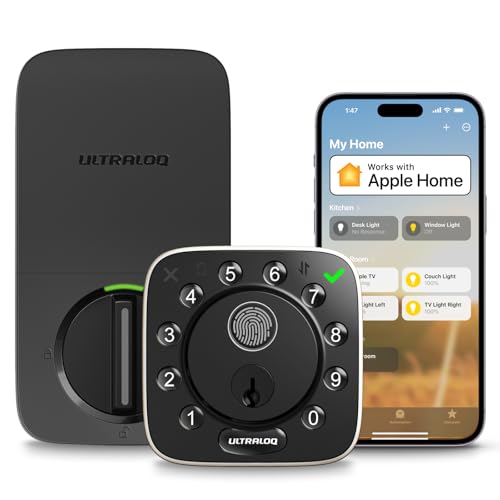
| Best for Smart Homes | Biometric (Fingerprint) Unlock: Fingerprint ID (stores up to 50) | Keypad / Passcode Entry: Passcodes via keypad (stores passcodes) | Physical Backup Key: Includes 2 backup physical keys | VIEW LATEST PRICE | Read Our Analysis |
| Fingerprint Smart Deadbolt Keypad Lock (Alexa & Google) |

| Best for High Capacity | Biometric (Fingerprint) Unlock: Fingerprint sensor (stores 100+) | Keypad / Passcode Entry: Keypad codes (stores 100+) | Physical Backup Key: Includes 2 physical keys | VIEW LATEST PRICE | Read Our Analysis |
| DESLOC B200 Smart Fingerprint Deadbolt Lock |

| Fastest Fingerprint Response | Biometric (Fingerprint) Unlock: Fingerprint sensor (<0.3s, AI learning) | Keypad / Passcode Entry: Touchscreen keypad / PIN codes (anti-peep) | Physical Backup Key: Includes 2 physical keys | VIEW LATEST PRICE | Read Our Analysis |
| SEPOX Smart 5-in-1 Keyless Deadbolt with Fingerprint |

| Best Compact Upgrade | Biometric (Fingerprint) Unlock: Fingerprint unlocking (up to 200 users) | Keypad / Passcode Entry: PIN/password entry via app/keypad | Physical Backup Key: Emergency mechanical key included | VIEW LATEST PRICE | Read Our Analysis |
| Smart Keyless Deadbolt with Fingerprint Bluetooth App Control |

| Easiest Installation | Biometric (Fingerprint) Unlock: Fingerprint unlocking | Keypad / Passcode Entry: Password/PIN entry | Physical Backup Key: Physical key included | VIEW LATEST PRICE | Read Our Analysis |
| VEVOR Fingerprint Electronic Deadbolt Lock (Matte Black) |

| Weatherproof Workhorse | Biometric (Fingerprint) Unlock: Fingerprint unlocking (stores up to 50) | Keypad / Passcode Entry: LED-backlit keypad with anti-peep (supports 100 codes) | Physical Backup Key: Includes 2 backup mechanical keys | VIEW LATEST PRICE | Read Our Analysis |
More Details on Our Top Picks
ULTRALOQ Bolt WiFi Fingerprint Smart Lock (8-in-1)
Provided that you want a versatile, smart deadbolt that fits homes, rentals, and small offices, the ULTRALOQ Bolt WiFi Fingerprint Smart Lock gives you eight ways to open—fingerprint, app, passcode, voice, auto-open, web portal, keypad, and two physical keys—so you’ll always have access options that match your lifestyle and tech setup. You’ll store up to 50 fingerprints and passcodes, use HomeKit, Siri, Alexa, Google Assistant, SmartThings or IFTTT, and control it via app, touch, voice, or remote. It’s ANSI/BHMA rated, AI-driven, weather-resistant (IP65), runs on eight AA batteries, and installs in about ten minutes.
- Biometric (Fingerprint) Unlock:Fingerprint ID (stores up to 50)
- Keypad / Passcode Entry:Passcodes via keypad (stores passcodes)
- Physical Backup Key:Includes 2 backup physical keys
- App / Remote Control (with gateway where required):App remote unlocking, Wi‑Fi & Bluetooth built-in (HomeKit)
- Auto-lock / Auto-unlock Capability:Auto Unlock feature (auto unlock)
- Weather Resistance / Outdoor Rated:IP65 dustproof and weather-resistant
- Additional Feature:HomeKit / Siri integration
- Additional Feature:Includes door sensor
- Additional Feature:Lifetime mechanical coverage
Fingerprint Smart Deadbolt Keypad Lock (Alexa & Google)
Choose the Sifely Model O Deadbolt while you want fast, keyless entry for busy households or rental properties—its fingerprint sensor plus 100+ fingerprint and passcode capacity makes managing multiple users simple and secure. You’ll access with fingerprint, keypad, app, fob/card, or physical key; two keys and two cards are included. Bluetooth and Wi‑Fi (gateway sold separately) enable remote control and voice via Alexa or Google. The app manages codes, logs, eKeys and schedules. Features include auto‑lock, one‑touch lock, privacy/passage modes, anti‑peep codes, low‑battery alerts, weather resistance, DIY installation, aluminum/zinc build, and a limited warranty.
- Biometric (Fingerprint) Unlock:Fingerprint sensor (stores 100+)
- Keypad / Passcode Entry:Keypad codes (stores 100+)
- Physical Backup Key:Includes 2 physical keys
- App / Remote Control (with gateway where required):App control & web portal (remote via gateway sold separately)
- Auto-lock / Auto-unlock Capability:Auto-lock after each entry (configurable)
- Weather Resistance / Outdoor Rated:Weather resistant (unspecified IP)
- Additional Feature:Stores 100+ fingerprints
- Additional Feature:Anti-peep code support
- Additional Feature:One-touch lock
DESLOC B200 Smart Fingerprint Deadbolt Lock
The DESLOC B200 is ideal for homeowners who want fast, keyless entry and sturdy local security—its <0.3 second fingerprint recognition and self-learning AI sensor get you in almost instantly while storing data locally to reduce remote-attack risk. You’ll enjoy multiple access methods: fingerprint, PIN (anti-peeping), eKey, fob, app (Bluetooth, 2 m), two physical keys, and voice via G2 bridge. It meets BHMA Grade 3, offers IP54 weather resistance, and runs on 4 AA batteries (~12 months) with USB-C emergency power and low-battery alert. Installation needs only a screwdriver; enable auto-lock and keep passage mode off.
- Biometric (Fingerprint) Unlock:Fingerprint sensor (<0.3s, AI learning)
- Keypad / Passcode Entry:Touchscreen keypad / PIN codes (anti-peep)
- Physical Backup Key:Includes 2 physical keys
- App / Remote Control (with gateway where required):TTLock app Bluetooth control (voice remote with G2 bridge)
- Auto-lock / Auto-unlock Capability:Auto-lock function and passage mode toggle
- Weather Resistance / Outdoor Rated:IP54 weather resistance
- Additional Feature:<0.3s fingerprint speed
- Additional Feature:USB‑C emergency power
- Additional Feature:Local data storage
SEPOX Smart 5-in-1 Keyless Deadbolt with Fingerprint
For anyone who wants quick, secure access without keys, the SEPOX Smart 5‑in‑1 Keyless Deadbolt puts biometric fingerprint entry and app control front and center so you can open your door in seconds. You’ll get fingerprint, Bluetooth, optional Wi‑Fi (with gateway), and emergency key access, plus app-based remote control through Tuya or Smart Life and Google Assistant. It fits US standard doors, holds up to 200 users, and uses aerospace‑grade aluminum with a stainless bolt for durability and IP45 weather resistance. Batteries are included, installation’s straightforward with video guidance, and SEPOX backs it with a five‑year warranty.
- Biometric (Fingerprint) Unlock:Fingerprint unlocking (up to 200 users)
- Keypad / Passcode Entry:PIN/password entry via app/keypad
- Physical Backup Key:Emergency mechanical key included
- App / Remote Control (with gateway where required):Tuya/Smart Life app (Wi‑Fi remote via gateway)
- Auto-lock / Auto-unlock Capability:Auto-lock and auto-unlock via app (gateway for remote)
- Weather Resistance / Outdoor Rated:IP45 weather resistance
- Additional Feature:Supports 200 users
- Additional Feature:5-year manufacturer warranty
- Additional Feature:Aerospace‑grade aluminum
Smart Keyless Deadbolt with Fingerprint Bluetooth App Control
Should you want keyless convenience and quick entry, this smart deadbolt delivers with fingerprint, Bluetooth, app, password, FOB, and physical key options so you’ll never be locked out for lack of a key. You can enroll fingerprints for instant access or use the app and Bluetooth whenever nearby. Add remote control through pairing a G2 Gateway (sold separately) and connecting to Wi‑Fi. Configure auto‑lock in the app, or turn the inside knob to lock or release in about one second. Installation takes roughly five minutes with a screwdriver, fits American standard doors, and tolerates -22°F to 158°F; avoid direct rain.
- Biometric (Fingerprint) Unlock:Fingerprint unlocking
- Keypad / Passcode Entry:Password/PIN entry
- Physical Backup Key:Physical key included
- App / Remote Control (with gateway where required):App & Bluetooth control (remote with G2 Gateway)
- Auto-lock / Auto-unlock Capability:Configurable auto-lock feature in app
- Weather Resistance / Outdoor Rated:Rated to operate from -22°F to 158°F; recommended sheltered use
- Additional Feature:Manual one‑second knob
- Additional Feature:5‑minute screwdriver install
- Additional Feature:Temporary/indoor rain caution
VEVOR Fingerprint Electronic Deadbolt Lock (Matte Black)
Choose the VEVOR Fingerprint Electronic Deadbolt Lock should you want fast, keyless entry that fits busy households or small offices—its fingerprint sensor releases in seconds so you won’t fumble with keys. You’ll get LED-backlit keypad, anti-peep password mode, silent operation, and a roomy UI panel for smoother handling. Store up to 50 fingerprints, 100 user codes, and create one-time PINs; two mechanical keys are included. Pickable auto-lock intervals range from 5 to 60 seconds and low-battery alerts keep you informed. Built from high-strength aluminum with an IP55 rating, it fits left or right doors and installs with a screwdriver.
- Biometric (Fingerprint) Unlock:Fingerprint unlocking (stores up to 50)
- Keypad / Passcode Entry:LED-backlit keypad with anti-peep (supports 100 codes)
- Physical Backup Key:Includes 2 backup mechanical keys
- App / Remote Control (with gateway where required):App control (Bluetooth) and related app features
- Auto-lock / Auto-unlock Capability:Selectable auto-lock intervals (5–60s)
- Weather Resistance / Outdoor Rated:IP55 waterproof rating; operates -22°F to 158°F
- Additional Feature:Silent operation mode
- Additional Feature:Stores 100 user codes
- Additional Feature:Selectable auto-lock intervals
Factors to Consider When Choosing a Biometric Deadbolt
Whenever choosing a biometric deadbolt, you’ll want to check security certifications to make certain it meets industry standards and resists tampering. Consider biometric accuracy and supported access methods—like fingerprint, PIN, or key backup— so the lock fits your household’s needs. Also weigh connectivity options and power/battery life to guarantee convenience with reliability.
Security Certifications
Because a biometric deadbolt mixes mechanical, electronic, and wireless systems, you should check for specific certifications that verify each part meets independent safety and performance standards. Look for ANSI/BHMA Grade 1 or 2 ratings to assess mechanical strength, cycle life, and forced-entry resistance—Grade 1 is best for heavy use. Check UL or ETL listings to confirm electronic components and fire safety meet independent testing. Verify IP ratings (for example, IP54 or IP65) so sensors survive dust and moisture where you’ll install the lock. Confirm industry biometric guidance (FIDO, ISO) or independent lab tests for sensor spoof-resistance and error rates. Finally, validate FCC/CE certification for Wi‑Fi or Bluetooth to limit radio interference and regulatory risks.
Biometric Accuracy
Certifications tell you a lock meets safety and performance standards, but biometric accuracy determines whether it actually works for you day-to-day. You should pick sensors that use AI-enhanced or capacitive recognition with FARs typically below 0.001% and FRRs under 1–2% so legitimate users pass reliably. Pay attention to sensor placement, surface area, and scan speed—larger, well-positioned sensors with sub‑0.5‑second reads cut failed attempts. Check environmental resilience: look for temperature range specs, wet/dust tolerance, and IP ratings so accuracy doesn’t collapse with cold or damp fingers. Favor devices that allow multiple scans per finger and ample template capacity to improve enrollment quality. Finally, choose locks with local template storage and firmware/algorithm updates to sustain and improve accuracy without sending biometric data to the cloud.
Access Methods Supported
Pick a lock that gives you several ways to get in so a single failure doesn’t lock you out. You should prioritize models offering fingerprint, PIN keypad, Bluetooth/app access, and a physical key, with optional proximity fob/card support for extra redundancy. Check storage limits—fingerprint capacity typically sits between ~50 and 200 users, while PIN systems can exceed 100 codes for large households or rentals. Confirm whether remote sharing, eKeys, and activity logs need a separate Wi‑Fi gateway or are native features. Verify emergency measures: physical key override, USB or backup power ports, and one‑time temporary PINs for battery or connectivity failures. Finally, choose convenience features—auto‑unlock/lock, anti‑peep PINs, and one‑touch locking—that fit your daily habits.
Connectivity Options
How will your lock connect to the rest of your home? Decide between built‑in Wi‑Fi for direct remote access and cloud features (usually 2.4 GHz) or Bluetooth for local, proximity‑based control with a paired phone. Some locks combine local Bluetooth with an optional gateway: you get secure on‑door operation plus remote management, voice assistant integration, and networked automations whenever the gateway links the lock to your home. Check home‑automation compatibility — native HomeKit, Alexa, Google support or IFTTT/hub compatibility determines whether the deadbolt can join scenes and voice routines. Also weigh credential storage: local storage reduces remote exposure but limits sharing and logging; cloud systems enable remote sharing and audit logs. Verify required network specs to make certain reliable integration.
Power And Battery
Typically, you’ll rely on batteries to keep a biometric deadbolt running, so check the type (AA, AAA, or rechargeables), how many it needs, and whether spares are easy to find to avoid lockouts. Compare manufacturer battery-life estimates—many models last months to a year depending on use—and match that to your household’s activity. Confirm low-battery alerts and visible indicators (LED, app notification, or audible tone) so you’re warned before power’s critical. Look for emergency power options like a USB port or external battery contact and whether recharge requires disassembly. Verify whether the lock accepts rechargeable cells or only disposables. Finally, make certain graceful power-fail behavior: nonvolatile user-data storage plus a mechanical key or emergency power method to maintain access in case batteries die.
Weather Resistance Rating
Because your deadbolt will face sun, wind, and rain, check its weather-resistance rating before you buy: aim for at least IP54 for basic dust and splash protection, with IP65+ should the lock will be exposed to heavy rain or jets of water. Also confirm the operating temperature range (for example -22°F to 158°F) so sensors and batteries work in your climate. Choose corrosion-resistant materials and plated or alloy finishes, and make certain electronics are sealed against moisture and salt. Verify fingerprint sensors, keypads, and battery compartments have gaskets or seals and are rated for outdoor use to prevent condensation damage. Finally, follow manufacturer guidance about sheltering the lock in case its rating isn’t suited for direct exposure.
Installation Ease
While you’re comparing biometric deadbolts, prioritize installation ease so you can fit the lock yourself without extra tools or door work. Check that the deadbolt installs with only a screwdriver and fits standard US door prep (backset and bore hole) to avoid drilling or hiring help. Confirm left/right handing and that the latch/bolt faceplate dimensions match your door edge to prevent modifications. Prefer models with clear step-by-step guides and quick-install kits (template, screws, strike plate) so typical DIY time stays under 30 minutes. Verify power and emergency options—battery type, included batteries, and a USB or physical key override—so you can finish installation and handle dead batteries. Finally, make certain electronics fit your door thickness and account for any required hubs.
Warranty And Support
Once you’ve confirmed the lock fits and you can install it yourself, check the warranty and support so you’re not left stranded should something go wrong. Look at electronics and mechanical coverage separately — electronics often have 12–18 months while mechanical parts might carry lifetime protection — so you know duration and scope. Verify support channels and hours: phone, email, live chat, and whether emergency help is available 24/7 or limited to business hours. Confirm which repairs, parts, and labor are covered versus exclusions like battery issues, water damage, misuse, or third‑party mods. Check return, replacement, and repair policies, turnaround times, and whether on‑site service exists. Ask whether firmware updates, app and cloud support, or integrations are included free or need subscriptions.
Frequently Asked Questions
Can Biometric Deadbolts Be Hacked Remotely?
Yes — they can be hacked remotely, though it’s uncommon. You should assume vulnerabilities exist, keep firmware updated, use strong network security, disable unnecessary wireless features, and pick reputable brands with regular security patches and encryption.
How Long Do Fingerprint Sensors Typically Last?
Fingerprint sensors typically last 3–10 years with regular use; high‑quality modules can endure longer. You’ll get thousands to millions of scans before degradation, but environmental factors, wear, and maintenance’ll influence actual lifespan markedly.
Do These Locks Work During Power Outages?
Yes — many will still work during outages; they usually keep mechanical key backup or internal batteries, so you won’t be stranded. You’ll feel relief, like finding a lighthouse in fog, whenever access remains reliable.
Are Biometric Deadbolts Weather-Resistant Outdoors?
Yes — many biometric deadbolts are weather-resistant for outdoor use; you’ll find models with IP ratings, sealed sensors, and corrosion-resistant finishes, but you should check specific specs and install under shelter provided you desire maximum long-term reliability.
Can Multiple Fingerprints Be Registered per User?
Yes — you can. Like a keyring of prints, most biometric deadbolts let you register multiple fingerprints per user, so you can add several fingers or trusted people, and you’ll manage access through the lock’s app.
Final Thoughts
You’re ready to stop fumbling with keys and start securing smarter: biometric deadbolts cut average entry time to seconds — some sensors release in under 0.5 seconds — and give you fingerprint, keypad, app and backup options so you’re never stranded. Pick a model with fast sensors, solid weather resistance, reliable battery fail-safes and a good warranty. Install one, and you’ll swap frustration for instant, secure access every day.
