

About 78% of smart‑home owners prefer devices that support local control for reliability. You’ll want compact, certified HomeKit plugs that pair quickly, don’t block neighboring outlets, and keep automations responsive. I’ll compare six practical options—from Thread‑enabled Wemo to Matter and meross minis—so you can pick the right balance of power, safety, and convenience. Keep going to see which one fits your setup.
| Mini HomeKit Smart Plugs (2-Pack) |

| Compact HomeKit Pick | HomeKit Support: Apple HomeKit (MFi certified) | Voice Assistant Compatibility: Siri, Alexa, Google Assistant | Remote/App Control & Automation: CozyLife app + Home app; timers/schedules, groups/automations | VIEW LATEST PRICE | Read Our Analysis |
| Wemo Smart Plug with Thread for Apple HomeKit |

| Best Thread Option | HomeKit Support: Apple HomeKit | Voice Assistant Compatibility: Siri (Home App/Siri) | Remote/App Control & Automation: Home app/HomeKit; schedules, automations, remote control via Home | VIEW LATEST PRICE | Read Our Analysis |
| Kasa Smart Plug Mini 15A (HomeKit 4-Pack) |

| Best for Power Users | HomeKit Support: Apple HomeKit | Voice Assistant Compatibility: Siri, Alexa, Google Assistant | Remote/App Control & Automation: Kasa Smart app + HomeKit; schedules, energy monitoring automations | VIEW LATEST PRICE | Read Our Analysis |
| Wemo Smart Plug Thread Outlet for Apple HomeKit (4-Pack) |

| Best for Apple Users | HomeKit Support: Apple HomeKit | Voice Assistant Compatibility: Siri (Home App/Siri) | Remote/App Control & Automation: Home app/HomeKit; automations, schedules | VIEW LATEST PRICE | Read Our Analysis |
| Matter Smart Plug Mini 15A (4-Pack) |

| Future‑Ready Choice | HomeKit Support: Matter (supports Siri/HomeKit via Matter) | Voice Assistant Compatibility: Siri, Alexa, Google Assistant | Remote/App Control & Automation: Matter app/HomeKit scenes; schedules/timers and automations | VIEW LATEST PRICE | Read Our Analysis |
| meross Smart Plug Mini 15A (4-Pack) |
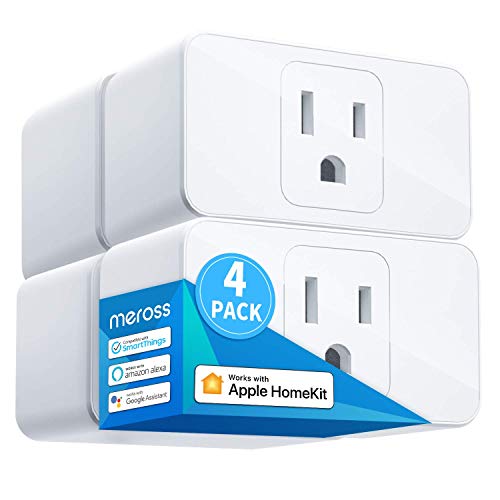
| Best for HomeKit Integration | HomeKit Support: Apple HomeKit | Voice Assistant Compatibility: Siri, Alexa, Google Assistant | Remote/App Control & Automation: Meross app + HomeKit; scheduling, sunrise/sunset automations | VIEW LATEST PRICE | Read Our Analysis |
More Details on Our Top Picks
Mini HomeKit Smart Plugs (2-Pack)
Should you want compact, HomeKit‑ready smart plugs that slip into any outlet without a hub, the Mini HomeKit Smart Plugs (2‑Pack) are a strong choice—Apple MFi certification lets you control devices with Siri, set schedules in the CozyLife app, or group outlets for one‑command control, all over 2.4 GHz Wi‑Fi. You’ll plug them in, scan the HomeKit code or use the CozyLife app for quick 5–10 second pairing, then add to Home, Alexa, or Google routines. They’re small (1.57 in cube), safety‑rated (overcharge/overheat protection, FCC/CE/RoHS), energy‑saving, and easy to automate.
- HomeKit Support:Apple HomeKit (MFi certified)
- Voice Assistant Compatibility:Siri, Alexa, Google Assistant
- Remote/App Control & Automation:CozyLife app + Home app; timers/schedules, groups/automations
- Compact/Space‑Saving Design:Mini compact plug (1.57″ cube)
- 2.4 GHz Wi‑Fi / Local Network Requirement:2.4 GHz Wi‑Fi only (no hub)
- Safety/Certifications:Apple MFi, FCC, CE, RoHS; overcharge/overheat protection
- Additional Feature:Apple MFi certified
- Additional Feature:Overheat/overcharge protection
- Additional Feature:Quick 5–10s pairing
Wemo Smart Plug with Thread for Apple HomeKit
Should you want a compact, reliable smart plug that works seamlessly with Apple HomeKit and takes advantage of Thread for faster local networking, the Wemo Smart Plug with Thread is a strong choice. You’ll get a white Type B outlet that’s small enough not to block adjacent sockets, supports Thread as primary connectivity (with Bluetooth and Wi‑Fi fallback), and pairs instantly via NFC with an activated iPhone. Control lights, fans, and appliances remotely through the Home app or Siri, and build automations, schedules, and scenes. It’s UL/cUL certified, model WSP100, 4.17 x 2.52 x 3.11 inches, released February 24, 2022.
- HomeKit Support:Apple HomeKit
- Voice Assistant Compatibility:Siri (Home App/Siri)
- Remote/App Control & Automation:Home app/HomeKit; schedules, automations, remote control via Home
- Compact/Space‑Saving Design:Compact design (space-saving, avoids blocking adjacent outlets)
- 2.4 GHz Wi‑Fi / Local Network Requirement:Uses Thread primary (and Wi‑Fi/Bluetooth); works with Wi‑Fi/Thread
- Safety/Certifications:UL, cUL certified
- Additional Feature:Thread networking support
- Additional Feature:NFC tap pairing
- Additional Feature:Compact outlet design
Kasa Smart Plug Mini 15A (HomeKit 4-Pack)
Should you want HomeKit-compatible smart plugs that also work across Alexa and Google ecosystems, the Kasa Smart Plug Mini 15A (4‑pack) is a strong pick: it gives you Siri control plus cross-platform voice support, 15A/1800W capacity for heavier loads, and real‑time energy monitoring in the Kasa app so you can track consumption. You’ll set them up quickly via Kasa’s app with Amazon FFS and Google Seamless Setup; they use 2.4 GHz Wi‑Fi and need iOS 10+/Android 5.0+. The compact, UL‑certified flame‑retardant housing won’t block neighbors, operates in 5–90% RH, and includes a two‑year warranty.
- HomeKit Support:Apple HomeKit
- Voice Assistant Compatibility:Siri, Alexa, Google Assistant
- Remote/App Control & Automation:Kasa Smart app + HomeKit; schedules, energy monitoring automations
- Compact/Space‑Saving Design:Compact mini design (avoids blocking adjacent outlets)
- 2.4 GHz Wi‑Fi / Local Network Requirement:2.4 GHz Wi‑Fi only
- Safety/Certifications:UL certified, flame‑retardant construction
- Additional Feature:15A / 1800W capacity
- Additional Feature:Energy usage monitoring
- Additional Feature:2‑year warranty
Wemo Smart Plug Thread Outlet for Apple HomeKit (4-Pack)
Should you’re deep into the Apple ecosystem and want plug-and-play smart outlets that just work with HomeKit, the Wemo Smart Plug Thread Outlet 4-pack is a great fit — it uses Thread for faster, more reliable connections while falling back to Bluetooth as necessary, and it’s set up quickly through tapping your accessible iPhone. You’ll only need an iPhone or iPad for NFC setup, then add the plugs to the Apple Home app and Siri controls. The compact design won’t block neighboring outlets, and remote control, automations, and scene integration behave like native HomeKit accessories for dependable daily use.
- HomeKit Support:Apple HomeKit
- Voice Assistant Compatibility:Siri (Home App/Siri)
- Remote/App Control & Automation:Home app/HomeKit; automations, schedules
- Compact/Space‑Saving Design:Space-saving, compact form
- 2.4 GHz Wi‑Fi / Local Network Requirement:Thread with Bluetooth fallback (works in Wi‑Fi/Thread setups)
- Safety/Certifications:(Designed to meet safety standards) — Thread/Bluetooth product with typical Wemo certifications (see manufacturer)
- Additional Feature:Apple iPhone setup-only
- Additional Feature:Thread with Bluetooth fallback
- Additional Feature:Space-saving form factor
Matter Smart Plug Mini 15A (4-Pack)
Should you want a compact, reliable plug that works seamlessly across Siri, Alexa, and Google — and keeps core controls local for privacy — the Matter Smart Plug Mini 15A (4‑Pack) is a strong choice. You’ll need Matter-compatible hubs (Apple TV 4K 2nd/3rd gen, HomePod/mini, Echo 4th gen, Nest Hubs/Wifi Pro) and 2.4 GHz Wi‑Fi, plus iOS 16.4 or Android 8.1+. Setup’s fast via Matter provisioning, and the plug supports schedules, timers, and local LAN operation so core functions work offline without cloud reliance. Rated 15A with ETL and FCC certification, the four-pack suits lights, fans, humidifiers, and other appliances.
- HomeKit Support:Matter (supports Siri/HomeKit via Matter)
- Voice Assistant Compatibility:Siri, Alexa, Google Assistant
- Remote/App Control & Automation:Matter app/HomeKit scenes; schedules/timers and automations
- Compact/Space‑Saving Design:Mini 4‑pack design (implied compact)
- 2.4 GHz Wi‑Fi / Local Network Requirement:2.4 GHz Wi‑Fi required (Matter provisioning may need hub)
- Safety/Certifications:ETL and FCC certified
- Additional Feature:Matter protocol support
- Additional Feature:Local LAN operation
- Additional Feature:Broad hub compatibility
meross Smart Plug Mini 15A (4-Pack)
Should you want compact, high‑capacity smart plugs that play nicely with Apple HomeKit, the meross Smart Plug Mini 15A (4‑Pack) is a solid pick — it fits two plugs in the same outlet, handles up to 15A for heavier appliances, and works natively with HomeKit, Siri, Apple Watch, and CarPlay for hands‑free control. You’ll also get Alexa, Google Assistant, and Nest Hub support. It connects via 2.4 GHz Wi‑Fi with no hub, but HomeKit remote control requires a HomePod, Apple TV, or iPad acting as a bridge that stays powered and online. App scheduling, sunrise/sunset automation, ETL and FCC safety certifications help save energy and provide peace of mind.
- HomeKit Support:Apple HomeKit
- Voice Assistant Compatibility:Siri, Alexa, Google Assistant
- Remote/App Control & Automation:Meross app + HomeKit; scheduling, sunrise/sunset automations
- Compact/Space‑Saving Design:Compact mini plug (single outlet occupation)
- 2.4 GHz Wi‑Fi / Local Network Requirement:2.4 GHz Wi‑Fi only (no hub)
- Safety/Certifications:ETL and FCC certified, PC flame‑retardant material
- Additional Feature:CarPlay & Apple Watch compatible
- Additional Feature:Sunrise/sunset scheduling
- Additional Feature:PC flame‑retardant material
Factors to Consider When Choosing an Apple HomeKit Smart Plug
At the time of choosing a HomeKit smart plug, you’ll want to make sure it’s fully compatible with HomeKit and supports the right connectivity (Wi‑Fi, Thread, or Bluetooth) for your setup. Check the plug’s power rating and safety certifications, confirm the app and voice control features meet your needs, and consider the plug’s size so it won’t block adjacent outlets. Those factors together determine reliability, convenience, and safety in your smart home.
Compatibility With HomeKit
Because HomeKit certification and protocol support determine how a smart plug behaves in your Apple ecosystem, you’ll want to prioritize those details before buying. Make certain the plug is MFi/HomeKit certified so it integrates natively with the Home app, pairs securely, and works with Siri. Confirm which HomeKit protocols it supports—HomeKit over Wi‑Fi, Thread, or Matter—since that affects responsiveness, mesh networking, and local control. Check whether remote access requires a home hub (HomePod, Apple TV, or iPad) and provided the hub must stay powered and on the same 2.4 GHz network. Verify minimum iOS and provisioning methods (QR, code scan, or NFC) for seamless setup. Finally, make sure the plug supports the automations and local features you need, like timers, scenes, grouped control, and LAN operation.
Connectivity And Protocols
Assuming you care about reliability and range, start matching the plug’s wireless protocols to your network and use case: most HomeKit plugs use 2.4 GHz Wi‑Fi rather than 5 GHz for better range and device compatibility, but some also support Thread or Zigbee for low‑power mesh networking that cuts latency and improves local resilience. You should verify whether the plug uses Bluetooth, Wi‑Fi, or a hub-based protocol for pairing and remote access — Bluetooth limits range, while hub protocols require an always‑on bridge. Prefer Matter-compatible or native HomeKit devices to get local control, cross‑platform interoperability, and less cloud dependence. Finally, look for NFC or QR/HomeKit code provisioning to simplify setup and speed onboarding with your smartphone.
Power Rating And Safety
In case you plug high-draw devices into a smart outlet without checking its ratings, you risk tripping breakers or damaging equipment, so always match the plug’s maximum current and wattage to the appliance you’re controlling. Check that the plug lists maximum current and power (commonly 15A / ~1800W) and choose units rated for continuous or motor loads whenever powering space heaters, air conditioners, pumps, or other inductive devices. Verify UL/ETL or equivalent safety certifications and that the housing is flame‑retardant. Prefer models with overcurrent, overheat, and surge protection to reduce fire risk and protect gear. Finally, confirm operating temperature and humidity limits; should requirements exceed the plug’s specs, use a dedicated hardwired solution instead.
App And Voice Control
Now that you’ve matched a plug’s power and safety specs to your devices, you’ll want to check how you’ll actually control it day to day. Make sure the plug supports Siri/Home app and any other voice assistants you use so it fits into existing automations. Verify whether remote app control needs a Home Hub or bridge to access plugs while you’re away. Pick apps that offer group control, scenes, scheduling and timers so you can manage multiple plugs with one command. Confirm setup methods—QR, NFC, or in‑app Wi‑Fi—match your expected ease of installation. Finally, prefer plugs with local LAN control for privacy and reliability in case the internet’s down instead of cloud‑only operation.
Size And Outlet Clearance
At the moment of choosing a HomeKit smart plug, check its physical dimensions and orientation so it won’t block the second socket or interfere with recessed outlets. Measure height, width, and depth to confirm it won’t obstruct an adjacent plug on a standard duplex plate. Seek “mini” or low‑profile models listed in inches or centimeters whenever you need clearance for power strips or bulky adapters. Verify prong depth and orientation so the plug sits flush and won’t clash with recessed outlets or outlet‑mounted furniture. Take note any swivel or angled prong features that change how close neighboring devices can sit. Should you plan to use stacked outlets, make certain the manufacturer states it occupies only one outlet or provides exact dimensions to prove it won’t block the other.
Automation And Scheduling
After checking physical fit, you’ll want to look at automation and scheduling capabilities so your smart plug does more than just turn things on and off manually. Make sure it supports precise schedules and timers—daily routines, weekdays-only, single-shot timers—and advanced options like randomized on/off, repeat intervals, and minimum/maximum run times to protect appliances. Prefer plugs that offer sunrise/sunset or geofencing-based automation so lighting follows local daylight automatically. Confirm the platform lets you create scenes and conditional rules (for example, “if motion detected AND after sunset, turn on”) to link multiple devices and triggers. Finally, verify automations run locally via your HomeKit hub so schedules keep working during internet outages or cloud failures.
Frequently Asked Questions
Do These Plugs Support Energy Monitoring for Cost Tracking?
Some do, but many don’t — you’ll need to check each model. Look for HomeKit-certified plugs advertising energy monitoring or power reporting; those’ll track wattage and runtime so you can estimate costs through Home app or vendor apps.
Can I Schedule Outlets Using Siri Shortcuts?
Yes — you can schedule outlets using Siri Shortcuts. You’ll create automations or shortcuts that turn plugs on/off at set times, trigger based on location or scenes, and combine actions across devices for customized routines.
Are These Smart Plugs Safe for Outdoor Use?
Yes — some are, but check ratings initially. You’ll want an outdoor-rated plug with waterproof IP65+ and temperature specs; otherwise don’t risk it. Use GFCI-protected outlets and covered connections for safe, reliable outdoor operation.
Do They Work Without a Homekit Hub Present?
Yes — many HomeKit smart plugs work without a hub provided they support native HomeKit over Wi‑Fi. You’ll just set them up directly in the Home app, though some models still require a bridge or hub for full features.
Can Multiple Users Control Them Remotely Simultaneously?
I’ve watched three roommates juggle one smart plug like a TV remote; yes, multiple users can control HomeKit plugs remotely provided you’ve got a Home hub and shared Home access, and permissions sync instantly across devices.
Final Thoughts
You’ve got compact, reliable HomeKit plugs that just work—so which one fits your life? Pick minis for tight spaces, choose Thread or Matter for future‑proofing, or grab a 15A model in case you need more power and energy monitoring. Consider local control, certifications, and easy QR/NFC setup so you avoid headaches later. Ready to simplify your smart home and stop wrestling with flaky devices every day?
