

You’re picking a SmartThings‑compatible thermostat for 2026, so you’ll want options that match your HVAC, wiring and smart‑home setup. This list balances Z‑Wave, Matter and Wi‑Fi choices—from straightforward Wi‑Fi models to multi‑stage Z‑Wave units and Matter‑ready picks—so you can find a thermostat that fits your system and automation needs. Keep going to see which one suits your home best.
| Honeywell T6 Pro Z-Wave Programmable Thermostat (TH6320ZW) |
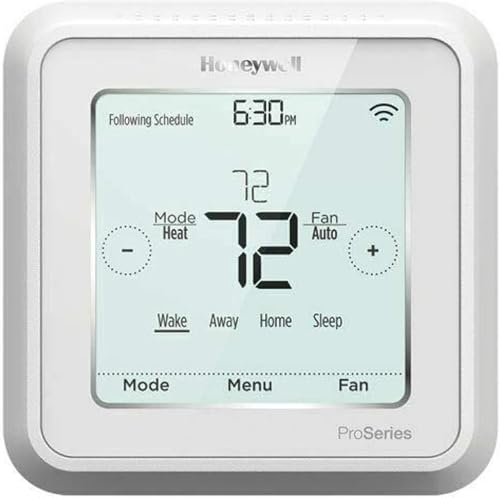
| Best Z‑Wave Choice | Connectivity: Z‑Wave | Smart Home Compatibility: SmartThings (Z‑Wave ecosystems) | Power Type / Voltage: Low‑voltage (24 VAC) | VIEW LATEST PRICE | Read Our Analysis |
| Honeywell Home T5 WiFi Smart Thermostat (RTH8800WF) |

| Best Smart Home Starter | Connectivity: Wi‑Fi | Smart Home Compatibility: Alexa, Google, Apple/HomeKit compatible | Power Type / Voltage: 24 Volts (low‑voltage), may need C‑wire | VIEW LATEST PRICE | Read Our Analysis |
| Honeywell TH6320ZW2003 T6 Pro Series Z-Wave Stat Thermostat & Smart Home |

| Best for Z‑Wave Systems | Connectivity: Z‑Wave | Smart Home Compatibility: SmartThings, Vera | Power Type / Voltage: 24 Volts (requires 3×AA batteries) | VIEW LATEST PRICE | Read Our Analysis |
| ecobee Smart Thermostat Essential — Wi‑Fi Voice Assistant Compatible |

| Best Energy Saver | Connectivity: Wi‑Fi | Smart Home Compatibility: Apple HomeKit, Alexa, Google Assistant | Power Type / Voltage: 24 VAC (low‑voltage) | VIEW LATEST PRICE | Read Our Analysis |
| Honeywell Home RTH6580WF Wi-Fi 7-Day Programmable Thermostat White |

| Best Budget Wi‑Fi | Connectivity: Wi‑Fi | Smart Home Compatibility: Alexa, Google Assistant, Cortana (voice assistants) | Power Type / Voltage: 20–30 VAC (low‑voltage), C‑wire required | VIEW LATEST PRICE | Read Our Analysis |
| ecobee Smart Thermostat Enhanced – Wi‑Fi Voice Control |

| Best Feature‑Packed | Connectivity: Wi‑Fi | Smart Home Compatibility: Siri, Alexa, Google Assistant | Power Type / Voltage: 24 VAC (hardwired; PEK included) | VIEW LATEST PRICE | Read Our Analysis |
| meross Smart WiFi Thermostat (Matter Alexa HomeKit) |
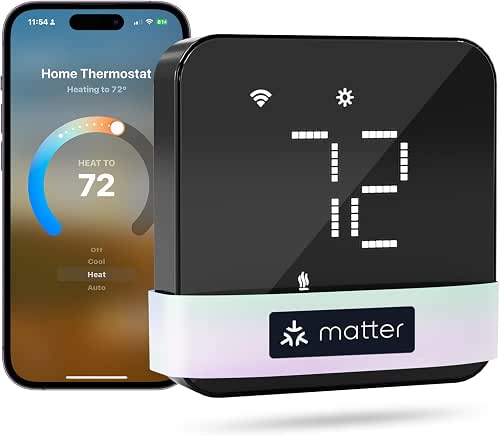
| Best Matter Compatible | Connectivity: Wi‑Fi / Matter | Smart Home Compatibility: Apple Home, Alexa, Google, SmartThings (Matter) | Power Type / Voltage: 24 Volts (low‑voltage; C‑wire required for some configs) | VIEW LATEST PRICE | Read Our Analysis |
More Details on Our Top Picks
Honeywell T6 Pro Z-Wave Programmable Thermostat (TH6320ZW)
Should you want a reliable Z‑Wave thermostat that skips Wi‑Fi and integrates directly with a SmartThings hub, the Honeywell T6 Pro Z‑Wave (TH6320ZW) fits the bill: it supports multi‑stage heat/cool and dual‑fuel systems, uses the standard UWP mounting for quick installation, and gives you programmable scheduling either at the thermostat or through the Honeywell Home app. You’ll get Z‑Wave certification, support for up to 3 heat/2 cool heat pump or dual‑fuel setups and 2 heat/2 cool conventional systems, plus UWP hardware, cover plate, screws and anchors, literature, and a five‑year warranty for peace of mind.
- Connectivity:Z‑Wave
- Smart Home Compatibility:SmartThings (Z‑Wave ecosystems)
- Power Type / Voltage:Low‑voltage (24 VAC)
- HVAC System Support:Heat pump and conventional (up to 3H/2C or 2H/2C depending)
- Programmability / Scheduling:Programmable (scheduling selectable at thermostat or via app)
- Wall Mount / Installation Kit:UWP mounting system included (wall mount)
- Additional Feature:Extended 5‑year warranty
- Additional Feature:Learns cycle timing
- Additional Feature:UWP universal mounting
Honeywell Home T5 WiFi Smart Thermostat (RTH8800WF)
Provided that you want a simple, ENERGY STAR–certified Wi‑Fi thermostat that works with Alexa, Google Assistant and Apple HomeKit, the Honeywell Home T5 (RTH8800WF) is a solid pick — it offers 7‑day flexible scheduling, geofencing for Auto Home/Away, and remote control from your phone. You’ll get Auto Changeover, Vacation Mode, fan control, and monthly energy reports with personalized tips. It’s compact, touch‑sensitive, and supports most heat/cool systems but might necessitate a C‑wire or adapter for some homes. Setup uses Wi‑Fi; you can enroll in utility demand response programs and check rebates from your provider.
- Connectivity:Wi‑Fi
- Smart Home Compatibility:Alexa, Google, Apple/HomeKit compatible
- Power Type / Voltage:24 Volts (low‑voltage), may need C‑wire
- HVAC System Support:Air conditioner, furnace, heat pump (common residential systems)
- Programmability / Scheduling:7‑day flexible scheduling (geofencing, Auto Home/Away)
- Wall Mount / Installation Kit:UWP mounting system and mounting hardware included (wall mount)
- Additional Feature:Geofencing (location‑based)
- Additional Feature:ENERGY STAR certified
- Additional Feature:Touch‑sensitive grid
Honeywell TH6320ZW2003 T6 Pro Series Z-Wave Stat Thermostat & Smart Home
Should you want a reliable Z‑Wave thermostat that integrates cleanly with SmartThings and learns your HVAC cycles to optimize comfort, the Honeywell TH6320ZW2003 T6 Pro is a strong choice. You’ll get Z‑Wave connectivity, SmartThings and Vera compatibility, and app or touch‑screen control via its 2.3‑inch display. It’s programmable, sets minimum cool and maximum heat limits, and offers automatic temperature control with backlight. The wall‑mount unit runs on 24V with three AA batteries for backup, meets Energy Star specs, and ships as a single white ABS thermostat. Reviews average 4.1/5; no manufacturer warranty is specified.
- Connectivity:Z‑Wave
- Smart Home Compatibility:SmartThings, Vera
- Power Type / Voltage:24 Volts (requires 3×AA batteries)
- HVAC System Support:Heat pump, conventional HVAC (programmable)
- Programmability / Scheduling:Programmable; learns cycles and schedules
- Wall Mount / Installation Kit:Wall mount (one thermostat included; mounting implied)
- Additional Feature:2.3″ touch screen
- Additional Feature:SmartThings/Vera compatible
- Additional Feature:Set min/max temps
ecobee Smart Thermostat Essential — Wi‑Fi Voice Assistant Compatible
Should you want an affordable, no‑frills smart thermostat that plays well with Apple HomeKit, Google Assistant and Alexa, the ecobee Smart Thermostat Essential is a smart pick — it saves energy with eco+ features like time‑of‑use preheat/precool and indoor humidity detection while keeping setup simple for most 24 VAC HVAC systems. You’ll get Energy Star efficiency (up to 23% yearly savings), auto‑away, schedule assistant, fan control and energy tracking via the ecobee app. It fits about 85% of systems; use ecobee’s compatibility checker. DIY install is easy; PEK and SmartSensor or trim kits are sold separately.
- Connectivity:Wi‑Fi
- Smart Home Compatibility:Apple HomeKit, Alexa, Google Assistant
- Power Type / Voltage:24 VAC (low‑voltage)
- HVAC System Support:Most 24 VAC equipment: gas, oil, electric, dual fuel, forced air, heat pump, boilers
- Programmability / Scheduling:Auto‑scheduling, schedule assistant (eco+ features)
- Wall Mount / Installation Kit:Wall mount; backplate and screws included
- Additional Feature:eco+ energy features
- Additional Feature:HomeKit/Siri compatible
- Additional Feature:No C‑wire required (PEK option)
Honeywell Home RTH6580WF Wi-Fi 7-Day Programmable Thermostat White
Provided that you want an affordable, app‑controllable thermostat that’s easy to install and learns your home’s heating and cooling cycles, the Honeywell Home RTH6580WF is a solid pick—especially for homeowners with standard forced‑air or hydronic systems who can provide a C‑wire. You’ll control it remotely via the Total Connect Comfort or Honeywell Home apps and use Alexa, Google Assistant, or Cortana for voice commands. It’s a 7‑day programmable unit with Smart Response learning, a large backlit display, and DIY setup. It’s ENERGY STAR certified and works with many utility programs, but it won’t support electric baseboard heat.
- Connectivity:Wi‑Fi
- Smart Home Compatibility:Alexa, Google Assistant, Cortana (voice assistants)
- Power Type / Voltage:20–30 VAC (low‑voltage), C‑wire required
- HVAC System Support:Forced air (gas/oil/electric), hot water, steam, heat pumps (not electric baseboard)
- Programmability / Scheduling:7‑day programmable with Smart Response learning
- Wall Mount / Installation Kit:Wall mount installation; DIY friendly (hardware included)
- Additional Feature:Smart Response learning
- Additional Feature:Large backlit display
- Additional Feature:Total Connect Comfort app
ecobee Smart Thermostat Enhanced – Wi‑Fi Voice Control
Should you want hands‑free comfort and reliable energy savings, the ecobee Smart Thermostat Enhanced is a strong pick—its built‑in radar occupancy and SmartSensor support let it preheat or precool spaces and avoid wasting energy whenever rooms are unused, helping you cut heating and cooling costs up to 26% while staying compatible with most 24 VAC HVAC systems. You’ll get Energy Star efficiency, adaptive scheduling, humidity-aware control, and Siri/Alexa/Google voice support. The box includes a Power Extender Kit and Trim Kit for homes without a C wire; hardwired operation needs no batteries. Install DIY via ecobee’s compatibility checker and manage remotely with the app.
- Connectivity:Wi‑Fi
- Smart Home Compatibility:Siri, Alexa, Google Assistant
- Power Type / Voltage:24 VAC (hardwired; PEK included)
- HVAC System Support:Most 24 VAC HVAC: conventional, heat pump, boilers (supports up to 3H/2C)
- Programmability / Scheduling:Learns preferences and schedule; auto‑adjusts for away/sleep
- Wall Mount / Installation Kit:Wall mount; PEK and trim kit included for install
- Additional Feature:Includes PEK and trim
- Additional Feature:Built‑in radar occupancy
- Additional Feature:Supports 3H/2C heat pumps
meross Smart WiFi Thermostat (Matter Alexa HomeKit)
Should you want a budget-friendly, Matter-certified thermostat that plays nicely with Apple Home, Alexa, Google, and SmartThings, the meross MTS300 is a smart pick — it’s ideal for homeowners who want broad smart‑home compatibility without swapping out most HVAC wiring. You’ll get a compact, glass‑front thermostat (0.9 x 3.6 x 3.6 inches, 8.4 oz) that supports ~95% of HVAC systems but not high‑voltage baseboards or millivolt/two‑wire setups, and some installs require a C‑wire. It offers Wi‑Fi/Matter control, 24/7 scheduling, energy tracking, alerts, dimmable lockable display, and remote app setup/support.
- Connectivity:Wi‑Fi / Matter
- Smart Home Compatibility:Apple Home, Alexa, Google, SmartThings (Matter)
- Power Type / Voltage:24 Volts (low‑voltage; C‑wire required for some configs)
- HVAC System Support:~95% HVAC systems including heat pump, AC, furnace, boiler (not high‑voltage baseboard)
- Programmability / Scheduling:24/7 flexible scheduling (home/away/sleep routines)
- Wall Mount / Installation Kit:Wall mount; backplate, screws, anchors, trim plate included
- Additional Feature:Matter certified integration
- Additional Feature:Filter & system alerts
- Additional Feature:Dimmable lockable display
Factors to Consider When Choosing a SmartThings Thermostat
Before you pick a SmartThings-compatible thermostat, check that it works with your HVAC system and has the right wiring or power requirements. Make sure it supports the smart home platforms and connectivity protocols you use (Zigbee, Z-Wave, Wi‑Fi, Matter) so automations and scheduling integrate smoothly. Finally, consider whether its scheduling and automation features meet your needs for energy savings and comfort.
Compatibility With HVAC
Upon selecting a SmartThings-compatible thermostat, start upon confirming it actually supports your HVAC type and staging—whether you have a single-stage forced-air furnace, a multi-stage heat pump, or a boiler system—so you don’t end up with missing functions or wiring mismatches. Verify the thermostat lists support for your system (conventional, heat pump, boiler, dual‑fuel) and the number of heat/cool stages (commonly 1–3 heat, 1–2 cool). Check voltage and wiring: most smart units need 24 VAC and won’t work with high‑voltage baseboards or millivolt setups. Confirm a C‑wire or that a power‑extender is available. Make sure it can control extras like humidifiers, dehumidifiers, ventilators, reversing valves, auxiliary/backup heat, and two‑stage compressors to avoid feature gaps.
Smart Home Integration
Upon choosing a SmartThings-compatible thermostat, focus on integration as much as HVAC fit so the device actually participates in your automations — confirm it uses a compatible protocol (Z‑Wave, Zigbee, Matter, or Wi‑Fi), supports two‑way communication to report temperature and state back to the hub, and exposes key capabilities (setpoint, hvacMode, fanMode, humidity, thermostatOperatingState) for routines, scenes, and third‑party triggers. You’ll also want firmware update support and cloud or local control options through the hub to preserve security and reliability. Verify the thermostat reports status (temperature, mode, battery) so dashboards and automations stay accurate. Finally, test routine, scene, and trigger compatibility (time, presence, sensor input) to make certain the unit behaves predictably in multisensor automations like away or occupancy‑based comfort.
Connectivity Protocols Supported
Now that you’ve checked automations and reporting, look at the connectivity protocols the thermostat uses — they determine whether the device will actually play nicely with your SmartThings hub, the range and reliability of control, and whether you’ll need extra wiring or a hub at all. Wi‑Fi models connect directly to the internet and mobile apps without a hub but depend on your router (watch for 2.4 GHz vs 5 GHz support) and typically draw more power. Z‑Wave and Zigbee are low‑power mesh protocols that extend range via other nodes but usually require a compatible hub. Emerging IP‑based standards like Matter aim to unify ecosystems and simplify setup. Match supported protocols to your existing hub, voice assistants, and remote‑control needs.
Power And Wiring Needs
Because your thermostat needs a steady power source and the right terminals to talk to your HVAC, check wiring and system type before you buy: confirm whether you have a 24 VAC common (C) wire or can add one, verify the system voltage (most smart thermostats won’t work with 120/240 V baseboard or millivolt systems), and match the thermostat’s terminals to your system’s stages and functions (R/RC, W, Y, G, O/B, AUX/EMER) so you don’t end up with incompatible control or missing features. Verify stage counts (single vs multi‑stage or heat pump with aux heat) so the thermostat supports required outputs. In the absence of a C‑wire, decide whether you can run one, install a power‑extender kit, or accept battery operation. Inspect wire labels, length, and condition; replace damaged wiring or hire a technician.
Scheduling And Automation
Upon choosing a SmartThings thermostat, prioritize how it handles scheduling and automation since those features determine daily comfort and energy savings; check for flexible multi‑day and 24/7 scheduling, auto‑learning or adaptive schedules, and the ability to trigger rules from geofencing or occupancy sensors. You should verify multi‑day and 24/7 flexible scheduling so weekdays, weekends, and specific times get distinct programs. Confirm auto‑scheduling or learning algorithms that adapt runtimes to your home’s thermal traits. Make sure the thermostat accepts external triggers—geofencing, occupancy sensors, door/window contacts—to override schedules as necessary. Look for multiple profiles (Home, Away, Sleep, Vacation) with easy manual or rule‑based switching. Finally, pick devices offering fine‑grain controls: setpoint granularity, min/max hold durations, and temporary hold timers.
Energy Savings Features
Often, you’ll want a thermostat that actively cuts runtime and bills, so prioritize models with adaptive learning, geofencing, and weather- or time‑of‑use integration. You should pick thermostats that learn your home’s thermal patterns and habits to trim heating and cooling runtime automatically. Use geofencing or presence detection to force energy‑saving setpoints whenever nobody’s home, preventing wasted conditioning. Make sure the unit ties into local weather forecasts and time‑of‑use rates so it preheats or precools during cheaper windows and avoids peak charges. Prefer devices offering remote monitoring, clear energy‑use reports, and actionable tips so you can spot trends and change behavior. Finally, verify support for auxiliary sensors (temperature, occupancy, door/window) for room‑level control and better overall efficiency.
Installation And Setup Ease
Saving energy is only useful provided you can get the thermostat installed and configured without headaches, so consider installation and setup ease as part of the aggregate efficiency equation. Initially, verify your HVAC type (conventional, heat pump, dual fuel, multi‑stage) and wiring—confirm C‑wire presence and number of stages to avoid running new wires or needing a power extender kit. Check that the unit uses a UWP or universal backplate and includes labeled wires, screws, anchors, and a trim plate for straightforward mounting and clean concealment. Confirm power options (batteries, C‑wire, external adapter) and preferred setup flow—on‑device touchscreen versus app pairing and hub inclusion/exclusion. Plan tools and time: expect 30–60 minutes for basic install, plus 30–90 minutes for network or HVAC configuration.
Security And Privacy Controls
Because your thermostat controls comfort and collects home data, prioritize security and privacy from the start: make sure the device and hub use end-to-end encryption, support signed automatic firmware updates, enforce strong authentication, and let you control what data’s collected, retained, or deleted. You should verify TLS 1.2+ or equivalent for cloud links and secure key exchange for local pairing to stop interception. Confirm automatic, signed firmware patches so fixes arrive without your intervention. Require multi-factor or at least unique device credentials and per-device access or role management. Check data-minimization, clear retention policies, and options to view, export, and delete usage logs. Prefer models offering local-only modes, ways to disable unneeded remote services, and guidance for VLAN or guest Wi‑Fi segmentation.
Frequently Asked Questions
Can I Connect Multiple Thermostats to One Smartthings Routine?
Yes — you can. Picture a quiet house where every thermostat obeys one command; you’ll add multiple thermostats to a SmartThings routine, set triggers and actions, and they’ll coordinate heating and cooling together seamlessly.
Do These Thermostats Support HVAC Alerts for Maintenance Needs?
Yes — many SmartThings-compatible thermostats do support HVAC maintenance alerts; you’ll get notifications for filter changes, system diagnostics, and fault codes via the thermostat app or SmartThings automations provided the specific model exposes those sensors and events.
Will Installing a Smart Thermostat Void My HVAC Warranty?
No — you probably won’t void your HVAC warranty just upon installing a smart thermostat, but check manufacturer terms; some require professional installation or limit coverage should wiring or controls get altered, so follow their guidelines to stay protected.
How Do Firmware Updates Get Delivered and Applied Automatically?
Your thermostat downloads firmware via Wi‑Fi or hub connection and installs updates automatically during scheduled maintenance windows; you’ll get notifications, can usually defer one update, and it restarts should that be needed to finalize the installation.
Are Any of These Thermostats Compatible With Two-Stage Heating/Cooling?
About 60% of modern smart thermostats support multi-stage systems. Yes—you’ll find several models that handle two-stage heating/cooling; check specs for “2H/2C” or multi-stage compressor support and confirm SmartThings integration before buying.
