

Picture your home finally learning what you want before you do — and saving money while it’s at it. You’ll find options here that fit tight budgets, complex HVAC systems, and smart‑home setups alike, from ENERGY STAR favorites to no‑fuss touchscreen units. I’ll point out which models excel at scheduling, geofencing, DIY installs, and integrations so you can pick the best match for your needs.
| Mysa Smart WiFi Thermostat for Heating & Cooling |

| Premium Efficiency | Wi‑Fi Connectivity: Wi‑Fi (direct, no hub) | Smart App Control / Remote Access: Mysa app (iOS, Android) — remote control, scheduling | Voice Assistant Integration: Voice control planned via Matter (Apple HomeKit/Google/Alexa support coming) | VIEW LATEST PRICE | Read Our Analysis |
| Sensi Smart Thermostat ST55 — Wi‑Fi Alexa Compatible |

| Reliable Classic | Wi‑Fi Connectivity: Wi‑Fi | Smart App Control / Remote Access: Sensi app — remote access, schedules, usage reports | Voice Assistant Integration: Amazon Alexa, Google Assistant, SmartThings, Vera | VIEW LATEST PRICE | Read Our Analysis |
| Smart WiFi Touchscreen Programmable Thermostat (Heat/Cool) | Budget Touchscreen | Wi‑Fi Connectivity: Wi‑Fi | Smart App Control / Remote Access: App remote access — programmable via app | Voice Assistant Integration: Voice control supported | VIEW LATEST PRICE | Read Our Analysis | |
| Sensi Lite Smart Wi‑Fi Thermostat (ST25) |

| Simple & Affordable | Wi‑Fi Connectivity: Wi‑Fi | Smart App Control / Remote Access: Sensi Lite app — remote access, scheduling, usage reports | Voice Assistant Integration: Amazon Alexa, Google Assistant, SmartThings | VIEW LATEST PRICE | Read Our Analysis |
| Google Nest Thermostat Smart Wi‑Fi Programmable (Snow) |

| Smart Energy Saver | Wi‑Fi Connectivity: Wi‑Fi | Smart App Control / Remote Access: Google Home / Nest app — remote control, scheduling | Voice Assistant Integration: Google Assistant, Alexa, Matter‑certified assistants | VIEW LATEST PRICE | Read Our Analysis |
| Honeywell Wi‑Fi 8000 Thermostat TH8321WF1001/U |
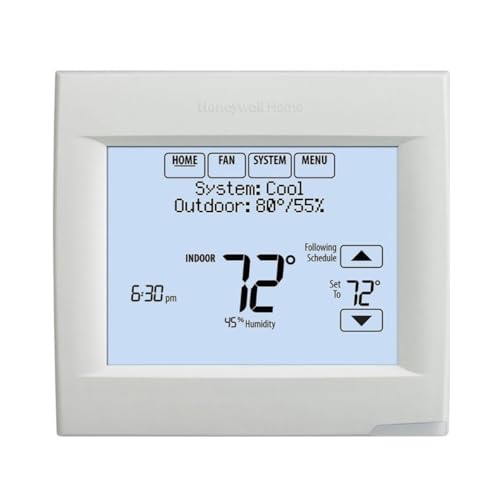
| Professional-Grade Control | Wi‑Fi Connectivity: Wi‑Fi | Smart App Control / Remote Access: Remote access via smartphone/tablet/computer (Honeywell app) | Voice Assistant Integration: Works with voice assistants (typical Honeywell integrations) | VIEW LATEST PRICE | Read Our Analysis |
| Like-New Amazon Smart Thermostat (Alexa & Ring) |

| Best for Alexa Users | Wi‑Fi Connectivity: Wi‑Fi (2.4 GHz) | Smart App Control / Remote Access: Alexa app / Ring app — remote control, scheduling | Voice Assistant Integration: Works with Alexa (requires Alexa device); Ring integration | VIEW LATEST PRICE | Read Our Analysis |
More Details on Our Top Picks
Mysa Smart WiFi Thermostat for Heating & Cooling
Should you want a sleek, energy-focused thermostat that’s built for modern 24V systems and pays for itself quickly, the Mysa Smart WiFi Thermostat is a top pick — it’s Energy Star certified, supports detailed energy charting, and uses geofencing to cut heating and cooling whenever you’re away. You’ll control it via the Mysa app or touchpad, set 7-day schedules, monitor humidity, and enable Vacation Mode. It installs DIY on most 24V HVAC systems (C-wire required), connects over Wi‑Fi, and will add Matter for voice and smart-home integration. You get instant alerts, five-year hardware protection, and free app access.
- Wi‑Fi Connectivity:Wi‑Fi (direct, no hub)
- Smart App Control / Remote Access:Mysa app (iOS, Android) — remote control, scheduling
- Voice Assistant Integration:Voice control planned via Matter (Apple HomeKit/Google/Alexa support coming)
- ENERGY STAR / Energy‑Saving Focus:ENERGY STAR certified; energy charts, geofencing, claims payback <1 year
- HVAC System Compatibility (24V residential systems):Most 24V central HVAC systems (furnace, AC, heat pump); optimized for modern heat pumps; C‑wire required
- DIY Installation / Included Setup Guidance:DIY installation with step‑by‑step video guidance in app
- Additional Feature:Adaptive LED display
- Additional Feature:Built-in humidity sensor
- Additional Feature:5-year hardware protection
Sensi Smart Thermostat ST55 — Wi‑Fi Alexa Compatible
Should you want a straightforward, DIY smart thermostat that’s easy to install and works without a c‑wire in most homes, the Sensi ST55 fits the bill. You get a glossy white, wall‑mount design that replaces standard thermostats and uses button controls with an LED backlight and built‑in level. It connects via Wi‑Fi and works with Alexa, Google Assistant, SmartThings, and Vera. The free app offers remote control, scheduling, usage reports, and installation guidance. ENERGY STAR certified, it can cut HVAC energy approximately 23% and sends alerts and filter notifications. Emerson backs it with a three‑year limited warranty.
- Wi‑Fi Connectivity:Wi‑Fi
- Smart App Control / Remote Access:Sensi app — remote access, schedules, usage reports
- Voice Assistant Integration:Amazon Alexa, Google Assistant, SmartThings, Vera
- ENERGY STAR / Energy‑Saving Focus:ENERGY STAR certified; ~23% HVAC energy savings claim
- HVAC System Compatibility (24V residential systems):Works with most residential HVAC systems (AC, boiler, furnace, heat pump); C‑wire not required in most applications
- DIY Installation / Included Setup Guidance:DIY installation with step‑by‑step app instructions and included hardware
- Additional Feature:Includes AAA battery
- Additional Feature:Auto changeover support
- Additional Feature:Filter replacement reminders
Smart WiFi Touchscreen Programmable Thermostat (Heat/Cool)
Budget Touchscreen
View Latest PriceShould you want a simple, budget-friendly Wi‑Fi thermostat that handles both heating and cooling with a touchscreen and remote app control, this Generic Smart WiFi Thermostat is a solid pick—especially for renters or small-space owners who need easy, tool-free installation and battery/USB power. You’ll get touchscreen programming, remote app and voice control, and Wi‑Fi compatibility for basic smart home setups. It’s lightweight, made from abrasion-resistant ABS, and mounts on walls, RVs, dorms, or hotels. Installation is quick with included screws and instructions. Keep in mind modest user ratings (2.7/5 from seven reviews), so temper expectations on refinement and support.
- Wi‑Fi Connectivity:Wi‑Fi
- Smart App Control / Remote Access:App remote access — programmable via app
- Voice Assistant Integration:Voice control supported
- ENERGY STAR / Energy‑Saving Focus:Energy saving climate management (generic claims)
- HVAC System Compatibility (24V residential systems):Heating & cooling systems (heat/cool); suitable for residential/commercial use
- DIY Installation / Included Setup Guidance:Easy installation/configuration; tool‑free setup claimed; screws/instructions included
- Additional Feature:USB-powered option
- Additional Feature:Tool-free installation
- Additional Feature:ABS abrasion-resistant construction
Sensi Lite Smart Wi‑Fi Thermostat (ST25)
In case you want a straightforward, budget‑friendly smart thermostat that’s easy to install and works with Alexa or Google Assistant, the Sensi Lite ST25 is a solid pick — it gives you reliable remote control, geofencing, and ENERGY STAR efficiency without complex setup. You’ll get a compact, black rectangular unit (0.88 x 5.07 x 3.13 in, 0.3 lb) that runs on 2 AAA batteries or a 24V C‑Wire whenever needed. It supports most HVAC systems, offers flexible scheduling, usage reports, auto changeover, and low‑voltage protection. Installation’s DIY‑friendly with included hardware, and a three‑year warranty covers defects.
- Wi‑Fi Connectivity:Wi‑Fi
- Smart App Control / Remote Access:Sensi Lite app — remote access, scheduling, usage reports
- Voice Assistant Integration:Amazon Alexa, Google Assistant, SmartThings
- ENERGY STAR / Energy‑Saving Focus:ENERGY STAR certified; scheduling and usage reports
- HVAC System Compatibility (24V residential systems):Works with most home systems (AC, boiler, furnace, heat pump); C‑wire required for some systems
- DIY Installation / Included Setup Guidance:Easy DIY with built‑in level, step‑by‑step instructions, included hardware
- Additional Feature:Battery or C‑Wire power
- Additional Feature:Built-in mounting level
- Additional Feature:Low voltage protection
Google Nest Thermostat Smart Wi‑Fi Programmable (Snow)
Should you want a budget‑friendly smart thermostat that still learns your habits and saves energy, the Google Nest Thermostat Smart (Snow) is a strong pick—ENERGY STAR certification, Savings Finder suggestions, and Nest Renew integration make it ideal for eco‑minded homeowners who want simple automation without a steep price. You’ll control it via Wi‑Fi and the Google Home app on phone, tablet, or laptop, and use voice control with Google Assistant, Alexa, or Matter‑certified devices. It often works without a C wire but check compatibility for certain systems. Nest monitors HVAC health, sends maintenance alerts, and nudges schedule tweaks to cut costs.
- Wi‑Fi Connectivity:Wi‑Fi
- Smart App Control / Remote Access:Google Home / Nest app — remote control, scheduling
- Voice Assistant Integration:Google Assistant, Alexa, Matter‑certified assistants
- ENERGY STAR / Energy‑Saving Focus:ENERGY STAR certified; Savings Finder and Nest Renew features
- HVAC System Compatibility (24V residential systems):Designed for most homes; some systems require C‑wire or power accessory
- DIY Installation / Included Setup Guidance:DIY install; Nest compatibility checker and app guidance
- Additional Feature:Nest Renew energy prioritization
- Additional Feature:Savings Finder suggestions
- Additional Feature:HVAC monitoring alerts
Honeywell Wi‑Fi 8000 Thermostat TH8321WF1001/U
Should you want a straightforward, Wi‑Fi–enabled thermostat that works with a wide range of systems, the Honeywell Wi‑Fi 8000 TH8321WF1001/U fits the bill—it’s built for homes and small commercial spaces and supports up to 3 heat and 2 cool stages. You’ll get universal compatibility, intuitive programming for easy setup, and remote comfort control from your computer, tablet, or smartphone. The thermostat sends equipment check and filter change alerts so you can stay on top of maintenance. You’ll appreciate simplified operation, scheduling that can cut annual energy use, and reliable remote access for on‑the‑go adjustments.
- Wi‑Fi Connectivity:Wi‑Fi
- Smart App Control / Remote Access:Remote access via smartphone/tablet/computer (Honeywell app)
- Voice Assistant Integration:Works with voice assistants (typical Honeywell integrations)
- ENERGY STAR / Energy‑Saving Focus:Programmable for annual energy savings (implied ENERGY STAR‑style benefits)
- HVAC System Compatibility (24V residential systems):Universal across multiple system types (supports multi‑stage heat/cool)
- DIY Installation / Included Setup Guidance:Intuitive programming and setup for easier installation (user‑friendly)
- Additional Feature:Supports multi-stage systems
- Additional Feature:Equipment check reminders
- Additional Feature:Tablet/computer remote access
Like-New Amazon Smart Thermostat (Alexa & Ring)
Perfect for budget-conscious smart-home adopters who already use Alexa or Ring, the Like-New Amazon Smart Thermostat delivers core smart features and simple setup in a refurbished package that looks and works like new. You get a certified 1st‑gen (2021) unit with a one-year limited warranty, compact dimensions, and Honeywell-derived reliability. It joins most 24V HVAC systems but needs a C‑wire or adapter. Control it via the Alexa or Ring apps, Echo devices, or three touch buttons; Alexa handles scheduling, hunches, and energy reporting. It’s ENERGY STAR certified, 2.4 GHz Wi‑Fi only, and lacks a far-field mic.
- Wi‑Fi Connectivity:Wi‑Fi (2.4 GHz)
- Smart App Control / Remote Access:Alexa app / Ring app — remote control, scheduling
- Voice Assistant Integration:Works with Alexa (requires Alexa device); Ring integration
- ENERGY STAR / Energy‑Saving Focus:ENERGY STAR certified; energy dashboard, rebate info
- HVAC System Compatibility (24V residential systems):Most 24V HVAC systems (conventional, heat pump, radiant boiler); C‑wire or adapter required
- DIY Installation / Included Setup Guidance:Guided installation via Alexa app; mounting hardware and installation tool included
- Additional Feature:Refurbished certified unit
- Additional Feature:Works with Ring app
- Additional Feature:Supports external temp sensors
Factors to Consider When Choosing to Buy Wifi Thermostat
Before you pick a wifi thermostat, check system compatibility and power requirements to make sure it’ll work with your HVAC. Consider how it’ll fit into your smart home and whether features like geofencing, learning schedules, or usage reports will actually save energy. Also weigh installation ease so you’re not stuck with extra parts or a costly pro visit.
System Compatibility
While choosing a Wi‑Fi thermostat, start alongside matching the device to your HVAC type and wiring so you don’t end up with an incompatible unit; check whether you have a single‑ or multi‑stage furnace/AC, a heat pump (and its aux/emergency heat), a boiler, zoned system, or 110–240V electric baseboard heat, and confirm the presence or need for a C‑wire, multi‑transformer arrangements, and any fan, humidifier/dehumidifier, or ventilation controls the thermostat must operate. Next, verify the thermostat supports your system’s control stages—many smart models only handle single‑stage or limited multi‑stage setups. Confirm 24V control compatibility and whether the model recognizes aux/emergency heat sequencing for heat pumps. Also check explicit support for fan, whole‑home humidification/dehumidification, and zoned or multi‑transformer configurations to avoid wiring conflicts or damage.
Power Requirements
Because most smart Wi‑Fi thermostats need continuous power to run their display and radio, confirming your system’s power setup should be one of the initial checks you make. Most models expect a 24V AC common (C‑wire). Some can run on batteries, steal power from the control circuit, or use a proprietary adapter, but those workarounds can limit features or cause intermittent Wi‑Fi. Should you not have a C‑wire, you can run a new common wire, install a C‑wire adapter/power module, or rely on supported battery backup. Before buying, verify the thermostat’s supported voltage, stage count (single vs multi‑stage), control‑signal compatibility, and its power/standby draw to avoid rapid battery drain or control failures.
Smart Home Integration
In case you want your thermostat to play nicely with the rest of your smart home, prioritize protocol and platform compatibility so it can join routines, scenes, and automations without extra hubs or hassle. Check support for Matter, Zigbee, Z‑Wave, or native Wi‑Fi/cloud integrations so devices interoperate. Verify voice assistant compatibility and whether voice control needs a separate hub or works via direct cloud integration to avoid extra hardware and latency. Make sure the app supports multiple platforms and shared access so family members can manage schedules, geofencing, and alerts. Prefer thermostats that offer local control APIs rather than cloud‑only control for reliability, privacy, and faster automations during outages. Also confirm interoperability with remote sensors, smart vents, and HVAC automation for accurate zoning.
Energy Savings Features
Smart integrations make routines and automations easier, but energy-saving capabilities are what’ll actually cut your bills. Choose an ENERGY STAR–certified model to see measurable yearly savings versus non‑programmable thermostats. Look for geofencing and automatic away modes that trim HVAC activity while you’re out, and scheduling options (7‑day, weekday/weekend, multiple daily setpoints) so setbacks match your routine. Real‑time energy reports and usage charts let you spot trends and tweak setpoints or schedules for more savings. Finally, pick thermostats with HVAC‑friendly features—adaptive recovery, heat pump optimization with auxiliary heat control, and auto changeover—so the device reduces runtime and works efficiently with your specific equipment. These features combine to lower energy use without sacrificing comfort.
Installation Ease
Start through checking whether your HVAC needs a C‑wire and whether the thermostat supports DIY wiring—knowing that up front can save you a service call. You’ll want a model that clearly states system compatibility (furnace, heat pump, boiler, multi‑stage) so you don’t uncover a mismatch mid‑install. Prefer thermostats with step‑by‑step guides, on‑device labels or wire stickers, and app‑guided setup to cut wiring errors and pairing frustration. Check mounting needs and dimensions: does the backplate cover old screw holes, or will you require adapters or an extra transformer? Should a C‑wire’s missing, confirm whether the vendor includes a power adapter or whether you’ll run a conductor. Clear guides, videos, and tool lists make DIY installs far more likely to evolve.
Frequently Asked Questions
Can These Thermostats Integrate With Multi-Zone HVAC Systems?
Yes — you can. Like a conductor coordinating many instruments, you’ll pair compatible smart thermostats with zone controllers or dedicated multi‑zone systems, and they’ll communicate to balance temperature, though some models need additional hardware or professional setup.
What Battery Life Can I Expect From Each Wi‑Fi Thermostat?
Battery life varies: you’ll get about 6–12 months with battery-powered models, 2–5 years with low-power displays, and virtually unlimited runtime on hardwired units with battery backup; frequent Wi‑Fi use or sensors can shorten spans.
Are There Any Ongoing Subscription Fees or Cloud Costs?
Yes — some models charge optional subscription fees for advanced cloud features; others offer free basic cloud control. Imagine a menu: you’ll pick paid premium analytics or stick with no‑cost remote control and app basics.
Do These Models Support Geofencing and Presence Detection?
Yes — many models support geofencing and presence detection. You’ll set zones, enable smartphone location services, and create automations. Check each thermostat’s app and privacy settings, since features and accuracy vary between brands and models.
How Difficult Is Troubleshooting Common Connectivity Issues?
It’s fairly easy provided you follow steps: restart the thermostat and router, check Wi‑Fi credentials and 2.4/5GHz compatibility, update firmware, verify app permissions, and reset network settings; contact support should problems persist or signal remains weak.
