

Funny coincidence: you already own a lamp that could get smarter with just a plug. You’ll want compact, reliable HomeKit options that handle bedside lights, TVs, and hub‑based automations without hiccups. I’ll walk through top 2026 picks—Matter and local HomeKit models, energy monitors, and safety features—so you can pick the right fit for your setup and needs.
| TP-Link Tapo P125 Mini Smart Plug (4-Pack) |

| Best HomeKit Value | HomeKit Compatibility: Apple HomeKit compatible (Tapo P125) | Voice Assistant Support: Siri (HomeKit), Alexa, Google Assistant | Wi‑Fi Frequency: 2.4 GHz only (Wi‑Fi; Bluetooth onboarding) | VIEW LATEST PRICE | Read Our Analysis |
| Amazon Smart Plug Works with Alexa Simple Setup Endless Possibilities |
| Best Alexa Integration | HomeKit Compatibility: Not HomeKit — Alexa-only (Amazon Smart Plug) | Voice Assistant Support: Amazon Alexa only (optimized for Alexa) | Wi‑Fi Frequency: 2.4 GHz only (802.11 b/g/n) | VIEW LATEST PRICE | Read Our Analysis |
| Kasa Matter Smart Plug with Energy Monitoring (2-Pack) |

| Best for Energy Tracking | HomeKit Compatibility: Matter (works with Apple Home via Matter) | Voice Assistant Support: Siri, Alexa, Google Assistant, SmartThings (via Matter) | Wi‑Fi Frequency: 2.4 GHz only (Wi‑Fi, Matter) | VIEW LATEST PRICE | Read Our Analysis |
| Linkind Matter Smart Plug 15A (4-Pack) |

| Best for Matter Ecosystem | HomeKit Compatibility: Matter-certified (works with Apple Home) | Voice Assistant Support: Siri, Alexa, Google Assistant, SmartThings (Matter) | Wi‑Fi Frequency: 2.4 GHz only (Wi‑Fi) | VIEW LATEST PRICE | Read Our Analysis |
| WiZ Smart Plug (Sunset-Sunrise) — Works with Alexa Google HomeKit |

| Best for Lighting Automation | HomeKit Compatibility: Apple HomeKit compatible (WiZ; Matter certified) | Voice Assistant Support: Siri (HomeKit), Alexa, Google Assistant | Wi‑Fi Frequency: 2.4 GHz only (WiZ) | VIEW LATEST PRICE | Read Our Analysis |
| Refoss Smart WiFi Plugs 4-Pack (HomeKit/Alexa) |

| Best Budget 4-Pack | HomeKit Compatibility: Apple HomeKit compatible (Refoss) | Voice Assistant Support: Siri (HomeKit), Alexa, Google Assistant | Wi‑Fi Frequency: 2.4 GHz only (Wi‑Fi) | VIEW LATEST PRICE | Read Our Analysis |
| GHome Mini WiFi Smart Plug (4-Pack) |
| Best Compact Option | HomeKit Compatibility: Not explicitly HomeKit — works with Alexa & Google (GHome) | Voice Assistant Support: Alexa, Google Assistant (Siri/HomeKit not listed) | Wi‑Fi Frequency: 2.4 GHz only (WiFi only) | VIEW LATEST PRICE | Read Our Analysis |
More Details on Our Top Picks
TP-Link Tapo P125 Mini Smart Plug (4-Pack)
Should you want simple, reliable HomeKit control across several outlets, the TP‑Link Tapo P125 Mini (4‑pack) is a strong pick — it gives you four compact, Siri‑ready plugs that work with your iPad, HomePod, or Apple TV for remote access and also support Alexa, Google Assistant, and the Tapo app. You’ll plug in devices up to 15 A/1800 W, set schedules, and control remotely over 2.4 GHz Wi‑Fi after Bluetooth onboarding. Each UL‑certified, flame‑retardant unit measures 2.36 × 1.5 × 1.3 inches, needs no batteries, and includes a two‑year warranty plus 24/7 support.
- HomeKit Compatibility:Apple HomeKit compatible (Tapo P125)
- Voice Assistant Support:Siri (HomeKit), Alexa, Google Assistant
- Wi‑Fi Frequency:2.4 GHz only (Wi‑Fi; Bluetooth onboarding)
- Electrical Rating (Ampacity / Wattage):15 A, 1800 W max
- Scheduling / Automation:Advanced scheduling, timers
- Certification / Safety Listing:UL certified, flame‑retardant design
- Additional Feature:Bluetooth onboarding setup
- Additional Feature:Compact mini formfactor
- Additional Feature:2‑year limited warranty
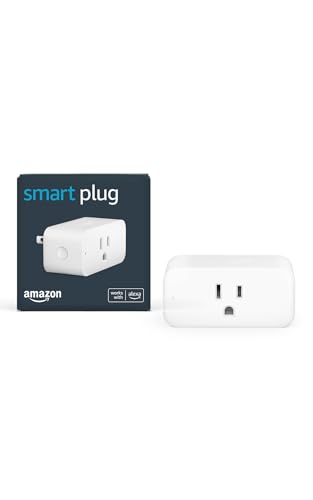
Amazon Smart Plug Works with Alexa Simple Setup Endless Possibilities
Should you want a no‑fuss way to add voice control to lamps, fans, or a coffee maker, the Amazon Smart Plug is a solid pick: plug it in, open the Alexa app, and you’ll have Alexa control in minutes without needing a hub. You’ll manage it via the Alexa app on Fire OS, Android, or iOS, using 2.4 GHz Wi‑Fi (802.11 b/g/n). The compact design preserves the second outlet, supports devices with a physical on/off switch, and reconnects after power or Wi‑Fi drops. Use Routines and Alexa+ features for automation. Indoor use only; rated 120VAC/15A, includes a one‑year limited warranty.
- HomeKit Compatibility:Not HomeKit — Alexa-only (Amazon Smart Plug)
- Voice Assistant Support:Amazon Alexa only (optimized for Alexa)
- Wi‑Fi Frequency:2.4 GHz only (802.11 b/g/n)
- Electrical Rating (Ampacity / Wattage):15 A, Input 120VAC 60Hz; Max output 15 A
- Scheduling / Automation:Routines and automation via Alexa
- Certification / Safety Listing:(meets US safety norms) 1‑year warranty; indoor use specified (no specific UL listed)
- Additional Feature:Alexa-optimized only
- Additional Feature:Automatic reconnects after outage
- Additional Feature:No hub required
Kasa Matter Smart Plug with Energy Monitoring (2-Pack)
Should you want HomeKit-compatible smart plugs that also report real energy use, the Kasa Matter Smart Plug KP125M (2-Pack) delivers—Matter interoperability gives you local control across Apple Home, Alexa, Google Home, and SmartThings, while built‑in energy monitoring helps you track and trim consumption. You get Type B, 15 A plugs (1800 W max), compact white housings (2.62 x 1.57 x 1.5 in), and 2.4 GHz Wi‑Fi. Matter enables local LAN operation and direct device-to-device actions without cloud reliance. TP-Link includes UL/FCC/RoHS certifications, flame‑retardant design, and a two‑year limited warranty for dependable, future‑proof integration.
- HomeKit Compatibility:Matter (works with Apple Home via Matter)
- Voice Assistant Support:Siri, Alexa, Google Assistant, SmartThings (via Matter)
- Wi‑Fi Frequency:2.4 GHz only (Wi‑Fi, Matter)
- Electrical Rating (Ampacity / Wattage):15 A, 1800 W max
- Scheduling / Automation:Scheduling/automation supported (Matter + Kasa app); energy tracking automations
- Certification / Safety Listing:UL, FCC, RoHS; UL flame‑retardant design
- Additional Feature:Matter-certified interoperability
- Additional Feature:Built-in energy monitoring
- Additional Feature:Local LAN operation
Linkind Matter Smart Plug 15A (4-Pack)
Provided you want compact, high-capacity smart outlets that work with Matter for cross-platform HomeKit, Alexa, and Google Home control, the Linkind Matter Smart Plug 15A 4-pack is a solid choice—each plug handles up to 15 A (1,800 W), supports native Matter for local LAN operation whenever offline, and can also be managed through the AiDot app without a hub. You’ll get Type B, three‑wire plugs on a compact 1×1×1 inch body with FCC certification, fire‑resistant materials, and short‑circuit/overload protection. Use 2.4 GHz Wi‑Fi and a Matter controller (HomePod, Echo Dot, Nest) for full platform integration.
- HomeKit Compatibility:Matter-certified (works with Apple Home)
- Voice Assistant Support:Siri, Alexa, Google Assistant, SmartThings (Matter)
- Wi‑Fi Frequency:2.4 GHz only (Wi‑Fi)
- Electrical Rating (Ampacity / Wattage):15 A, 1800 W max
- Scheduling / Automation:Scheduling, countdown timers, automation
- Certification / Safety Listing:FCC certified; fire‑resistant materials; short‑circuit & overload protection
- Additional Feature:Native Matter support
- Additional Feature:IPv6 network support
- Additional Feature:AiDot app alternative
WiZ Smart Plug (Sunset-Sunrise) — Works with Alexa Google HomeKit
Should you want a compact, no-hub smart plug that plays nicely with every major ecosystem, the WiZ Smart Plug is a solid pick—especially for users who rely on HomeKit but also want Alexa, Google, and Matter compatibility. You’ll convert lamps, fans, and appliances into smart devices with no gateway—just plug in and connect to 2.4 GHz Wi‑Fi via the WiZ app. Use voice commands, remote app control, schedules, timers, and presets. Alexa supports sunset-to-sunrise automation, and SpaceSense adds motion-triggered actions whenever two WiZ devices are present. Its slim profile won’t block adjacent outlets, and setup takes seconds.
- HomeKit Compatibility:Apple HomeKit compatible (WiZ; Matter certified)
- Voice Assistant Support:Siri (HomeKit), Alexa, Google Assistant
- Wi‑Fi Frequency:2.4 GHz only (WiZ)
- Electrical Rating (Ampacity / Wattage):(not explicitly listed amps) — implied typical smart‑plug rating; works with common appliances (but Matter certified)
- Scheduling / Automation:Sunset‑to‑sunrise, schedules, timers, presets
- Certification / Safety Listing:Matter certified; (HomeKit) — safety specifics not detailed in summary
- Additional Feature:Sunset-to-sunrise automation
- Additional Feature:SpaceSense motion integration
- Additional Feature:Slim compact profile
Refoss Smart WiFi Plugs 4-Pack (HomeKit/Alexa)
Should you want compact, HomeKit-ready smart outlets that play nicely with multiple voice assistants and fit two per wall socket, the Refoss Smart WiFi Plugs 4‑Pack is a solid pick — it’s ideal for renters or homeowners who need straightforward, space‑saving control of lamps and small appliances. Each Type B MSS110 unit is ETL/FCC certified, handles 15A, and measures 3 x 2 x 2 inches. You’ll get HomeKit, Alexa, Google Assistant and Siri support, 2.4 GHz Wi‑Fi, app and Apple Home remote control (requires a networked Apple device), scheduling that survives outages, and AWS‑backed data storage.
- HomeKit Compatibility:Apple HomeKit compatible (Refoss)
- Voice Assistant Support:Siri (HomeKit), Alexa, Google Assistant
- Wi‑Fi Frequency:2.4 GHz only (Wi‑Fi)
- Electrical Rating (Ampacity / Wattage):15 A
- Scheduling / Automation:Scheduling/timers; executes schedules offline
- Certification / Safety Listing:ETL, FCC, IC listed
- Additional Feature:Apple HomeKit support
- Additional Feature:Longer Wi‑Fi range claim
- Additional Feature:ETL & FCC certified
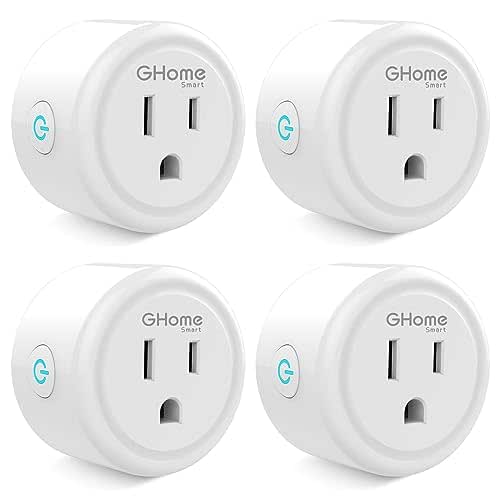
GHome Mini WiFi Smart Plug (4-Pack)
Should you want an affordable, compact smart plug that plays nicely with Alexa and Google Assistant after a quick GHome app setup, the GHome Smart Plug Mini (4-pack) is a solid pick — it plugs into 2.4 GHz WiFi without a hub and saves space with a small, corner-friendly design. You’ll set it up in the GHome app (linking to voice assistants afterward), enjoy voice control, remote on/off, group control, and flexible schedules including random timers. It uses improved WiFi plus Bluetooth for stable connections, is ETL/FCC listed, handles 10 A/1200 W at 120 V, and ships as a four-pack.
- HomeKit Compatibility:Not explicitly HomeKit — works with Alexa & Google (GHome)
- Voice Assistant Support:Alexa, Google Assistant (Siri/HomeKit not listed)
- Wi‑Fi Frequency:2.4 GHz only (WiFi only)
- Electrical Rating (Ampacity / Wattage):10 A, 1200 W (different/lower rating)
- Scheduling / Automation:Schedules & timers, random scheduling, group control
- Certification / Safety Listing:ETL listed, FCC listed
- Additional Feature:Enhanced Wi‑Fi + Bluetooth
- Additional Feature:Group control support
- Additional Feature:Randomized scheduling option
Factors to Consider When Choosing Smart Plug Homekit
Upon choosing a HomeKit smart plug, you’ll want to confirm true HomeKit compatibility and whether it works over your local network without cloud dependence. Check the plug’s power and safety ratings and make sure its size won’t block neighboring outlets. Also consider built‑in automation, scheduling features, and how well it integrates with your existing HomeKit scenes.
Compatibility With HomeKit
Because HomeKit certification determines how a smart plug integrates with your Apple setup, confirm the device is explicitly HomeKit‑certified so you can add it natively to the Home app and control it reliably via Siri. Also check whether remote access needs a home hub (HomePod, Apple TV, or iPad) on your local network for off‑site control and automations. Verify the plug supports HomeKit local LAN operation so automations and controls keep working in case internet fails. Make sure the setup method—Bluetooth or QR code pairing—matches your iPhone/iPad and follows Apple’s provisioning flow for smooth onboarding. Finally, look for HomeKit features beyond on/off, like scenes, automation triggers, timers, and status reporting, to integrate fully into your existing HomeKit routines.
Local Network Support
After confirming HomeKit certification and setup methods, check how the plug actually communicates on your local network: you want a device that gets a local IP over 2.4 GHz Wi‑Fi, advertises itself via mDNS/Bonjour or Matter, and accepts LAN/HomeKit commands without routing everything through a cloud service. You should confirm the plug supports local LAN/HomeKit communication so automations and Siri still work in case the internet dies. Verify whether a HomeKit hub is required for remote access and whether the hub enables local bridging for faster, private control. Make certain the device supports IPv4/IPv6 and reliable discovery (mDNS/Bonjour or Matter). Look for explicit documentation about LAN-only commands, offline schedules, or Matter local operation to avoid surprises.
Power And Safety Ratings
Should you plan to plug in heaters, pumps, or other high‑draw appliances, make sure the smart plug’s current and wattage ratings match or exceed your device’s demands—15 A and about 1800 W is a common safe baseline for many household loads, while light‑duty plugs can suffice for lamps and chargers. Also verify the operating voltage and frequency match your home (e.g., 120 VAC, 60 Hz) to avoid incompatibility. Check safety certifications like UL, ETL, FCC, and RoHS and prefer flame‑retardant housings. Confirm built‑in protections: overload, short‑circuit, and thermal cutoff. Finally, match the operating temperature range and IP/ingress rating to the intended location so the plug stays safe in damp or exposed environments.
Physical Size And Fit
Consider physical fit before you buy: measure your outlet spacing and compare it to the smart plug’s width, height, and depth so it won’t block the adjacent socket or collide with nearby switches, furniture, or a wall‑mounted TV. You’ll want a compact or low‑profile model in case you plan to use both outlets on a duplex receptacle or tuck the plug behind furniture or inside tight enclosures. Check orientation and prong alignment—vertical versus horizontal plugs can force cords into sharp bends unless they match your outlet. Reflect on depth so the unit won’t protrude and interfere with bedside tables, TV backs, or outlet covers. Finally, verify weight and build size while pairing heavy devices or mounting on vertical power strips to avoid sagging or loose connections.
Automation And Scheduling
Once you’ve confirmed the plug fits your outlets, consider about how you’ll actually use it day‑to‑day: automations and scheduling are where HomeKit smart plugs earn their keep. Make sure the plug supports native HomeKit automations so schedules and scenes run locally through a Home Hub (HomePod, Apple TV, or iPad) even in case the internet drops. Look for advanced scheduling—multiple timers, repeating schedules, sunrise/sunset triggers—to match routines and seasonal shifts. Verify the device can join HomeKit scenes and conditional automations with sensors, lights, or thermostats for actions like “turn on whenever motion detected.” Prefer plugs with countdown timers, energy-based triggers, or multiple programmable actions per schedule for complex needs. Finally, confirm reliable local execution and fast response during Wi‑Fi outages.
Frequently Asked Questions
Can These Plugs Operate Without Internet for Local Homekit Control?
Yes — most HomeKit-enabled plugs can work locally without internet provided your Home hub (Apple TV, HomePod, or iPad) stays on your network. You’ll still control and automate devices from within your home.
Do Any Plugs Support Scheduled Energy Reports via Homekit?
No, HomeKit itself doesn’t provide scheduled energy-reporting; you’ll need plugs with their own firmware/cloud apps or third-party hubs that export energy data to HomeKit, and they’ll handle scheduled reports outside native HomeKit.
Are Firmware Updates Reversible if a Bad Update Breaks Features?
Usually you can’t revert firmware updates on smart plugs; manufacturers rarely provide official rollback tools, so you’ll need to contact support, restore from backups provided they exist, or use recovery modes solely whenever the vendor explicitly supports them.
Can I Create Single-Button Automations Across Different Manufacturers?
Yes — you can: 72% of HomeKit users link devices cross-brand. You’ll create a single-button automation in the Home app, pick scenes or accessories from different manufacturers, then assign that scene or accessory to one trigger.
Which Plugs Support Remote Access Without Using Vendor Cloud Services?
You can use HomeKit-enabled plugs that support Thread or local Home Hub access—like Eve Energy (Thread/Local), Meross with local firmware, and some Aqara models whenever integrated via a Home Hub; they let you control remotely without vendor cloud.
