

A thermostat earns its wall space when you can read it at a glance, change the temperature without digging through tiny buttons, and match it to the way your household actually runs. Your daily routine may call for a straightforward weekly schedule, room-by-room comfort input, or app control during long workdays away. These touchscreen choices cover standard HVAC setups, more complex multi-stage systems, and smart-home-focused climate control.
An Overview Of The Picks

Aqara Smart Thermostat W200
Honeywell Home RTH7600D 7-Day Programmable Thermostat

Honeywell TH8321WF1001 VisionPRO 8000 Thermostat

Honeywell Home ElitePro S1200 Smart Thermostat

ecobee Smart Thermostat Essential
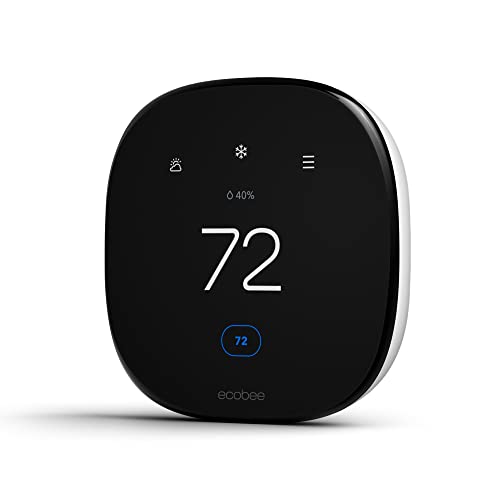
ecobee Smart Thermostat Enhanced

Aqara Smart Climate Sensor W100

Google Nest Learning Thermostat 4th Gen Polished Gold
A Deeper Look At The Lineup
The W200 makes the strongest case for households already settled into Apple Home. Adaptive Temperature can respond to home, sleep, away, and extended-away states, so your routine can guide temperature changes without manually building a detailed calendar.
That approach may feel more natural for a home where arrival times shift through the week. It supports about 85% of HVAC systems, though an Apple TV or HomePod home hub and newer Apple devices are part of the setup.
What Helps Most
- Apple Home states can shape temperature changes around your presence.
- Clean Energy Guidance can shift small adjustments around cleaner grid periods.
- Broad HVAC support suits many standard home systems.
Things To Consider
- Adaptive Temperature requires an Apple home hub plus compatible Apple devices.
- Clean Energy Guidance applies only in the contiguous United States.
A fixed weekday rhythm calls for a different approach than Aqara’s activity-led automation. The RTH7600D gives you seven-day programming with four daily periods, putting the timing decisions directly in your hands.
Its backlit screen shows current room temperature and your selected setting together, which helps during a quick adjustment before bed. The honest read is that it suits hands-on scheduling more than app-centered control.
Useful Strengths
- Four daily periods create separate morning, daytime, evening, and overnight settings.
- Temporary and permanent holds suit vacations or changed plans.
- Smart Response learns heating and cooling lead times for programmed comfort.
- The clock adjusts for Daylight Saving Time automatically.
Worth Noting
- Your schedule needs manual entry and occasional updating.
The VisionPRO 8000 steps beyond the RTH7600D by handling systems with up to three heating stages and two cooling stages. A stage is a separate level of heating or cooling output, so this matters for equipment that does more than switch between on and off.
Wi-Fi control through the Total Connect Comfort app suits households that want access away from the wall panel. For a basic single-stage setup, though, that capability may be more than your system needs.
A Strong Showing
- Supports up to three heat stages and two cooling stages.
- Remote app access helps during travel or irregular workdays.
- A large touchscreen makes routine temperature changes easier to read.
- Daily schedules can be set independently across the week.
- Works well where HVAC equipment needs more detailed control logic.
Trade Offs
- Confirm stage counts before installation so controls match your equipment.
- The feature set can feel excessive for a simple furnace and air conditioner.
Who It Suits Best
You benefit most with multi-stage heating and cooling plus a need for remote adjustments.
Where Another Pick Suits Better
Honeywell Home RTH7600D suits a household that wants visible scheduling without app-based controls.
The ElitePro S1200 is built around advanced system oversight rather than a basic temperature dial replacement. Its five-inch touchscreen can monitor indoor humidity, VOCs, and estimated carbon dioxide, giving you a broader indoor-air picture.
It can also control two IAQ devices, meaning indoor air quality equipment such as ventilation or humidity hardware. For a complex home or commercial setting, that extra coordination may justify the added installation planning.
A Few Strong Suits
- Supports residential and commercial equipment configurations.
- Handles up to 4H/2C heat pumps or 3H/3C conventional systems.
- Can control two configurable IAQ outputs.
- Displays humidity, VOC, and estimated carbon dioxide information.
- Can show video from compatible First Alert and Ring doorbells.
- An equipment interface module can simplify expanded system connections.
Minor Gripes
- Advanced outputs call for careful equipment matching during installation.
- Its broader monitoring tools may exceed the needs of a basic residence.
- Doorbell video depends on compatible doorbell hardware.
ecobee Smart Thermostat Premium shifts attention from the hallway wall to the room you use most. Its included SmartSensor gives the system extra room information, which can help a frequently occupied office or bedroom carry more weight in comfort decisions.
Unlike the equipment-focused ElitePro S1200, this model leans into connected household features, including doorbell live view and built-in air-quality monitoring. You may find those extras worthwhile in a busy smart-home setup, while a simpler schedule may not need them.
Where It Excels
- An included SmartSensor supports comfort decisions in a selected room.
- Built-in air-quality monitoring adds another view of indoor conditions.
Room For Improvement
- Doorbell live view requires a compatible wired ecobee doorbell camera.
- Siri support needs an Apple home hub.
- Check HVAC compatibility before planning a DIY installation.
- Households without a room-specific concern may not use the included sensor fully.

Made For
You get the most from it in a household with one room that regularly feels different from the rest.
Consider Something Else When
ecobee Smart Thermostat Essential suits your home better when straightforward touchscreen and app control are enough.
The Essential keeps the ecobee approach focused on the daily basics: tap the color touchscreen or adjust settings through the app. It supports scheduled temperature changes, which suits a home with predictable school, work, or sleep hours.
Compared with ecobee Premium, you trade the included room sensor and expanded monitoring for a more stripped-back connected thermostat. For most apartments or smaller homes with a consistent routine, that can be a sensible trade.
Useful Touches
- Color touchscreen makes temperature changes direct at the wall.
- App control gives you another way to manage settings away from home.
- Scheduled adjustments help align heating and cooling with regular absences.
Points To Note
- Compatibility reaches about 85% of systems, so check your equipment first.
- Its focused design does not include the Premium model’s room sensor.
Right Fit For
You suit this model when you want scheduled comfort and phone control without extra room hardware.
Not Your Match When
ecobee Smart Thermostat Enhanced fits better for households that want radar-based occupancy sensing.
The Enhanced sits between ecobee Essential’s straightforward controls and Premium’s broader monitoring package. Built-in radar occupancy sensing can recognize whether your home is occupied, helping temperature behavior follow a less predictable routine.
It also includes a Power Extender Kit, or PEK, a wiring accessory that can help homes without a traditional common wire. That makes it especially appealing for DIY-minded households, assuming the compatibility check matches your HVAC equipment.
Benefits That Matter
- Radar occupancy sensing can adjust settings around whether anyone is home.
- Schedule suggestions can help refine an existing routine.
- The included PEK supports installations that lack a common wire.
- A trim kit helps cover wall marks left by an older thermostat.
Softer Spots
- Compatibility covers about 90% of systems, not every HVAC arrangement.
- Occupancy-based control matters less in a home with a fixed daily routine.
- Installation still depends on correct wire and equipment identification.
The W100 is not a wall-wired replacement thermostat in the usual sense. Instead, it is a wireless climate sensor and control panel that can pair with an IR air conditioner through an Aqara Hub M3 in Zigbee mode.
Its 3.4-inch LCD shows temperature and humidity, while three programmable buttons support nine actions across single, double, and long presses. For an Aqara-equipped room, it can work like a compact command center rather than another fixed thermostat.
Features That Help
- Supports Thread and Zigbee for flexible smart-home connections.
- Three programmable buttons create nine possible automation actions.
- Displays temperature and humidity on a 3.4-inch LCD.
- Can show data from an external Aqara temperature and humidity sensor.
- Battery operation supports placement away from an HVAC wall connection.
Small Caveats
- Thread mode needs both a Matter controller and Thread border router.
- Zigbee mode requires an Aqara hub.
- IR air-conditioner control needs an Aqara Hub M3 and Zigbee mode.
- It does not replace a conventional wired thermostat for central HVAC.
Google Nest Learning Thermostat 4th Gen is aimed at routines that change rather than repeat exactly. It learns preferred temperatures over time, while the included Nest Temperature Sensor adds a separate reading point for a chosen room.
Unlike the Aqara W100, it is designed for central 24V HVAC systems, including forced-air, heat-pump, and radiant arrangements. Most homes may install it without a C wire, though checking your particular system remains the smart first step.
Everyday Advantages
- Learning behavior can adjust as household temperature habits change.
- The included sensor gives a selected room an extra temperature reference.
- Works with many 24V gas, electric, oil, forced-air, heat-pump, and radiant systems.
Areas To Watch
- System compatibility still needs confirmation before installation.
Best Suited To
You benefit most with a variable household schedule and a room that needs separate temperature attention.
A Better Fit Elsewhere
Honeywell Home ElitePro S1200 suits complex systems needing humidity, VOC, and IAQ-device oversight.
What Matters Before Installing a Touchscreen Thermostat
Match the HVAC Wiring
Start with your heating and cooling equipment, not the display. Confirm whether your system is conventional or a heat pump, then check its stage count, meaning the number of distinct heating and cooling output levels it uses. A thermostat built for 3H/2C equipment can be useful for involved systems, but it adds little value to a simple setup.
Decide Between Schedules and Sensors
A seven-day schedule works well for a predictable commute, regular school hours, and a stable bedtime. Occupancy sensing makes more sense for homes where arrival and departure times move around. Room sensors deserve attention when one bedroom, office, or living room runs noticeably differently from the hallway thermostat location.
Check Your Smart-Home Requirements
Connected controls can need a hub, a compatible app, a border router, or supporting equipment. Thread is a low-power smart-home network, while Zigbee is another wireless protocol commonly used with hub-based devices. Your existing setup should guide this decision, especially with Aqara products.
Think About the Screen’s Job
A large display helps with quick wall-side adjustments, but your routine determines whether remote control is equally important. You may prefer a simple screen with a permanent hold during travel, or automation that changes temperatures based on occupancy. Keep the controls aligned with habits you will actually maintain.
Details That Shape the Upgrade
Common Shopping Slip Ups
Many homes need a wiring and system-stage check before anything else. Avoid assuming a smart thermostat works with every setup, especially heat pumps, radiant systems, or equipment with multiple stages.
Where the Extra Money Goes
Higher-tier models add room sensors, occupancy detection, larger displays, indoor-condition monitoring, and support for more complex HVAC controls. Those additions make sense where your home has uneven room temperatures or more involved equipment.
Frequently Asked Questions
Do touchscreen thermostats work with every HVAC system?
No, compatibility depends on your wiring, system type, and heating and cooling stages. Check the thermostat’s compatibility information against your existing equipment before installation.
What does a multi-stage thermostat control?
A multi-stage thermostat can manage equipment with separate levels of heating or cooling output. This helps match the control to systems that do more than basic on-and-off operation.
Is a room sensor useful with a thermostat?
A room sensor is useful when the main thermostat location does not reflect the room you use most. It gives the system another temperature reference point for comfort decisions.
Do smart thermostats need a common wire?
Some systems use a common wire to provide continuous power. Certain models include accessories or support installations without one in many homes.
What is the difference between Thread and Zigbee?
Thread and Zigbee are wireless protocols used by smart-home devices. Each may require different supporting hardware, such as a hub or border router.
