

I’ve tested a range of Zigbee light switches and narrowed the field to seven that balance compatibility, wiring flexibility, and long-term reliability. I’ll walk you through practical highlights—from compact retrofit options to multi-channel relays and Matter-ready models—so you can pick the right fit for your setup and future plans. Keep going and I’ll point out which ones really stand out and why.
Enbrighten Add-On In-Wall Smart Toggle Switch (59340)

In case you’re wiring a multi-switch setup in an older home or tight box, the Enbrighten Add-On In-Wall Smart Toggle (59340) is ideal because its QuickFit and SimpleWire designs shrink housing depth and simplify daisy-chaining ground connections, letting you add smart control where space and screw placement used to block you. You’ll use this add-on with a compatible Enbrighten smart main control unit (Zigbee, Z-Wave, or Wi‑Fi); it won’t work standalone. It supports up to four add-ons per main control unit for control from five locations, handles 120/277VAC, integrates with Alexa and Google Assistant, and uses 700 Series toggle tech for reliable 3‑way operation.
Best For: homeowners or electricians needing a slim, daisy-chainable add-on smart switch to expand 3‑way/multi‑location lighting control in older or tight switch boxes.
Pros:
- QuickFit and SimpleWire designs reduce housing depth and simplify ground daisy-chaining for tight or multigang installations.
- Supports up to four add-ons per main control for control from up to five locations and works with Zigbee, Z‑Wave, or Wi‑Fi mains.
- Universal 120/277VAC rating and Alexa/Google Assistant integration for broad electrical compatibility and voice control.
Cons:
- Add-on only — requires a compatible Enbrighten main smart switch/dimmer; cannot operate standalone.
- Limited to pairing with Enbrighten ecosystem, which may restrict use with other brands or setups.
- Toggle form factor and wiring still require proper installation skills or electrician assistance in older homes.
Enbrighten White Add-On Z-Wave/Zigbee Smart Switch

Looking for a compact add-on that lets you control lights or fans from multiple locations without replacing your primary switch? You’ll like the Enbrighten White Add-On Z-Wave/Zigbee Smart Switch. It mirrors your primary Enbrighten device to dim lights, adjust fan speeds, and toggle fixtures from up to five locations. This second-generation unit is slimmer (20% reduced depth) for tight, multi-gang boxes and adds dual offset ground ports for chaining together. It’s hardwired only—requires neutral, traveler, and ground—and pairs with Z-Wave or ZigBee Enbrighten switches/dimmers. Rated 15A, 120V (or 277V commercial with proper primary), IP54, and backed by a 2-year warranty.
Best For: Homeowners or electricians who need a compact, hardwired add-on switch to extend Enbrighten Z-Wave/ZigBee smart control to multi-switch (3-way) setups in tight or multi-gang boxes.
Pros:
- Slim 2nd-generation design (up to 20% reduced depth) and Quick Fit features make it ideal for crowded or older switch boxes.
- Mirrors primary Enbrighten smart devices to control lights/fans from up to five locations and supports Z-Wave/ZigBee hubs (Ring, SmartThings, Vera, etc.).
- Robust specs for residential (120V, 15A) and selectable commercial use (277V with proper primary), IP54 rating, and a 2-year limited warranty.
Cons:
- Not a standalone device—must be paired with an Enbrighten primary switch/dimmer and requires neutral, traveler, and ground wiring.
- Hardwired indoor installation only; no battery or wireless-only power option and wall plate not included.
- Limited temperature range (32°F–104°F) and may require verifying compatibility with specific bulbs/fixtures per the primary device.
ZigBee 1-Way Smart Light Switch (Hub Required)

In case you want a simple, reliable Zigbee switch for a hub-based smart home, the Besisglas ZigBee 1-Way Smart Light Switch is a solid choice — it’s built for users who already run Home Assistant, SmartThings, Alexa, or Google Home through a Zigbee 3.0 hub. You get a compact 1.7 x 1.7 x 0.8-inch, 1-ounce unit that handles ON-OFF control at 120V AC and up to 16A. It’s a normally open, screw-terminal, plug-in device with brass contacts and Zigbee connectivity; IP00. Install it behind a switch for remote control via your existing Zigbee hub or Echo with a hub.
Best For: Homeowners and smart-home enthusiasts who already use a Zigbee 3.0 hub (Home Assistant, SmartThings, Alexa, or Google Home) and need a compact, reliable 1-way ON/OFF switch to retrofit behind a wall switch.
Pros:
- Compact, lightweight design (1.7 x 1.7 x 0.8 in, 1 oz) fits easily behind switches.
- Supports Zigbee 3.0 and integrates with major smart-home platforms for remote control.
- High current rating (16A) and brass contacts for durable power switching.
Cons:
- Requires a Zigbee hub or Echo with built-in hub—no standalone operation.
- No IP protection (IP00), not suitable for damp or exposed locations.
- Limited to simple ON/OFF (no dimming or multi-way support).
Shelly 2PM Gen4 2-Channel Smart Relay with Metering

In case you want precise energy tracking plus flexible connectivity, the Shelly 2PM Gen4 is a strong choice—its dual channels each handle up to 16A and include per-channel metering, so you can monitor and control two circuits or lights with real-time power data over Wi‑Fi, Zigbee, or Matter. You’ll also get Bluetooth gateway functionality and hub-free operation. Use it for lights, roller shutters, bi-directional motors, or office equipment, and control them via the Shelly app, voice assistants, or home automation platforms. Schedule scenes, combine devices, and rely on Shelly’s support and a three-year warranty for peace of mind.
Best For: Homeowners and small-business users who want precise per-circuit energy monitoring and flexible, hub-free smart control of two lights or devices (including roller shutters and motors) with Wi‑Fi, Zigbee, and Matter connectivity.
Pros:
- Dual 16A channels with per-channel metering provide accurate real-time energy monitoring and control for two circuits.
- Multi-protocol connectivity (Wi‑Fi, Zigbee, Matter) plus Bluetooth gateway function offers flexible integration with major smart home ecosystems and voice assistants.
- Hub-free operation, robust app control, automation scenes, and a 3-year warranty backed by Shelly support.
Cons:
- Installation requires in-wall wiring and some electrical knowledge, which may necessitate a professional electrician.
- Managing only two channels per unit may require multiple devices for larger systems, increasing cost and space usage.
- Advanced features and integrations may have a learning curve for non-technical users.
Aqara H2 2-Button Smart Light Switch (Thread/Zigbee)
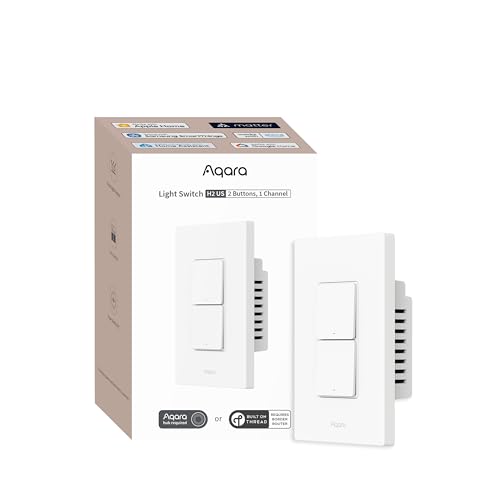
Should you want a versatile switch that works in both modern and older homes, the Aqara H2 2-Button Smart Light Switch is a solid pick—its 2-in-1 neutral compatibility lets you install it with or without a neutral wire while still offering power monitoring and overload protection once a neutral’s present. You get a wired electrical switch plus a pure wireless one, support for single-pole and 3-way setups, and a decoupled top button for scene triggers. It supports Thread and Zigbee (Matter-over-Thread), integrates with major platforms, and favors the Aqara hub for full features; rated 10A, 120V, IP65.
Best For: Homeowners or smart-home enthusiasts who need a versatile, retrofit-capable smart switch that works with or without a neutral and integrates into Thread/Zigbee (including Matter-over-Thread) ecosystems.
Pros:
- 2-in-1 neutral compatibility lets you install in older and modern homes, with power monitoring and overload protection when neutral is present.
- Supports single-pole and 3-way setups, includes one wired and one pure wireless switch, and a decoupled button for advanced scenes/automations.
- Thread and Zigbee support (including Matter-over-Thread) plus wide platform compatibility (Apple Home, Google Home, Alexa, SmartThings, Home Assistant).
Cons:
- Full feature set and advanced functions are best accessed via an Aqara hub; third-party Zigbee systems (e.g., Zigbee2MQTT) and some USB dongles may be unsupported or limited.
- Power monitoring and overload protection require a neutral connection—those without neutral lose those capabilities.
- Rated for 10 A and 120 V only, which may not suit higher-current or non-US electrical systems.
SONOFF Orb Zigbee 4‑in‑1 Smart Scene Button

Who needs a compact, wireless scene controller that doubles as a handheld dimmer? You do, should you want flexible scene control without wiring. The SONOFF Orb Zigbee 4‑in‑1 Smart Scene Button gives four physical buttons with single/double/triple/long presses, yielding 16 scene triggers for lights, routines, and automations. Its split magnetic design becomes a detachable dimmer remote or a wall-mounted switch. It supports Zigbee and eWeLink‑Remote, integrates with Home Assistant and Zigbee2MQTT, and offers local control via TouchLink and bindings. Battery powered and fully wireless, it mounts with magnets, adhesive, or screws for convenient placement.
Best For: anyone wanting a compact, battery-powered Zigbee scene controller and handheld dimmer for flexible, local smart-home automation without wiring.
Pros:
- Supports 16 scene triggers (single/double/triple/long presses across four buttons) for versatile automations.
- Split magnetic design doubles as a detachable handheld dimmer remote and wall-mounted switch for flexible placement.
- Integrates with Zigbee ecosystems (Home Assistant, Zigbee2MQTT) and supports local control via TouchLink and bindings.
Cons:
- IP00 rating and plastic contact mean not suitable for outdoor or wet locations.
- Limited electrical specs (3 V, 1 A, 3 W) make it purely a low-power controller—cannot directly drive lights or high-power loads.
- Requires additional setup for some platforms (e.g., ZHA needs a custom script), which may be tricky for beginners.
MOES ZigBee Smart Touch Wall Light Switch (3-Gang)

Homeowners who want a reliable, multi-gang Zigbee switch will like the MOES 3-gang for its flexible wiring and hub-based integration—you can install it with or without a neutral and then control lights via Tuya Zigbee hub, Smart Life app, Alexa, or Google Home. You’ll get capacitive touch control on a toughened glass face that’s damp-proof and scratch-resistant. The updated model needs no capacitor, cutting noise. Each gang retains relay status after power loss and supports association for 2/3-way circuits, though one gang can’t associate multiple gangs at once. Backlight settings, multi-input control, and sleek finishes suit modern homes.
Best For: Homeowners wanting a versatile, hub-based 3-gang Zigbee switch that supports neutral-free wiring options and integrates with Tuya/Smart Life, Alexa, and Google Home.
Pros:
- Flexible wiring (neutral + live or live-only) and no capacitor required in updated model, simplifying installation and reducing electrical noise.
- Integrates with Tuya Zigbee hub for app control, voice assistants, backlight settings, and multi-control associations for 2/3-way circuits.
- Durable capacitive touch glass face that is scratch- and damp-resistant, with relay memory to retain state after power loss.
Cons:
- Requires a Tuya Zigbee 3.0 hub (not included), adding extra cost and dependency on the Tuya ecosystem.
- One gang cannot associate multiple gangs simultaneously, which may limit complex multi-control setups on a single device.
- Some users may prefer fully neutral-required wiring standards or alternate ecosystems (Zigbee hub compatibility varies).
Factors to Consider When Choosing a Zigbee Light Switch
Before you pick a Zigbee switch, I’ll walk you through the key factors that actually matter: hub compatibility, wiring and installation needs, and the switch’s power/load ratings. I’ll also cover how well it plays with your smart ecosystem and whether the physical design and durability meet your daily use. Understanding these points upfront makes choosing the right switch much simpler.
Compatibility With Hubs
When I pick a Zigbee light switch, I make sure its protocol version matches my hub (for example Zigbee 3.0 or Thread-over-Zigbee) and that the manufacturer explicitly lists compatibility with my specific hub or ecosystem; otherwise pairing and advanced features can fail. I also confirm the switch can pair with my exact hub model and app so configuration, automation, and remote control work reliably. I look for multi-device association support so I can set up multi-way switching and synchronized control across locations. Finally, I verify whether the switch needs a primary gateway or can operate autonomously within the Zigbee mesh; that determines dependence on a hub and affects redundancy, local control, and failure modes.
Wiring And Installation
Evaluating wiring needs is the initial practical step I take upon choosing a Zigbee switch, because the presence or absence of neutral, traveler, and ground conductors determines compatibility with most homes and multi-switch (3-way or more) setups. I check the box depth and look for reduced-housing designs or QuickFit features that let the switch sit in older, tight enclosures without rewiring. I verify whether the model requires a neutral — some versions work without it but might lose features like power monitoring or require careful wiring. Dual offset ground ports are a plus: they avoid screw interference and simplify daisy-chaining in multi-location installs. I also confirm terminal type (screw or clamp), hardwired requirements, and whether wall plates are included.
Power And Load Ratings
Since electrical specs determine whether a switch will reliably handle your fixtures, I start upon matching the switch’s voltage and current ratings to the circuit — typically 120V for homes or 277V for commercial runs, and 10–16A for most residential loads. Next I confirm the wattage capacity (often around 1800W) so the total bulb and device draw stays safely below the limit. I also verify the circuit type—1-way versus 3-way—and whether the switch supports multi-switch setups to avoid control and distribution issues. Finally, I check contact type and materials; sturdy contacts rated for expected loads reduce wear and heat under continuous operation. These checks prevent tripped breakers, premature failures, and safety hazards.
Smart Ecosystem Support
During the moment I pick a Zigbee light switch, compatibility with my existing smart ecosystem is the initial box I tick — I want it to work natively with Alexa, Google Assistant, HomeKit, or SmartThings so I don’t have to rebuild automations. I also check support for popular Zigbee hubs and platforms to guarantee seamless inclusion in my network. I favor devices running Zigbee 3.0 or adding Thread for better device detection and stability. Voice control and remote access via major smart home apps are non-negotiable — they let me control lights from anywhere. Finally, I confirm interoperability features like Matter or multi-protocol connectivity to future-proof my setup and avoid being locked into a single ecosystem.
Physical Design And Durability
At the moment I choose a Zigbee light switch, I look beyond smart features to its physical design and build — a switch needs to feel reliable in my hand and last through daily use. I prefer capacitive touch or well-engineered toggle designs for responsive interaction, and I value physical buttons with metal or brass contacts during longevity and consistent connectivity matter. Toughened glass or high-grade plastics resist scratches and impacts, keeping finishes attractive over years. I check IP ratings—IP54 at minimum, IP65 where moisture or dust is a risk—to guarantee suitability for kitchens, bathrooms, or garages. Slim housings and reduced depth simplify retrofit installs in older boxes without sacrificing structural integrity. Ultimately, good materials and clear protection specs guide my picks.
