

You’re upgrading your home network for years to come, so you’ll want gear that handles multi‑gig speeds, crowded devices, and future standards without fuss. Consider Wi‑Fi 6E or 7, 2.5/5/10 Gbps ports, strong CPUs, and mesh support—choices that balance speed, range, and security. I’ll walk through top picks and what matters so you can pick the right fit for your layout and budget—starting with the RS500.
| NETGEAR Nighthawk Tri‑Band WiFi 7 Router (RS500) |

| Future-Proof Performance | Wi‑Fi Generation: Wi‑Fi 7 | Bands: Tri‑band (includes 6 GHz) | Requires Separate Modem: Yes (router only; separate modem/ONT for cable or fiber) | VIEW LATEST PRICE | Our Analysis |
| NETGEAR Nighthawk RAXE300 WiFi 6E Tri-Band Router |

| High-Speed 6E Powerhouse | Wi‑Fi Generation: Wi‑Fi 6E | Bands: Tri‑band (includes 6 GHz) | Requires Separate Modem: Yes (requires separate modem or modem router) | VIEW LATEST PRICE | Our Analysis |
| NETGEAR Nighthawk RAX70 AX6600 WiFi 6 Router |
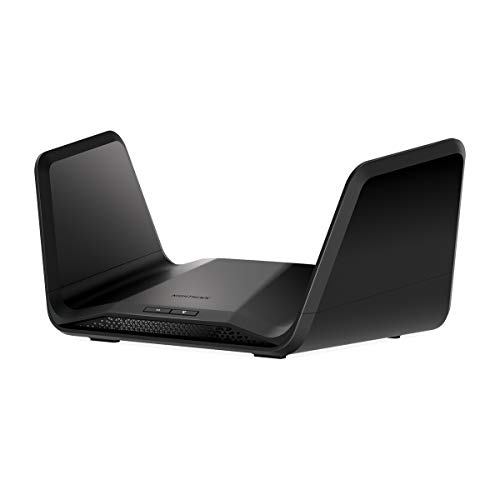
| Balanced Performance Pick | Wi‑Fi Generation: Wi‑Fi 6 | Bands: Tri‑band (no 6 GHz specified) | Requires Separate Modem: Yes (separate modem or modem‑router required) | VIEW LATEST PRICE | Our Analysis |
| TP-Link Archer AX21 AX1800 WiFi 6 Router |

| Budget-Friendly Basic | Wi‑Fi Generation: Wi‑Fi 6 | Bands: Dual‑band (2.4 + 5 GHz) | Requires Separate Modem: Yes (requires separate modem) | VIEW LATEST PRICE | Our Analysis |
| TP-Link Archer AXE75 AXE5400 WiFi 6E Router |

| Best for Gamers | Wi‑Fi Generation: Wi‑Fi 6E | Bands: Tri‑band (includes 6 GHz) | Requires Separate Modem: Yes (modem required for most providers) | VIEW LATEST PRICE | Our Analysis |
More Details on Our Top Picks
NETGEAR Nighthawk Tri‑Band WiFi 7 Router (RS500)
Should you need top-tier wireless performance for dense homes or serious gaming, the NETGEAR Nighthawk RS500 delivers WiFi 7 speeds up to 12 Gbps and a dedicated 6 GHz band so you can run 4K/8K streaming, AR/VR, and dozens of connected devices without bottlenecks. You’ll get tri‑band coverage with 320 MHz channels, support for up to 120 devices, and up to 3,000 sq. ft. coverage from a compact design. The RS500 lacks a built-in modem, so you’ll need a separate cable modem or ONT for multi‑gig services. It includes 2.5G and Gig Ethernet ports, NETGEAR Armor protection, and automatic updates.
- Wi‑Fi Generation:Wi‑Fi 7
- Bands:Tri‑band (includes 6 GHz)
- Requires Separate Modem:Yes (router only; separate modem/ONT for cable or fiber)
- Ethernet Ports:1 × 2.5 Gb + 3 × 1 Gb LAN
- Security Suite / Features:NETGEAR Armor, automatic firmware updates, advanced router protection
- Coverage / Device Capacity:Coverage up to 3,000 sq. ft.; supports up to 120 devices
- Additional Feature:BE12000 up to 12Gbps
- Additional Feature:320 MHz high-capacity channels
- Additional Feature:2.5Gb LAN port
NETGEAR Nighthawk RAXE300 WiFi 6E Tri-Band Router
Should you want state-of-the-art speed and extra range for next‑gen devices, the NETGEAR Nighthawk RAXE300 is built for homes that need WiFi 6E performance—its AXE7800 tri‑band design adds a dedicated 6 GHz band and an 8‑stream layout to deliver up to 7.8 Gbps, making it ideal for heavy 4K/8K streaming, AR/VR gaming, and high‑density households. You’ll get backward compatibility with 2.4/5 GHz gadgets, coverage up to 2,500 sq. ft., and support for about 40 devices. A 1.7 GHz quad‑core CPU, four 1 GbE ports and one 2.5 GbE port handle wired needs. NETGEAR Armor, updates and the Nighthawk app simplify security and management. US use only.
- Wi‑Fi Generation:Wi‑Fi 6E
- Bands:Tri‑band (includes 6 GHz)
- Requires Separate Modem:Yes (requires separate modem or modem router)
- Ethernet Ports:1 × 2.5 Gb + 4 × 1 Gb
- Security Suite / Features:NETGEAR Armor, built‑in security and updates
- Coverage / Device Capacity:Coverage up to 2,500 sq. ft.; supports up to 40 devices
- Additional Feature:AXE7800 up to 7.8Gbps
- Additional Feature:1.7GHz quad-core CPU
- Additional Feature:8-stream design
NETGEAR Nighthawk RAX70 AX6600 WiFi 6 Router
Provided that you need fast, reliable Wi‑Fi for busy homes, the NETGEAR Nighthawk RAX70 delivers AX6600 tri‑band performance and coverage up to 2,500 sq. ft., so you can stream, game, and video‑conference on dozens of devices without bottlenecks. You’ll get Gigabit speeds up to 6.6 Gbps, support for about 40 devices, and dedicated tri‑band handling to reduce congestion. Four Gigabit Ethernet ports and a USB 3.0 port let you wire consoles and storage. It replaces your router but needs a separate modem or modem‑router and works with ISPs up to 2 Gbps. Use the Nighthawk app and NETGEAR Armor for security.
- Wi‑Fi Generation:Wi‑Fi 6
- Bands:Tri‑band (no 6 GHz specified)
- Requires Separate Modem:Yes (separate modem or modem‑router required)
- Ethernet Ports:4 × 1 Gb
- Security Suite / Features:NETGEAR Armor, built‑in enhanced safety features
- Coverage / Device Capacity:Coverage up to 2,500 sq. ft.; supports up to 40 devices
- Additional Feature:AX6600 up to 6.6Gbps
- Additional Feature:USB 3.0 port
- Additional Feature:Supports up to 2Gbps ISP
TP-Link Archer AX21 AX1800 WiFi 6 Router
Should you want a budget-friendly Wi‑Fi 6 upgrade that boosts speeds and handles multiple devices, the TP‑Link Archer AX21 (AX1800) is a strong pick. You’ll get dual‑band AX1800 throughput (up to 1200 Mbps on 5 GHz and 574 Mbps on 2.4 GHz) for smoother streaming and gaming than older routers. OFDMA and beamforming help serve many devices and extend reach via four high‑gain antennas and an advanced FEM chipset, though real-world range varies with walls and distance. It needs a separate modem, supports OpenVPN/PPTP server, works with major ISPs, and benefits from updated firmware and TP‑Link support.
- Wi‑Fi Generation:Wi‑Fi 6
- Bands:Dual‑band (2.4 + 5 GHz)
- Requires Separate Modem:Yes (requires separate modem)
- Ethernet Ports:4 × 1 Gb
- Security Suite / Features:Advanced security design, VPN server support (OpenVPN, PPTP)
- Coverage / Device Capacity:Coverage implied extended by antennas/FEM; device capacity improved via OFDMA (no specific sq. ft./device count)
- Additional Feature:AX1800 total bandwidth
- Additional Feature:Four high-gain antennas
- Additional Feature:OpenVPN & PPTP support
TP-Link Archer AXE75 AXE5400 WiFi 6E Router
Should you want low-latency performance for gaming and crowded-home streaming, the TP-Link Archer AXE75 (AXE5400) delivers a practical WiFi 6E upgrade with a dedicated 6 GHz band and up to 5,400 Mbps aggregate throughput. You’ll get tri-band coverage—6 GHz 2402 Mbps, 5 GHz 2402 Mbps, 2.4 GHz 574 Mbps—with 160 MHz channels and OFDMA to handle many devices. A 1.7 GHz quad-core CPU and 512 MB RAM keep traffic flowing. It supports OneMesh, WPA3, OpenVPN/PPTP/L2TP, and HomeShield security tools. It works with major ISPs but usually needs a separate modem.
- Wi‑Fi Generation:Wi‑Fi 6E
- Bands:Tri‑band (includes 6 GHz)
- Requires Separate Modem:Yes (modem required for most providers)
- Ethernet Ports:(Not fully enumerated in summary) Gigabit ports (typical WAN/LAN Gigabit; quad‑LAN implied)
- Security Suite / Features:TP‑Link HomeShield, WPA3 support, VPN server/client options
- Coverage / Device Capacity:Designed for whole‑home use with OneMesh support; high device capacity via OFDMA and 6 GHz band (no specific sq. ft./device count)
- Additional Feature:AXE5400 up to 5400Mbps
- Additional Feature:OneMesh seamless networking
- Additional Feature:WPA3 + VPN client/server
Factors to Consider When Choosing New Routers
Upon selecting a new router, you’ll want to weigh speed and bandwidth against how many devices you’ll actually connect. Check wired port options and wireless coverage range to make sure the hardware fits your home layout and wired needs. Don’t forget security and privacy features, since they protect your network as much as raw performance.
Speed And Bandwidth
Because your router has to move everything fast enough for both your internet plan and the devices on your network, check its Wi generation and maximum aggregate wireless throughput (Wi‑6/Wi‑6E/Wi‑7 and multi‑gig totals) along with supported channel widths and frequency range (80/160/320 MHz and 6 GHz availability); also compare spatial streams and MU‑MIMO/OFDMA support and wired port speeds (1G/2.5G/multi‑gig) so you pick hardware rated for higher device density and real‑world aggregate throughput than your peak simultaneous use. Then verify channel width and extra bandwidth to enhance single‑stream peaks and cut congestion. Favor more spatial streams and OFDMA/MU‑MIMO for concurrent device throughput. Don’t overlook multi‑gig Ethernet for wired backhaul or high‑bandwidth clients.
Device Capacity Limits
You’ve checked raw speed and bands, but how many devices that performance can serve matters just as much. Check a router’s rated simultaneous-device counts—consumer gear typically lists ~40–120—to match phones, TVs, smart hubs and IoT endpoints. Don’t rely solely on that number: throughput type, distance and interference change real‑world limits, so plan a margin above your current total.
Choose routers with OFDMA and MU‑MIMO to multiplex multiple clients efficiently and cut congestion during peaks. Prefer tri‑band models (including 6 GHz) and wider channel widths so more high‑bandwidth devices don’t compete on one band. Finally, inspect CPU cores and RAM: stronger processors and larger buffers handle higher throughput and many concurrent connections more reliably.
Wired Port Options
Should you plan to rely on wired connections for gaming, NAS access, or a mesh backhaul, choose a router with multi‑gig Ethernet and enough LAN ports to match your devices. Prioritize 2.5/5/10 Gbps ports to prevent a 1 Gbps WAN/LAN bottleneck whenever you connect high‑speed NAS, gaming PCs, or a multi‑gig modem. Count LAN ports—three or four is common, but obtain more provided you have many wired devices; each wired link gives lower latency and steadier throughput than Wi‑Fi. Check the dedicated WAN speed and support for link aggregation (LACP) so you can bond ports for higher throughput or redundancy. Should you plan to share USB storage or printers, make certain USB 3.0 and SMB/FTP/NAS support. For wired mesh, verify Gigabit+ backhaul capability.
Wireless Coverage Range
Wired ports matter for low‑latency, high‑throughput links, but wireless coverage decides how well devices in different rooms actually perform—so estimate the area you need to cover (add about 20–30% to your home’s square footage for walls and floors) and pick a router rated for at least that size. Keep in mind bands: 2.4 GHz reaches farther and penetrates obstacles better but gives lower peak speeds; 5 GHz and 6 GHz deliver faster throughput with shorter range. Building materials and dense furniture will cut real‑world coverage well below open‑air claims. Check antenna design, transmit power, beamforming, and whether the router supports mesh or wired access points. For larger or multi‑floor homes, add mesh nodes or wired APs instead of relying on one router.
Security And Privacy
Because your router sits at the edge of your home network, pick one that enforces modern encryption (WPA3), keeps firmware updated automatically or makes updates easy, and offers network‑level threat protection so malware and intrusions are blocked before they reach your devices. Also use a separate guest network to isolate IoT and visitor devices, cutting lateral movement risk. Disable default admin accounts and set a strong, unique admin password; enable two‑factor admin access provided available. Prefer routers that support secure remote management (HTTPS or SSH) and allow you to turn off remote admin entirely whenever you don’t need it. Finally, verify the vendor’s patching cadence and update notifications so you’re not left exposed owing to known vulnerabilities.
Setup And Management
Upon setting up a new router, prioritize how you’ll manage it day to day—look for a clear mobile app or web interface that guides installation, simplifies firmware updates, and exposes features like guest networks, parental controls, QoS, and VLAN/SSID settings so you can tailor the network without wrestling with obscure menus. Check for automatic and scheduled firmware updates so critical patches install without you babysitting the device. Confirm remote management options (secure cloud or VPN) and whether they need subscriptions, balancing convenience against recurring cost and security. Make sure the admin interface supports role-based accounts, strong password policies, and two-factor authentication where available to protect management access. These choices keep control simple, secure, and suited to your household needs.
Future Proofing Technologies
Good setup and management habits make a router useful today, but you’ll want hardware and software that stay useful over several years. Choose routers supporting the latest Wi‑Fi standards (Wi‑Fi 6E/7) and multi‑GHz operation, including 6 GHz and wider channels (160–320 MHz), to maximize throughput and reduce future congestion. Prefer multi‑gig Ethernet ports (2.5 Gbps+) and multi‑core CPUs with ample RAM so the device handles higher ISP speeds, many clients, and advanced features over its lifetime. Guarantee OFDMA and MU‑MIMO support and wider channel bandwidths to preserve performance as Wi‑Fi 6/6E/7 device counts grow. Verify a strong update policy with automatic security/firmware updates. Favor modular, extensible designs—multi‑band radios, selectable backhaul, and mesh/AP expansion—to upgrade coverage without full replacement.
