

You may suppose ISP‑supplied gear is fine, but swapping to an Xfinity‑certified DOCSIS 3.1 gateway can cut lag and drops. You’ll get multi‑gig options, better channel bonding, and modern Wi‑Fi security without juggling separate devices—yet the best pick depends on your streaming, gaming, and upload needs. Below are top modem‑router combos and factors to help you match performance to budget.
| ARRIS G54 DOCSIS 3.1 WiFi 7 Multi-Gig Router |

| Best Performance | Technology Standard: DOCSIS 3.1 | Router Combo (Modem + Wi‑Fi): Modem + Wi‑Fi router combo (Wi‑Fi 7) | ISP Compatibility (Major U.S. Cable): Compatible with Xfinity, Spectrum, Cox | VIEW LATEST PRICE | Our Analysis |
| NETGEAR Nighthawk DOCSIS 3.1 Cable Modem (CM3000) |

| Future-Proof Modem | Technology Standard: DOCSIS 3.1 | Router Combo (Modem + Wi‑Fi): Modem only (pairs with router; router sold separately) | ISP Compatibility (Major U.S. Cable): Approved for Xfinity, Spectrum, Cox | VIEW LATEST PRICE | Our Analysis |
| NETGEAR Nighthawk C7000 Modem Router Combo (AC1900) |

| All-in-One Starter | Technology Standard: DOCSIS 3.0 (24×8) | Router Combo (Modem + Wi‑Fi): Modem + Wi‑Fi router combo (Wi‑Fi 5 AC1900) | ISP Compatibility (Major U.S. Cable): Compatible with Xfinity and Cox | VIEW LATEST PRICE | Our Analysis |
| Netgear Nighthawk C7000 Cable Modem WiFi Router (Renewed) |
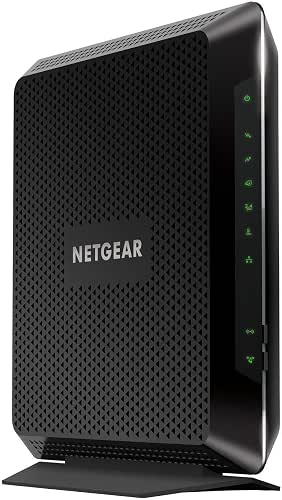
| Refurbished Value | Technology Standard: DOCSIS (renewed C7000 uses DOCSIS 3.0) | Router Combo (Modem + Wi‑Fi): Modem + Wi‑Fi router combo (renewed) | ISP Compatibility (Major U.S. Cable): Compatible with Xfinity and Cox | VIEW LATEST PRICE | Our Analysis |
| ARRIS SBG7400AC2 Modem Router Combo (AC2350) |

| Reliable Midrange | Technology Standard: DOCSIS 3.0 | Router Combo (Modem + Wi‑Fi): Modem + Wi‑Fi router combo (Wi‑Fi AC2350) | ISP Compatibility (Major U.S. Cable): Certified for Xfinity, Spectrum, Cox | VIEW LATEST PRICE | Our Analysis |
More Details on Our Top Picks
ARRIS G54 DOCSIS 3.1 WiFi 7 Multi-Gig Router
Should you need blistering home speeds for 4K/8K streaming and competitive gaming, the ARRIS G54 (BE18000) is built for you — it combines DOCSIS 3.1 cable tech with Wi‑Fi 7 to deliver up to 18 Gbps aggregated throughput and cover roughly 5,000 sq ft, while giving you multi‑gig wired options (one 10‑GbE and four 1‑GbE ports) so you can hook up high‑bandwidth devices without compromise. You’ll get quad‑band Wi‑Fi, compatibility with major ISPs like Xfinity, Spectrum, and Cox, and residential‑ready deployment. Owning it cuts recurring rental fees and exploits a brand used in over 260 million homes.
- Technology Standard:DOCSIS 3.1
- Router Combo (Modem + Wi‑Fi):Modem + Wi‑Fi router combo (Wi‑Fi 7)
- ISP Compatibility (Major U.S. Cable):Compatible with Xfinity, Spectrum, Cox
- Ethernet Ports:Four 1‑Gb LAN + one 10‑Gb port (quad‑band Wi‑Fi)
- Home Use / Residential Focus:Designed for home (residential deployment)
- Rental Fee Savings (Ownership Benefit):Owning avoids ISP rental fees (manufacturer‑stated savings vary)
- Additional Feature:Up to 18 Gbps throughput
- Additional Feature:Quad-band Wi‑Fi
- Additional Feature:10‑Gigabit Ethernet port
NETGEAR Nighthawk DOCSIS 3.1 Cable Modem (CM3000)
Should you need a future-proof modem that handles multi-gig downloads and heavy household use, the NETGEAR Nighthawk CM3000 is a strong pick—DOCSIS 3.1 and a 2.5Gbps port let you feed a Wi‑Fi 6E/7 router or Orbi mesh for blazing speeds and lower latency during gaming, video calls, and large uploads. You’ll get mid/high-split support, up to 2.5 Gbps down and 1 Gbps up, and multi-gig linking via the 2.5Gbps port or dual Gigabit aggregation to reach 2 Gbps. It’s approved for Xfinity, a major cable provider, Cox, reduces rental fees, and pairs with modern routers for durable performance.
- Technology Standard:DOCSIS 3.1
- Router Combo (Modem + Wi‑Fi):Modem only (pairs with router; router sold separately)
- ISP Compatibility (Major U.S. Cable):Approved for Xfinity, Spectrum, Cox
- Ethernet Ports:2.5Gb modem port (for multi‑gig) and supports link aggregation to routers (router ports separate)
- Home Use / Residential Focus:Designed for home/high‑use households
- Rental Fee Savings (Ownership Benefit):Ownership can reduce/ eliminate modem rental fees (savings highlighted)
- Additional Feature:2.5 Gbps download support
- Additional Feature:Mid/high‑split DOCSIS 3.1
- Additional Feature:Link‑aggregation capable
NETGEAR Nighthawk C7000 Modem Router Combo (AC1900)
Should you want a simple, budget-friendly all-in-one for Xfinity that still handles HD streaming and multiple devices, the NETGEAR Nighthawk C7000 is a solid pick — it combines a DOCSIS 3.0 modem with AC1900 Wi‑Fi to support cable plans up to 800 Mbps and cover about 1,800 sq. ft. You’ll get 24×8 channel bonding, dual-band 802.11ac up to 1.9 Gbps combined, and support for roughly 30 devices. It replaces separate modem and router, offers four Gigabit LAN ports plus USB 2.0, WPA/WPA2 security, NETGEAR Armor trial, app-based setup, and automatic updates for peace of mind.
- Technology Standard:DOCSIS 3.0 (24×8)
- Router Combo (Modem + Wi‑Fi):Modem + Wi‑Fi router combo (Wi‑Fi 5 AC1900)
- ISP Compatibility (Major U.S. Cable):Compatible with Xfinity and Cox
- Ethernet Ports:Four 1‑Gb Ethernet LAN ports
- Home Use / Residential Focus:Intended for home use (supports up to ~30 devices)
- Rental Fee Savings (Ownership Benefit):Eliminates equipment rental fees (manufacturer‑stated annual savings)
- Additional Feature:24×8 channel bonding
- Additional Feature:AC1900 Wi‑Fi 5
- Additional Feature:USB 2.0 port
Netgear Nighthawk C7000 Cable Modem WiFi Router (Renewed)
Should you want a budget-friendly, all-in-one modem/router that handles cable plans up to 800 Mbps, the renewed Netgear Nighthawk C7000 is a solid pick—it’s built for DOCSIS cable networks and works with Xfinity and Cox while saving you money compared with buying new. You’ll get AC1900-class WiFi and a built-in cable modem that’s suitable for most home streaming and gaming needs on qualifying plans. It won’t work with Verizon, the cable provider, AT&T, CenturyLink, DSL, or bundled voice services, so check compatibility before buying. As a renewed unit, inspect warranty and specs from the seller.
- Technology Standard:DOCSIS (renewed C7000 uses DOCSIS 3.0)
- Router Combo (Modem + Wi‑Fi):Modem + Wi‑Fi router combo (renewed)
- ISP Compatibility (Major U.S. Cable):Compatible with Xfinity and Cox
- Ethernet Ports:Four 1‑Gb Ethernet LAN ports
- Home Use / Residential Focus:Renewed unit intended for home cable plans
- Rental Fee Savings (Ownership Benefit):Ownership eliminates rental fees compared to leasing from ISP
- Additional Feature:Renewed (refurbished) unit
- Additional Feature:Best for ≤800 Mbps
- Additional Feature:DOCSIS 3.0 modem
ARRIS SBG7400AC2 Modem Router Combo (AC2350)
Should you want a straightforward, budget-friendly combo that handles gigabit-class cable plans without extra gear, the ARRIS SBG7400AC2 is a solid pick—its DOCSIS 3.0 modem and AC2350 dual‑band Wi‑Fi cover speeds up to 960 Mbps and give you four Gigabit Ethernet ports for reliable wired connections. You’ll get broad ISP compatibility with Xfinity, the cable company, and Cox, easy setup via the SURFboard Central app, and app controls for monitoring and parental limits. It doesn’t support cable digital voice or non‑cable ISPs (fiber/DSL), so confirm provider approval before buying to avoid activation issues.
- Technology Standard:DOCSIS 3.0
- Router Combo (Modem + Wi‑Fi):Modem + Wi‑Fi router combo (Wi‑Fi AC2350)
- ISP Compatibility (Major U.S. Cable):Certified for Xfinity, Spectrum, Cox
- Ethernet Ports:Four 1‑Gb Ethernet LAN ports
- Home Use / Residential Focus:Designed for home Wi‑Fi and cable plans
- Rental Fee Savings (Ownership Benefit):Owning can eliminate monthly rental fees (savings vary)
- Additional Feature:AC2350 dual‑band Wi‑Fi
- Additional Feature:Supports up to 960 Mbps
- Additional Feature:SURFboard Central app
Factors to Consider When Choosing Buy Xfinity Modem Router
At the time of choosing an Xfinity-compatible modem router, you’ll want to check whether it’s a combo unit or separate modem and router, and confirm ISP compatibility. Look at speed and throughput ratings, supported Wi‑Fi standards, and the number/types of Ethernet and other ports to match your devices. Those factors will determine real-world performance and future-proofing.
Modem And Router Type
Because a modem and router define both your broadband entry point and local network, pick the configuration that matches your upgrade plans and performance needs. Choose a modem‑router combo when you want simple setup and fewer devices, but go with separate modem plus router when you plan to upgrade Wi‑Fi independently or need higher‑end wireless features. Prefer DOCSIS 3.1 modems for multi‑gig cable plans; DOCSIS 3.0 with channel bonding suits sub‑gig tiers. For routers, pick the Wi generation (Wi‑6, Wi‑6E, Wi‑7) and dual/tri/quad‑band layouts to match device density and 4K/cloud demands. Confirm Ethernet capabilities—2.5G, 10G, or link aggregation—in case wired multi‑gig is required. Finally, make sure chosen devices support services you need (digital voice, QoS, parental controls, firmware management).
ISP Compatibility Check
Before buying, confirm your modem‑router is explicitly certified for Xfinity and matches the DOCSIS version, channel bonding, and Ethernet/multi‑gig requirements of your plan—doing so avoids activation headaches and guarantees features like digital voice or remote gateway management will work as expected. You should check Xfinity’s approved device list and read activation instructions prior to purchase to avoid surprises. Verify DOCSIS 3.1 for multi‑gig or sufficient DOCSIS 3.0 channel counts for sub‑gig plans. Make sure the unit’s Ethernet/multi‑gig ports fit how you’ll connect a separate router or wired devices—look for a 2.5G/10G port or link‑aggregation if needed. Confirm the device supports ISP services you want and that your provider will enable them during provisioning.
Speed And Throughput
After confirming compatibility with Xfinity and the right DOCSIS version, you’ll want to match the modem‑router’s real throughput to your plan so the device doesn’t become the bottleneck. Check both WAN‑to‑LAN and concurrent wireless throughput; manufacturers’ aggregated Gbps numbers often combine radios and won’t reflect sustained single‑client speeds. Should you be on multi‑gig service or move large files to a NAS, pick a unit with 2.5/5/10 Gbps ports or link‑aggregation. Don’t forget upstream capacity and DOCSIS channel bonding (or equivalent) in case you perform cloud backups, frequent video calls, or live streams. Finally, evaluate real‑world performance under load: simultaneous devices, QoS, and how the router handles traffic shape effective throughput more than headline specs.
Wi‑Fi Standards Supported
Look for a modem‑router that supports at least Wi‑Fi 6 (802.11ax) — it’ll give you better multi‑device performance, lower latency, and improved spectral efficiency compared with Wi‑Fi 5; consider Wi‑Fi 7 (802.11be) should you want the latest aggregated throughput and future‑proofing. Also check supported bands: dual‑band (2.4 GHz + 5 GHz) is baseline, while tri‑ or quad‑band gear adds extra 5 GHz or 6 GHz radios to cut congestion for high‑demand clients. Inspect maximum PHY rates and channel widths (80 vs 160 MHz on 5 GHz, up to 320 MHz on Wi‑Fi 7) since wider channels enhance peak speeds but increase interference risk. Confirm MU‑MIMO, OFDMA, and WPA3 support to improve simultaneous performance and security. Finally, verify your phones, laptops, and consoles are compatible to actually reap those gains.
Ethernet And Port Options
Pick a gateway with the right mix of Ethernet ports so your wired devices actually get the speeds and reliability you pay for. In case you’re on a high-speed plan or connecting a gaming PC or NAS, make sure there’s at least one multi-gig (2.5/5/10 Gbps) port. Confirm you have multiple Gigabit LAN ports (commonly four) and consider link aggregation in the event you need combined throughput above 1 Gbps. Look for a clearly labeled dedicated WAN/multi‑gig port to avoid configuration errors when pairing with a router or switch. Should you run many wired devices, choose VLAN tagging and per‑port QoS to prioritize gaming, conferencing, or VoIP. Finally, check USB and SFP/SFP+ options for external storage or fiber uplinks.
Long‑Term Cost Savings
Owning your Xfinity modem‑router can shave a surprising chunk off your broadband bill, since you’ll stop paying that recurring rental fee—often amounting to $120–$300+ over just a few years. You’ll usually recoup a higher upfront cost within 6–24 months compared with renting, depending on the monthly fee. Pick equipment that supports current standards (DOCSIS 3.1, Wi‑Fi 6/7) so it stays compatible with faster plans and delays replacement. Factor warranty length and resale value: longer warranties and stronger resale reduce net lifetime cost. Also count indirect savings—lower latency and higher throughput enhance remote‑work efficiency, cut service calls, and might eliminate extenders. Add these elements into a total cost‑of‑ownership calculation before you buy.
