

You’re ready to squeeze faster, steadier Wi‑Fi from your home network, and Wi‑Fi 6 gear for 2026 delivers the tools to do it — cleaner 6 GHz lanes, wider 160 MHz channels, smarter radios and mesh options that scale. I’ll walk you through standout routers and what features actually move the needle so you can pick the right setup for streaming, gaming, or lots of devices — and avoid overspending on specs you won’t use.
| TP-Link Archer AXE75 AXE5400 WiFi 6E Router |

| Best for Low Latency | Wi‑Fi Standard: Wi‑Fi 6E (802.11ax, includes 6 GHz) | Mesh/Expandability Support: OneMesh support (seamless whole‑home via TP‑Link extenders) | Parental Controls: Basic parental controls (HomeShield) | VIEW LATEST PRICE | Our Analysis |
| H3C AX5400 WiFi 6 Whole-Home Gaming Router |
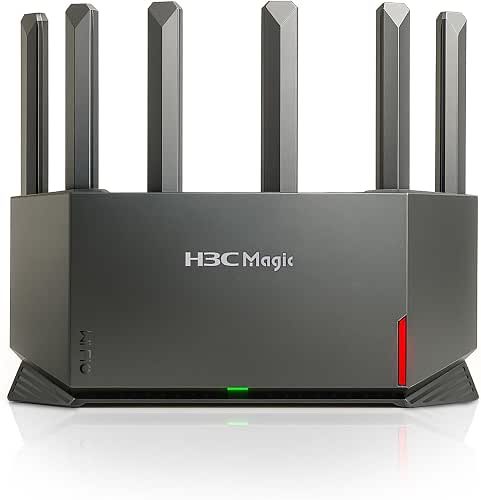
| Best for Gamers | Wi‑Fi Standard: Wi‑Fi 6 (802.11ax) | Mesh/Expandability Support: EasyMesh support (mesh network extension) | Parental Controls: Advanced parental controls (subscription‑free) | VIEW LATEST PRICE | Our Analysis |
| Amazon eero 6 Mesh WiFi Router (1-Pack) |

| Best for Smart Homes | Wi‑Fi Standard: Wi‑Fi 6 (802.11ax) | Mesh/Expandability Support: TrueMesh / cross‑compatible with other eero devices | Parental Controls: Parental controls via eero Plus (subscription option) | VIEW LATEST PRICE | Our Analysis |
| TP-Link Deco X55 AX3000 Mesh WiFi System (3-Pack) |

| Best for Whole‑Home Coverage | Wi‑Fi Standard: Wi‑Fi 6 (802.11ax) | Mesh/Expandability Support: Deco mesh system (units form mesh; any unit can be router) | Parental Controls: Parental controls (HomeShield basic, no‑cost) | VIEW LATEST PRICE | Our Analysis |
| ASUS RT-AX1800S WiFi 6 Router with AiMesh |

| Best for Budget Mesh Expansion | Wi‑Fi Standard: Wi‑Fi 6 (802.11ax) | Mesh/Expandability Support: AiMesh support (ASUS mesh expansion) | Parental Controls: Built‑in parental controls (AiProtection/ASUS) | VIEW LATEST PRICE | Our Analysis |
More Details on Our Top Picks
TP-Link Archer AXE75 AXE5400 WiFi 6E Router
Should you need low-latency performance for gaming and streaming across many devices, the TP-Link Archer AXE75 (AXE5400) is a strong choice because its tri-band Wi‑Fi 6E design adds a 6 GHz band and 160 MHz channels to handle high-throughput tasks with minimal interference. You’ll get up to 5400 Mbps aggregate (2402 Mbps each on 6 GHz and 5 GHz, 574 Mbps on 2.4 GHz), OFDMA for simultaneous device transmission, and a 1.7 GHz quad-core CPU with 512 MB RAM to keep sessions smooth. You can extend coverage with OneMesh, enable WPA3, and run VPNs or HomeShield security features.
- Wi‑Fi Standard:Wi‑Fi 6E (802.11ax, includes 6 GHz)
- Mesh/Expandability Support:OneMesh support (seamless whole‑home via TP‑Link extenders)
- Parental Controls:Basic parental controls (HomeShield)
- VPN Support:VPN server/client (OpenVPN, PPTP, L2TP)
- WPA3 Security:WPA3 support
- App‑Based Management:TP‑Link app/HomeShield management
- Additional Feature:6 GHz Wi‑Fi 6E band
- Additional Feature:1.7 GHz quad‑core CPU
- Additional Feature:OneMesh seamless roaming
H3C AX5400 WiFi 6 Whole-Home Gaming Router
Should you need a router that prioritizes low latency and wide, whole‑home coverage for gaming and 4K/8K streaming, the H3C AX5400 (NX54) delivers with a 4T4R, 6‑antenna design and up to 4804 Mbps on the 5 GHz band. You’ll get WiFi 6 performance with 4K QAM, 160 MHz channels, True MU‑MIMO and a dedicated NPU to keep multiple devices responsive. EasyMesh lets you extend coverage, while WPA3, subscription‑free security and parental controls protect the household. The mobile app makes setup and management quick, and the router supports IPv6, VPN, guest networks and dozens of concurrent connections.
- Wi‑Fi Standard:Wi‑Fi 6 (802.11ax)
- Mesh/Expandability Support:EasyMesh support (mesh network extension)
- Parental Controls:Advanced parental controls (subscription‑free)
- VPN Support:VPN support (unspecified protocols)
- WPA3 Security:WPA3 support
- App‑Based Management:Mobile app for setup and management
- Additional Feature:6 external high‑gain antennas
- Additional Feature:Dedicated NPU accelerator
- Additional Feature:4T4R antenna configuration
Amazon eero 6 Mesh WiFi Router (1-Pack)
Should you want a compact, easy-to-manage Wi‑Fi 6 router that doubles as a smart‑home hub, the Amazon eero 6 1‑pack is a solid pick — it combines AX1800 dual‑band Wi‑Fi 6 performance with a built‑in Zigbee hub and BLE 5.0 so you can plug it into your modem, add Alexa devices, and bring smart‑home gear onto the same network without extra bridges. You’ll get AX1800 speeds for plans up to 900 Mbps, coverage to about 1,500 sq ft, and support for 75+ devices. Two auto‑sensing Gigabit ports, TrueMesh routing, WPA3 support, automatic updates, and an intuitive app simplify setup and management.
- Wi‑Fi Standard:Wi‑Fi 6 (802.11ax)
- Mesh/Expandability Support:TrueMesh / cross‑compatible with other eero devices
- Parental Controls:Parental controls via eero Plus (subscription option)
- VPN Support:VPN passthrough (client features via eero/cloud)
- WPA3 Security:WPA3 available (eero Labs/feature)
- App‑Based Management:eero app guided setup and remote management
- Additional Feature:Built‑in Zigbee hub
- Additional Feature:TrueMesh self‑optimizing routing
- Additional Feature:1.2 GHz quad‑core CPU
TP-Link Deco X55 AX3000 Mesh WiFi System (3-Pack)
Looking for a reliable mesh that covers large homes without breaking the bank? The TP-Link Deco X55 AX3000 (3-pack) gives you Wi‑Fi 6 speeds—2402 Mbps on the 2×2/HE160 band plus 574 Mbps on the secondary band—while replacing router and extenders. You’ll cover up to 6,500 sq. ft., connect as many as 150 devices, and eliminate dead zones with AI‑driven mesh that adapts to your environment. Each unit has three Gigabit Ethernet ports and supports wired backhaul; any node can act as the router. TP‑Link HomeShield provides no‑cost security, QoS, and parental controls, plus guided setup via the Deco app.
- Wi‑Fi Standard:Wi‑Fi 6 (802.11ax)
- Mesh/Expandability Support:Deco mesh system (units form mesh; any unit can be router)
- Parental Controls:Parental controls (HomeShield basic, no‑cost)
- VPN Support:VPN support (general support noted)
- WPA3 Security:WPA3 (Wi‑Fi 6 security support implied via HomeShield)
- App‑Based Management:Deco app guided setup and remote management
- Additional Feature:Covers up to 6,500 sq.ft.
- Additional Feature:3× Gigabit Ethernet ports
- Additional Feature:AI‑driven mesh optimization
ASUS RT-AX1800S WiFi 6 Router with AiMesh
In case you want a compact, budget-friendly Wi Fi 6 router that’s easy to expand into a mesh, the ASUS RT-AX1800S delivers solid performance for gaming, streaming, and smart-home setups thanks to its dual-band 2×2 WiFi 6 radios, MU‑MIMO/OFDMA efficiency, and AiMesh compatibility. You’ll get 80 MHz channels, 1024-QAM modulation, and improved throughput and device battery life, though real-world speeds depend on conditions. Four external antennas, a dual-core CPU, one WAN and four Gigabit LAN ports keep wired devices happy. AiProtection Classic, Instant Guard VPN, and parental controls secure your network without subscriptions. Lightweight and easy to deploy.
- Wi‑Fi Standard:Wi‑Fi 6 (802.11ax)
- Mesh/Expandability Support:AiMesh support (ASUS mesh expansion)
- Parental Controls:Built‑in parental controls (AiProtection/ASUS)
- VPN Support:Built‑in VPN support (ASUS Instant Guard, VPN features)
- WPA3 Security:WPA3 support (Wi‑Fi 6 standard features)
- App‑Based Management:ASUS app and AiMesh management
- Additional Feature:AiProtection Classic security
- Additional Feature:ASUS Instant Guard VPN
- Additional Feature:4 external antennas
Factors to Consider When Choosing Wi‑Fi 6 Routers
As you choose a Wi‑Fi 6 router, you’ll want to balance raw speed and bandwidth with real-world coverage and range so every corner of your home gets a reliable signal. Check device capacity limits and support for advanced security and privacy features to protect all your gadgets. Finally, consider mesh compatibility and extensibility so you can expand your network as needs grow.
Speed And Bandwidth
Want faster Wi‑Fi for 4K streaming or big file transfers? Look for routers that support wider channels (up to 160 MHz) and higher‑order modulation like 1024‑QAM—those raise peak PHY throughput and help bandwidth‑heavy tasks. Also prioritize Wi‑Fi 6 features such as OFDMA and MU‑MIMO so multiple devices can transmit simultaneously, improving effective per‑client bandwidth in dense homes. Consider tri‑band models with a 6 GHz radio provided you have compatible devices; the extra clean range reduces congestion and sustains higher throughput. Keep in mind theoretical link rates depend on channels, spatial streams, and modulation, but real‑world speeds fall short due to overhead and interference. Finally, match router capacity to your ISP plan, wired backhaul, and client radios—extra router bandwidth won’t increase internet speeds beyond those limits.
Coverage And Range
Many factors affect how far and how well a Wi‑Fi 6 router will cover your home, so focus on the tech and the placement that matter most. Pay attention to antenna counts and MIMO streams: 4T4R or higher designs keep speeds usable farther away than 2×2 units. OFDMA and MU‑MIMO don’t extend raw range but let more devices stay fast simultaneously, improving effective coverage in busy homes. Use 160 MHz channels only provided interference is low—they raise peak throughput but can shrink usable range in congested 5 GHz/6 GHz bands. Place the router centrally, raised, and clear of metal or large appliances; building materials like concrete or brick will limit reach more than transmit power. For whole‑home coverage, choose mesh or wired backhaul to eliminate dead zones.
Device Capacity Limits
Anticipate how many devices you’ll actually have online and pick a router that can handle that load: Wi‑Fi 6 boosts capacity with OFDMA and MU‑MIMO, but real‑world performance depends on antenna/stream counts (4T4R beats 2T2R for dozens of clients), channel planning (160 MHz ups peak speed but cuts usable channels), and the router’s CPU/RAM to manage NAT sessions and background services. Choose hardware with higher spatial streams and resilient processing in case you run many smart home gadgets, cameras, phones, and streaming boxes concurrently. Also consider firmware features like client steering, airtime fairness, and QoS to balance load across bands and APs. In crowded environments, prefer more orthogonal channels over maximum single‑client speed to preserve simultaneous throughput.
Security And Privacy
Because your router is the gateway between your home and the wider internet, pick Wi‑Fi 6 hardware that prioritizes modern encryption, updateability, and access controls to keep both data and devices safe. Choose models with WPA3 to defend against brute‑force and passive eavesdropping. Prefer routers offering built‑in VPN server and client support (OpenVPN, IKEv2) so you can encrypt traffic without third‑party firmware. Make certain the vendor provides automatic or cryptographically signed firmware updates to patch vulnerabilities promptly. Use guest network isolation and configurable VLANs to segment IoT and visitor devices, reducing lateral movement. Finally, pick management interfaces you trust—local web UI, app, or cloud—that enforce unique admin passwords and optional two‑factor authentication while avoiding exposure of admin access to the public Internet.
Mesh And Extensibility
Mesh systems let you blanket a large home with a single SSID and seamless roaming, so devices switch to the best node without dropping connections. Whenever choosing Wi‑Fi 6 gear, pick systems that support EasyMesh or sturdy vendor mesh protocols and offer wired Ethernet backhaul to maximize stability and throughput between nodes. Make sure both router and extenders support OFDMA, MU‑MIMO and 160 MHz channels so performance and client capacity scale as you expand. Check the kit’s rated coverage and simultaneous-client capacity and confirm you can add extra nodes to match your floorplan. Finally, prefer solutions with unified app or cloud control, automatic band steering and clear firmware policies so setup, monitoring and security stay consistent across the mesh.
Management And Controls
Upon selecting a Wi‑Fi 6 router, management and control options matter as much as raw speed—they determine how easily you’ll secure, prioritize, and troubleshoot your network. Choose routers with both app and web interfaces so you can configure settings, monitor traffic, and update firmware from mobile or desktop devices. Prioritize granular parental controls—scheduling, content filtering, per‑device pause—and built‑in QoS to allocate bandwidth for gaming, streaming, or work. Pick devices that support role‑based or multi‑admin accounts and secure remote management with strong passwords and two‑factor or OAuth authentication to safely delegate administration. Make certain automatic, signed firmware updates and a clear patching policy. Finally, look for detailed analytics—per‑device usage, connection history, client signal/throughput stats—and exportable logs for troubleshooting and auditing.
