

Should you want a gaming network that stays smooth whenever everyone’s online, you’ll need more than a fast single router. You’ll want Wi‑Fi 7 tri‑band systems, wired or dedicated backhaul, and smart QoS to keep latency and jitter low across 100+ devices. I’ll walk you through top models and the key specs that actually matter for lag‑free play—so you can pick gear that won’t bottleneck your games.
| NETGEAR Orbi 370 WiFi 7 Mesh System (RBE373) |
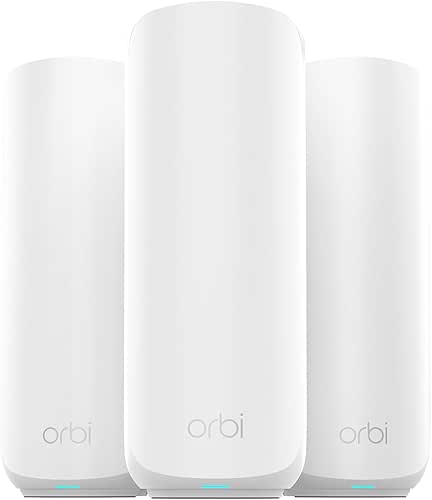
| Best Whole-Home Mesh | Wi‑Fi Standard: WiFi 7 (dual‑band WiFi 7 mesh) | Mesh / Multi‑node Support: Mesh system (router + 2 extenders included) | 2.5G Ports (multi‑gig wired): Includes a 2.5 Gigabit Internet port | VIEW LATEST PRICE | Our Analysis |
| TP-Link Archer BE9300 Wi‑Fi 7 Tri‑Band Router |

| High‑Performance Powerhouse | Wi‑Fi Standard: WiFi 7 (tri‑band) | Mesh / Multi‑node Support: EasyMesh support (can expand with compatible units) | 2.5G Ports (multi‑gig wired): One 2.5G WAN + four 2.5G LAN ports | VIEW LATEST PRICE | Our Analysis |
| ASUS ROG Strix GS-BE12000 WiFi 7 Tri-Band Router |

| Best for Gamers | Wi‑Fi Standard: WiFi 7 (tri‑band) | Mesh / Multi‑node Support: AiMesh compatible (can form mesh with other ASUS units) | 2.5G Ports (multi‑gig wired): One 2.5G WAN + seven 2.5G LAN ports (total wired up to 20G) | VIEW LATEST PRICE | Our Analysis |
| TP-Link Archer AX21 AX1800 WiFi 6 Router |

| Budget-Friendly Starter | Wi‑Fi Standard: WiFi 6 (AX1800) — note: older gen but wireless standard listed | Mesh / Multi‑node Support: Not a mesh kit (single‑router) — supports standard router networking (included for comparison) | 2.5G Ports (multi‑gig wired): Not specified as 2.5G (consumer AX1800 typical Gigabit ports; no 2.5G listed) | VIEW LATEST PRICE | Our Analysis |
| TP-Link Deco 7 Pro BE63 Wi‑Fi 7 Mesh System (3-Pack) |

| Best High-Capacity Mesh | Wi‑Fi Standard: WiFi 7 (tri‑band) | Mesh / Multi‑node Support: Mesh system (3‑pack) | 2.5G Ports (multi‑gig wired): Four 2.5G WAN/LAN ports | VIEW LATEST PRICE | Our Analysis |
More Details on Our Top Picks
NETGEAR Orbi 370 WiFi 7 Mesh System (RBE373)
Should you want a future-proof mesh that prioritizes low-latency gaming and heavy 4K streaming across a large home, pick the NETGEAR Orbi 370 (RBE373); its WiFi 7 speeds up to 5 Gbps, 2.5 Gigabit WAN port, and tri-unit coverage up to 6,000 sq. ft. keep up to 70 devices running smoothly without bottlenecks. You’ll get a dual-band mesh with improved backhaul, a router plus two BE5000 extenders, and backward compatibility for older gear. Automatic firmware updates and Advanced Router Protection tighten security. The compact units fit most setups, and the system’s throughput and range handle gaming, conferencing, and smart-home loads.
- Wi‑Fi Standard:WiFi 7 (dual‑band WiFi 7 mesh)
- Mesh / Multi‑node Support:Mesh system (router + 2 extenders included)
- 2.5G Ports (multi‑gig wired):Includes a 2.5 Gigabit Internet port
- Security Suite / Protections:Built‑in security with automatic firmware updates; Advanced Router Protection
- VPN Support:Automatic firmware/security updates (VPN not explicitly listed)
- Use Cases / Targeted Applications:Home entertainment, hybrid work, smart home (4K streaming, video calls, gaming)
- Additional Feature:Dual‑band Wi‑7 design
- Additional Feature:Includes router + 2 extenders
- Additional Feature:Up to 6,000 sq ft
TP-Link Archer BE9300 Wi‑Fi 7 Tri‑Band Router
Should you want the fastest, lowest‑latency Wi‑Fi 7 experience for 4K/8K streaming and AR/VR gaming, the TP‑Link Archer BE9300 delivers with Multi‑Link Operation, 320 MHz channels and 4K‑QAM to squeeze every bit of throughput from your connections. You get tri‑band speeds (5760/2880/574 Mbps), a 6‑stream design, and low latency for heavy gaming and fast downloads. Six internal antennas with Beamforming and 2,000 sq. ft. coverage reduce dead zones. Full 2.5G ports, EasyMesh, WPA3 IoT isolation, HomeShield protections, built‑in VPN, and Tether app setup give you high capacity, backward compatibility, and simple management.
- Wi‑Fi Standard:WiFi 7 (tri‑band)
- Mesh / Multi‑node Support:EasyMesh support (can expand with compatible units)
- 2.5G Ports (multi‑gig wired):One 2.5G WAN + four 2.5G LAN ports
- Security Suite / Protections:TP‑Link HomeShield (network protection, parental controls, IoT security)
- VPN Support:Built‑in VPN client and server (simultaneous VPN + regular internet)
- Use Cases / Targeted Applications:4K/8K streaming, AR/VR gaming, low‑latency downloads
- Additional Feature:Tri‑band 6‑stream design
- Additional Feature:Six internal antennas
- Additional Feature:Voice assistant compatible
ASUS ROG Strix GS-BE12000 WiFi 7 Tri-Band Router
Should you need top-tier low-latency performance for competitive gaming and high-density wired setups, the ASUS ROG Strix GS-BE12000 is built for you. You get WiFi 7 tri-band speeds up to 12,000 Mbps with 320 MHz 6 GHz channels, 4×4 MIMO, MLO and 4K-QAM for cleaner, faster wireless performance across about 3,000 sq. ft. Hardware includes a 2.0 GHz quad-core CPU, 2 GB RAM, eight internal antennas and sturdy cooling. Wired fans benefit from one 2.5G WAN and seven 2.5G LAN ports (up to 20G total). ROG Gaming Network and Triple-Level AiProtection secure and optimize play.
- Wi‑Fi Standard:WiFi 7 (tri‑band)
- Mesh / Multi‑node Support:AiMesh compatible (can form mesh with other ASUS units)
- 2.5G Ports (multi‑gig wired):One 2.5G WAN + seven 2.5G LAN ports (total wired up to 20G)
- Security Suite / Protections:AiProtection Pro (commercial‑grade Triple‑Level Network Security)
- VPN Support:VPNs supported (Smart Home Master supports SSIDs for VPNs)
- Use Cases / Targeted Applications:Gaming‑focused (ROG Game Acceleration), low‑latency streaming and gaming
- Additional Feature:2.0 GHz quad‑core CPU
- Additional Feature:Seven 2.5G LAN ports
- Additional Feature:ROG game acceleration
TP-Link Archer AX21 AX1800 WiFi 6 Router
Should you want a budget-friendly Wi‑Fi 6 router that boosts speed and capacity for multiple devices, the TP‑Link Archer AX21 (AX1800) is a solid pick — it delivers up to 1.8 Gbps across dual bands (1200 Mbps on 5 GHz, 574 Mbps on 2.4 GHz). You’ll get faster speeds and better multi-device handling via OFDMA and beamforming, plus four high‑gain antennas and an advanced FEM chipset to extend coverage. It needs a separate modem, lacks 6 GHz, and real-world performance depends on distance and obstacles. Security includes OpenVPN/PPTP support and CISA-aligned design; keep firmware updated and use the Tether app.
- Wi‑Fi Standard:WiFi 6 (AX1800) — note: older gen but wireless standard listed
- Mesh / Multi‑node Support:Not a mesh kit (single‑router) — supports standard router networking (included for comparison)
- 2.5G Ports (multi‑gig wired):Not specified as 2.5G (consumer AX1800 typical Gigabit ports; no 2.5G listed)
- Security Suite / Protections:Advanced security; CISA Secure‑by‑Design pledge; VPN server support
- VPN Support:VPN server support (OpenVPN and PPTP)
- Use Cases / Targeted Applications:Home internet, multi‑device usage, improved capacity over previous gen (general home use)
- Additional Feature:Four high‑gain antennas
- Additional Feature:OFDMA multi‑device support
- Additional Feature:AX1800 total bandwidth
TP-Link Deco 7 Pro BE63 Wi‑Fi 7 Mesh System (3-Pack)
Should you’re after blistering local speeds and future-proof capacity, the Deco 7 Pro BE63 is built for gamers and power users who want Wi‑Fi 7’s multi‑link performance and up to six streams across 6 GHz, 5 GHz, and 2.4 GHz. You get tri-band features—Multi-Link Operation, 4K‑QAM, 320 MHz channels—with raw rates of 5188/4324/574 Mbps and a 6‑stream 10 Gbps design. A 3‑pack covers up to 7,600 sq. ft., supports 200+ devices, and offers AI‑Roaming for seamless movement. Four 2.5G ports, USB‑3, dual backhaul, HomeShield security, VPN client/server, Deco app, and voice assistant support round it out.
- Wi‑Fi Standard:WiFi 7 (tri‑band)
- Mesh / Multi‑node Support:Mesh system (3‑pack)
- 2.5G Ports (multi‑gig wired):Four 2.5G WAN/LAN ports
- Security Suite / Protections:TP‑Link HomeShield (network protection, parental controls, IoT security)
- VPN Support:VPN client and server support (simultaneous VPN + regular internet)
- Use Cases / Targeted Applications:High‑capacity home use (seamless roaming, uninterrupted streaming, supports 200+ devices)
- Additional Feature:AI‑driven seamless roaming
- Additional Feature:Covers up to 7,600 sq ft
- Additional Feature:USB 3.0 port
Factors to Consider When Choosing a Mesh Router for Gaming
Once you pick a mesh router for gaming, focus on latency and jitter initially because smooth, consistent response beats raw speed. Check wireless backhaul performance and multi-link operation support to keep node-to-node traffic fast and flexible, and make sure wired port capacity matches your consoles and PC. Finally, enable strong quality of service so you can prioritize game traffic and avoid lag spikes.
Latency And Jitter
Because every millisecond matters in fast-paced multiplayer, you’ll want a mesh setup that keeps end-to-end latency under ~20 ms and jitter below ~5 ms to avoid input lag, stuttering, and inconsistent hit registration. Aim for mesh hardware and firmware that prioritize low round‑trip times: QoS or explicit gaming prioritization keeps your game packets ahead of streaming or large uploads. Use wired or dedicated wireless backhaul where possible and consider Multi‑Link Operation to provide parallel paths and prevent single‑link congestion. Test latency and jitter across peak hours with ping, traceroute, and jitter metrics to your game servers—average throughput won’t reveal real-time performance under load. Choose a mesh that combines prioritization features with reliable, low-variance routing for consistent competitive play.
Wireless Backhaul Performance
Pick a mesh with a strong wireless backhaul—it’s the backbone that keeps node-to-node traffic from clogging your client links and killing gaming performance. Prefer a dedicated backhaul band or a tri-band system that reserves a separate 5 GHz/6 GHz link for node-to-node traffic so clients don’t compete with the mesh for airtime. Make sure backhaul PHY capacity meets or exceeds your internet and LAN needs; a weak backhaul bottlenecks gameplay even whenever client radios show high speeds. Check adaptive backhaul features like automatic band steering and node link aggregation so the system picks the lowest-latency route as conditions change. Finally, evaluate real-world throughput and range through walls and floors—advertised peak rates often fall off dramatically in typical homes.
Multi‑Link Operation Support
Provided you want the smoothest, lowest‑latency gaming on a mesh, look for systems that support Multi‑Link Operation (MLO). MLO lets your device use multiple bands (2.4, 5, 6 GHz) at once, aggregating throughput and smoothing out latency spikes through steering game packets onto the least congested link. That means more consistent frame rates, faster matchmaking, and fewer hiccups during competitive play whenever the network is busy. Verify the mesh implements low‑overhead link switching and preserves packet ordering so parallel links don’t introduce jitter. Keep in mind MLO’s gains only materialize provided your gaming client supports it and usable frequency ranges exist in your environment. In the event client hardware or channels aren’t compatible, MLO won’t improve latency or capacity.
Wired Port Capacity
Consider about wired port capacity as the backbone that keeps your competitive gaming stable and low‑latency. You should prioritize nodes with at least one 2.5 Gbps Ethernet port so consoles or PCs and wired backhaul won’t get bottlenecked. Pick systems with multiple LAN ports per node—four or more—if you plan to hardwire several devices without adding a switch. Verify support for dedicated wired backhaul or the option to configure full‑time Ethernet backhaul to minimize packet loss between nodes. Check the total wired throughput capacity (WAN plus LAN aggregate) to confirm it matches your internet plan and simultaneous streaming or download needs. Finally, consider link aggregation support so you can combine two ports for higher bandwidth to a gaming PC or server.
Quality Of Service
Lock down smooth, low‑latency gameplay through choosing a mesh system with resilient Quality of Service that lets you prioritize specific devices and game traffic. You’ll want per-device QoS and explicit game‑priority rules so consoles or PCs get reserved bandwidth during peak times. Check for latency-optimized features—DSCP traffic classification and packet prioritization—that reduce jitter and keep ping stable for real‑time play. Make sure QoS can enforce uplink/downlink limits and minimum guaranteed throughput so background downloads or streams can’t starve gaming traffic. Prefer meshes with multi-link operation or intelligent backhaul selection that routes game packets over the lowest‑latency path (wired backhaul foremost, then the fastest wireless). Finally, verify QoS applies across router and satellites and supports multiple simultaneous gaming devices without collapsing performance.
Firmware And Security
Because firmware and security directly affect both safety and latency, pick a mesh that gets regular automatic updates and supports modern protections like WPA3, HTTPS/SSH admin access, and intrusion/malware defenses. You’ll want automatic patching to close vulnerabilities without interrupting play, plus reliable rollout so optimizations and QoS settings survive updates. Check for built-in intrusion detection/prevention, malware blocking, and IoT device isolation to shrink the attack surface and prevent disruptive traffic spikes. Prefer firmware with granular QoS or game-prioritization controls so you can enforce low latency for consoles and PCs. Finally, choose a system offering local rollback or manual update control so you can revert immediately in the event an update harms latency or stability, keeping your gaming sessions uninterrupted.
