

Powerful airflow meets whisper-quiet operation, and you shouldn’t have to choose. You’ll find options that cool big rooms fast, slip into a home office without noise, or double as a heater for year-round comfort. I’ll show models that balance performance, smart features, and efficiency so you get the most value without surprises — and help you pick the right fit for your space and budget.
| Lasko 35″ High Velocity Oscillating Tower Fan (U35115) |
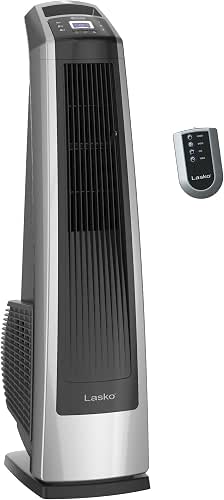
| Best for Powerful Airflow | Oscillation: 35″ oscillation for wide distribution | Speeds / Settings: 3 powerful speeds | Remote Control: Remote control included | VIEW LATEST PRICE | Read Our Analysis |
| 30″ Quiet Oscillating Tower Fan with Remote |

| Best for Quiet Bedrooms | Oscillation: 70° wide-angle oscillation | Speeds / Settings: 3 speeds (plus 3 modes) | Remote Control: Remote included (plus touch panel) | VIEW LATEST PRICE | Read Our Analysis |
| 13″ Bladeless Tower Fan — 70° Oscillating Portable |

| Best for Small Spaces | Oscillation: 70° oscillation | Speeds / Settings: 3 speed settings | Remote Control: Simple knob control (no remote mentioned) | VIEW LATEST PRICE | Read Our Analysis |
| Lasko 1500W Oscillating Tower Fan & Space Heater |

| Best Year-Round Combo | Oscillation: Oscillation for wider air distribution | Speeds / Settings: Fan: 4 speeds; Heat: 3 settings | Remote Control: Multi-function digital remote with storage | VIEW LATEST PRICE | Read Our Analysis |
| Dreo Smart Bladeless Tower Fan with WiFi Voice Control |

| Best Smart Fan | Oscillation: Oscillation function to distribute airflow | Speeds / Settings: 9 speed settings | Remote Control: Remote control included (plus app/voice) | VIEW LATEST PRICE | Read Our Analysis |
| Shark TurboBlade Bladeless Tower Fan (TF202SWH) |

| Best for Versatile Coverage | Oscillation: 180° oscillation | Speeds / Settings: 10 speeds | Remote Control: Remote Control included | VIEW LATEST PRICE | Read Our Analysis |
More Details on Our Top Picks
Lasko 35″ High Velocity Oscillating Tower Fan (U35115)
Should you need powerful, no-nonsense airflow for large rooms or workspaces, the Lasko 35″ High Velocity Oscillating Tower Fan delivers—producing up to 509 CFM with 25% more air velocity than traditional room fans, three strong speeds, and 35″ oscillation to move air across bedrooms, garages, basements, or gyms. You’ll appreciate the slim 9″ x 12″ footprint that saves space compared with pedestal models, the included remote for convenient control, and an automatic timer up to 7 hours. ETL listing and Lasko’s Blue Plug safety fuse add reliability, making this tower fan a practical, high-performance choice for big spaces.
- Oscillation:35″ oscillation for wide distribution
- Speeds / Settings:3 powerful speeds
- Remote Control:Remote control included
- Quiet Operation:Designed for bedroom/indoor use (quiet implied)
- Bladeless / Tower Design:Tower form factor (traditional high-velocity style)
- Timer:Automatic timer up to 7 hours
- Additional Feature:Produces up to 509 CFM
- Additional Feature:35″ wide oscillation
- Additional Feature:Blue Plug safety fuse
30″ Quiet Oscillating Tower Fan with Remote
Should you want a quiet, space-saving fan that’s easy to move from bedroom to communal room, this 30″ oscillating tower with remote is a strong pick—offering whisper-quiet operation at 30 dB, three airflow modes (Normal, Nature, Sleep), and a 70° sweep for whole-room coverage. You’ll get three speeds, a bladeless slim profile (30 × 10.2 × 10.2 inches), and sturdy airflow that cools faster than stationary fans. Use the touch panel or remote to set oscillation, speed, and a 12-hour timer. Tipping the scales at 5.6 lbs with an integrated handle, it’s portable and suitable for all-season use.
- Oscillation:70° wide-angle oscillation
- Speeds / Settings:3 speeds (plus 3 modes)
- Remote Control:Remote included (plus touch panel)
- Quiet Operation:Whisper-quiet operation at 30 dB
- Bladeless / Tower Design:Bladeless 30-inch standing tower fan
- Timer:12-hour timer
- Additional Feature:Whisper-quiet 30 dB
- Additional Feature:70° sweep oscillation
- Additional Feature:Lightweight 5.6 lbs
13″ Bladeless Tower Fan — 70° Oscillating Portable
Should you want a quiet, space-saving fan that’s easy to move from bedroom to desk, this 13″ bladeless tower fan is a smart pick—its ultra-quiet 29 dB operation and 70° oscillation spread airflow evenly while the built-in handle and 3 lb weight make it genuinely portable. You’ll get airflow up to 23 ft/s across bedrooms, offices, or dorms. The slim design fits nightstands and desks, and simple knob controls offer three speeds. It arrives fully assembled and plugs in for immediate use. Energy-efficient operation keeps running costs low, so you’ll stay cool without wasting power.
- Oscillation:70° oscillation
- Speeds / Settings:3 speed settings
- Remote Control:Simple knob control (no remote mentioned)
- Quiet Operation:Ultra-quiet operation at 29 dB
- Bladeless / Tower Design:Bladeless 13″ tower fan
- Timer:(No timer specified)
- Additional Feature:Ultra-quiet 29 dB
- Additional Feature:13″ compact height
- Additional Feature:Weighs 3 lbs
Lasko 1500W Oscillating Tower Fan & Space Heater
Should you want year-round comfort from a single compact unit, the Lasko 1500W oscillating tower fan and space heater is a smart pick — it delivers full-room airflow with a high-reaching tower design and swaps between four quiet fan speeds and three heat settings to suit changing seasons. You’ll control cooling on the upper half (high, medium, low, extra low) and heating below (high, medium, low) while an automatic electronic thermostat maintains your set temperature efficiently. The multi-function digital remote stores onboard, an 8-hour auto-off timer adds convenience, and oscillation broadens coverage. At 12.5 pounds and sleek black styling, it fits home or office spaces.
- Oscillation:Oscillation for wider air distribution
- Speeds / Settings:Fan: 4 speeds; Heat: 3 settings
- Remote Control:Multi-function digital remote with storage
- Quiet Operation:Quiet fan speeds (multi-speed quiet operation)
- Bladeless / Tower Design:Tall tower design (oscillating tower heater/fan)
- Timer:8-hour auto-off timer
- Additional Feature:1500W ceramic heater
- Additional Feature:Digital thermostat control
- Additional Feature:8-hour auto-off timer
Dreo Smart Bladeless Tower Fan with WiFi Voice Control
Should you want a quiet, smart fan you can control from anywhere, the Dreo Smart Bladeless Tower Fan with WiFi Voice Control is a great pick — especially for bedrooms and home offices where low noise and remote access matter. You’ll get Alexa and Google Assistant compatibility, app control via WiFi, and the free DREO App to unify devices. Its motor and air propeller push air at 28 ft/s, with oscillation and nine speeds for targeted cooling. Four modes, a 12-hour timer, and ultra-quiet sleep mode suit overnight use. A large LED shows temp, speed, mode, and a remote’s included.
- Oscillation:Oscillation function to distribute airflow
- Speeds / Settings:9 speed settings
- Remote Control:Remote control included (plus app/voice)
- Quiet Operation:Sleep mode — ultra-quiet overnight operation
- Bladeless / Tower Design:Bladeless, floor-standing tower design
- Timer:12-hour timer
- Additional Feature:WiFi + Alexa/Google
- Additional Feature:9 speed settings
- Additional Feature:Large LED temperature display
Shark TurboBlade Bladeless Tower Fan (TF202SWH)
Should you want quiet, wide-reaching airflow without the fuss of blades, the Shark TurboBlade TF202SWH is a smart pick—it delivers bladeless cooling with 180° oscillation, dual blades, and adjustable height so you can direct a powerful, room-filling breeze where you need it. You get a dove-colored tower and remote control, plus a wipe-clean, Dust Defense design that traps particles and helps longevity. Pivot vertically and horizontally, switch between Tower and Air Blanket modes, and twist vents for multi-directional airflow. Ten speeds and ten noise levels let you fine-tune cooling and white-noise comfort while circulating air efficiently.
- Oscillation:180° oscillation
- Speeds / Settings:10 speeds
- Remote Control:Remote Control included
- Quiet Operation:10 noise levels for quiet/white-noise cooling
- Bladeless / Tower Design:Bladeless TurboBlade tower fan
- Timer:(No timer specified)
- Additional Feature:180° oscillation
- Additional Feature:Pivot Tower/Air modes
- Additional Feature:10 speed/noise levels
Factors to Consider When Choosing a Tower Fan For The Money
While selecting a tower fan for the money, you’ll want to check airflow and velocity to make sure it actually moves enough air for your space. Consider noise levels, coverage and oscillation, and energy efficiency ratings so you get a quiet, cost‑effective unit that cools the right area. Also consider size and portability to be sure it fits your room and can be moved as required.
Airflow And Velocity
Check a fan’s airflow specs—CFM (cubic feet per minute) and peak air velocity (ft/s)—because higher numbers mean stronger air movement and better cooling for larger rooms. Compare both: high velocity with low CFM gives a focused blast, while high CFM with moderate velocity delivers broader, gentler circulation. Observe oscillation angle (35°–180°); wider sweep spreads airflow across more of the room rather than a single stream. Look for vertical tilt or directional vents to add multi‑directional coverage without needing a huge max CFM. Choose a model with multiple speed settings (3–10+) so you can fine‑tune peak airflow versus energy use. Prioritize the combination of CFM, velocity, sweep, and adjustability for practical, room‑wide comfort.
Noise Levels And Quietness
Because the quietness of a tower fan affects sleep, work, and general comfort, you’ll want to compare decibel ratings and real‑world noise at different speeds rather than relying on marketing claims. Measured levels typically span about 29 dB (ultra‑quiet/sleep) to 50+ dB (high), so check specs and independent tests. Favor models with multiple speeds and a dedicated sleep or low‑noise mode so you can cut rpm—and noise—without losing usable airflow. Bladeless or enclosed‑impeller designs often sound smoother and less turbulent than exposed blades at similar output. Also compare advertised noise relative to airflow (dB per CFM) to judge acoustic efficiency. Remote, timer, or app controls let you keep the fan at quieter settings without getting up.
Coverage And Oscillation
In case you want even airflow across a room, prioritize wide-angle oscillation—ideally 70° or more—and match the tower’s height and sweep to the space so the breeze reaches where people actually sit or sleep. Choose taller towers with wider sweeps for residential rooms and open areas; pick compact units with shorter oscillation for desks or nightstands. Check coverage metrics like CFM, feet-per-second, or claimed room-size to estimate real-world performance. For whole-room cooling, favor multi-directional or pivoting heads and longer oscillation ranges to circulate air instead of a narrow focused stream. Confirm adjustable oscillation speeds and patterns—continuous sweep, intermittent, or set-angle options—so you can tailor coverage for sleeping, working, or hosting without overcooling specific spots.
Energy Efficiency Ratings
At the moment you’re sizing up tower fans, energy efficiency should be as essential as airflow—look beyond advertised speeds to watts-per-setting and CFM/W so you know how much cooling you get for each watt used. Check power draw at each speed: typical fans use about 20–70 W on low/medium and 40–100+ W on high, so lower-watt models cost less to run. Compare airflow-per-watt (CFM/W): higher CFM/W delivers more cooling per watt and cuts operating costs. Prefer fans with multiple speeds, eco/sleep modes, and timers so you can reduce runtime. Look for brushless DC (BLDC) motors—they typically save 20–50% versus AC motors and keep efficiency across speeds. Estimate annual cost: watts × hours/day × days/year × your electricity rate.
Size And Portability
While choosing a tower fan, consider about where you’ll use it and how often you’ll move it: height and footprint determine whether a fan suits a desk, bedside, or full room, while weight and handles affect how easy it is to carry and store. Pick a height that matches the space—compact ~13″ units for desks, 30–40″ models for full-room coverage with a 9–13″ footprint. Check depth: slim profiles as narrow as 9–10″ fit tight spots or against furniture. Should you move the fan often, favor lightweight (3–6 lbs) units with integrated, easy-grip handles and a low center of gravity to reduce tipping. For multi-room use, choose taller, oscillating towers that spread air vertically so you don’t have to relocate the fan.
Control Options Available
Because you’ll use your tower fan from different spots and at different times, choose one with multiple control methods—physical buttons, a remote, and app/Wi‑Fi—so you can adjust settings whether you’re up close or across the room. Also look for clear interfaces: labeled touch panels or an LED display let you confirm speed, mode, oscillation angle, and remaining timer at a glance. Prioritize fans offering precise speed and mode choices (typically 3–10 speeds and sleep/nature/auto modes) so you can match airflow and noise to activities. Timers and programmable schedules (common ranges 1–12 hours) automate comfort and save energy. In case you use smart home routines, pick models with reliable smartphone apps and voice assistant compatibility for hands‑free control.
Safety Features Included
Many buyers prioritize safety features whenever choosing a tower fan, and you should too: look for ETL or UL listings, fused plugs or thermal cutoffs, tip‑resistant bases, enclosed or bladeless designs, and automatic shutoffs so the unit won’t overheat, fall, or expose fingers to moving parts. Check certification marks to confirm independent electrical and performance testing. A fused plug or built‑in thermal cutoff cuts power during faults, lowering fire risk. Prefer stable, low‑center‑of‑gravity bases in case you have pets or kids to reduce tipping. Choose bladeless models or tight grills to prevent finger access to spinning parts. Automatic timers and overheat protection add a safety net should you forget to turn the fan off, shutting the unit down before temperatures get dangerous.
Additional Functionality
Should you want a tower fan that fits varied needs, prioritize extra functionality like multiple speed settings and operating modes so you can fine‑tune airflow and noise for daytime, sleep, or workout use. Look for 3–10 speeds and modes labeled normal, nature, and sleep to match activity and noise tolerance. Built‑in timers (7–12 hours) and auto‑off save energy and let you schedule runtime. Choose smart connectivity—Wi‑Fi, app control, and voice assistant compatibility—if you want remote control and automated schedules. Extra features like heating elements, wide oscillation, and adjustable vertical/horizontal pivoting enhance year‑round coverage. Finally, verify usability with a remote, responsive touch panel, and a clear display that shows speed, mode, timer, and temperature for quick adjustments.
