

Most ISPs still allow third‑party DSL modem‑routers provided they support TR‑069 provisioning and the right VDSL2 profiles, but many people don’t realize how much that choice affects real‑world Wi‑Fi speeds. You’ll want AX‑class radios, solid DSL features like vectoring and bonded pairs, and gigabit ports with link aggregation to avoid bottlenecks. Keep going to see top vetted models and what each one fixes for typical home setups.
| NETGEAR Nighthawk CAX30 Modem Router Combo (AX2700) |

| Best for Cable Gigabit | DSL/Cable Compatibility Type: Cable modem (DOCSIS 3.1) — not DSL | Wi‑Fi Bands / Standard: Dual‑band Wi‑Fi 6 (AX2700) | Wired Ethernet Ports: Four 1 Gigabit Ethernet ports (port aggregation supported) | VIEW LATEST PRICE | Read Our Analysis |
| ZyXEL C3000Z Modem CenturyLink |

| Best for CenturyLink DSL | DSL/Cable Compatibility Type: DSL (VDSL2, ADSL2+), CenturyLink-focused | Wi‑Fi Bands / Standard: Dual‑band Wi‑Fi (2.4 GHz + 5 GHz) — standard not specified (likely AC) | Wired Ethernet Ports: Four Gigabit Ethernet ports | VIEW LATEST PRICE | Read Our Analysis |
| CenturyLink Technicolor C1100T Vdsl2 Modem 802.11n WiFi Router |
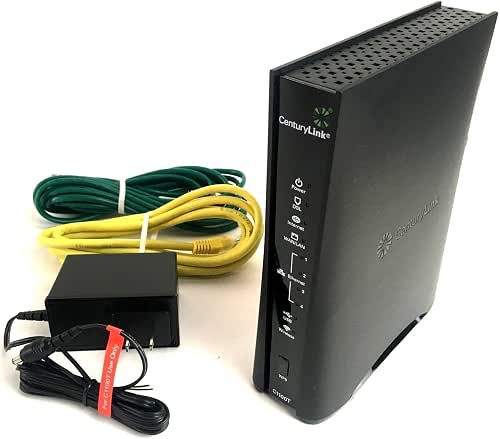
| Best for Basic DSL Homes | DSL/Cable Compatibility Type: DSL (VDSL2, ADSL2/ADSL2+), CenturyLink deployment | Wi‑Fi Bands / Standard: Single‑band 2.4 GHz 802.11n | Wired Ethernet Ports: Four Gigabit LAN ports + 1 Gigabit WAN port (auto‑sensing) | VIEW LATEST PRICE | Read Our Analysis |
| C4000BG CenturyLink Bonded Line Wi Fi DSL Router |

| Best for Bonded Line Performance | DSL/Cable Compatibility Type: Bonded DSL (ADSL/VDSL up to 17a), CenturyLink-focused | Wi‑Fi Bands / Standard: Dual‑band 802.11ac (supports 160 MHz/channel) | Wired Ethernet Ports: (Implied) Gigabit Ethernet LAN ports for whole‑home (exact count not listed) | VIEW LATEST PRICE | Read Our Analysis |
More Details on Our Top Picks
NETGEAR Nighthawk CAX30 Modem Router Combo (AX2700)
Should you want a single device that replaces both a cable modem and a Wi‑Fi 6 router, the NETGEAR Nighthawk CAX30 is a strong pick—its DOCSIS 3.1 modem and AX2700 dual‑band radio deliver up to 2.7 Gbps and cover about 2,000 sq. ft., making it ideal for households with up to ~25 connected devices. You’ll get wide provider compatibility (Xfinity, Charter, Cox) but it won’t work with Verizon, AT&T, CenturyLink, DSL, DirecTV, DISH, or bundled voice. You can aggregate its two gigabit ports, use the USB 3.0, enable NETGEAR Armor trial, and manage everything in the Nighthawk app.
- DSL/Cable Compatibility Type:Cable modem (DOCSIS 3.1) — not DSL
- Wi‑Fi Bands / Standard:Dual‑band Wi‑Fi 6 (AX2700)
- Wired Ethernet Ports:Four 1 Gigabit Ethernet ports (port aggregation supported)
- Provider Target / Certification:Certified for major cable providers (Xfinity, Spectrum, Cox)
- Security / Management Features:NETGEAR Armor (threat protection trial), Nighthawk app management
- Performance Enhancements / Technologies:DOCSIS 3.1, 32×8 channel bonding, Wi‑Fi 6 (up to 2.7 Gbps)
- Additional Feature:Replaces modem + router
- Additional Feature:USB 3.0 port
- Additional Feature:NETGEAR Armor trial
ZyXEL C3000Z Modem CenturyLink
Should you need a CenturyLink-ready modem router that’s tuned for reliable VDSL2 speeds, the ZyXEL C3000Z fits the bill—it’s tested for CenturyLink activation and handles HD streaming, gaming, and video calls without fuss. You’ll get VDSL2 and ADSL2+ support for fast and fallback connections, dual-band Wi‑Fi to split 2.4/5 GHz traffic, and four Gigabit Ethernet ports for wired devices or mesh backhaul. Security includes WPA2 and a built-in firewall, while TR-069 enables remote management. This unit is professionally renewed, factory-reset, and ships with a compatible power supply and Ethernet cable for easy self-installation.
- DSL/Cable Compatibility Type:DSL (VDSL2, ADSL2+), CenturyLink-focused
- Wi‑Fi Bands / Standard:Dual‑band Wi‑Fi (2.4 GHz + 5 GHz) — standard not specified (likely AC)
- Wired Ethernet Ports:Four Gigabit Ethernet ports
- Provider Target / Certification:Designed and tested for CenturyLink DSL
- Security / Management Features:WPA2 encryption, firewall, TR‑069 remote management
- Performance Enhancements / Technologies:VDSL2 and ADSL2+ support for faster DSL speeds
- Additional Feature:Professionally renewed condition
- Additional Feature:Includes power + cable
- Additional Feature:TR-069 remote management
CenturyLink Technicolor C1100T Vdsl2 Modem 802.11n WiFi Router
Should you want a reliable, ISP‑friendly modem router for CenturyLink’s VDSL2 service, the Technicolor C1100T is a straightforward choice: it supports VDSL2 with vectoring and G.INP for cleaner, faster DSL connections, while offering basic 2.4 GHz 802.11n Wi‑Fi and four gigabit LAN ports for wired devices. You’ll get ADSL2/2+ fallback, 2×2 MIMO coverage for smart home gear and HD streaming, plus an auto‑sensing Gigabit WAN port. TR‑069 zero‑touch provisioning and remote management simplify setup and support. Dual‑stack IPv4/IPv6 future‑proofs your network, and LED indicators speed troubleshooting.
- DSL/Cable Compatibility Type:DSL (VDSL2, ADSL2/ADSL2+), CenturyLink deployment
- Wi‑Fi Bands / Standard:Single‑band 2.4 GHz 802.11n
- Wired Ethernet Ports:Four Gigabit LAN ports + 1 Gigabit WAN port (auto‑sensing)
- Provider Target / Certification:Designed for CenturyLink deployments (ISP‑provisioned)
- Security / Management Features:TR‑069 remote management, provisioning; standard ISP management features
- Performance Enhancements / Technologies:VDSL2 with vectoring, G.vector and G.INP for noise protection
- Additional Feature:G.vector & G.INP
- Additional Feature:Intuitive LED indicators
- Additional Feature:Zero-touch provisioning
C4000BG CenturyLink Bonded Line Wi Fi DSL Router
Should you need reliable bonded‑DSL performance and whole‑home Wi‑Fi under a single SSID, the C4000BG is a smart pick: it’s built for CenturyLink bonded lines and delivers up to 3 Gbps aggregate throughput (600 + 2400 Mbps) with 2‑stream connectivity so you’ll get smoother 4K streaming and faster device performance across the house. You’ll benefit from 160 MHz channel support and 1024‑QAM for noticeably higher rates on compatible devices. It uses 802.11ac, supports ADSL and VDSL up to profile 17a, and prioritizes high‑bandwidth gear like phones, laptops, and 4K TVs for consistent whole‑home coverage.
- DSL/Cable Compatibility Type:Bonded DSL (ADSL/VDSL up to 17a), CenturyLink-focused
- Wi‑Fi Bands / Standard:Dual‑band 802.11ac (supports 160 MHz/channel)
- Wired Ethernet Ports:(Implied) Gigabit Ethernet LAN ports for whole‑home (exact count not listed)
- Provider Target / Certification:Optimized for CenturyLink bonded DSL deployments
- Security / Management Features:Router management/ISP deployment features (single SSID, optimized Wi‑Fi) — advanced provisioning implied
- Performance Enhancements / Technologies:Bonded DSL support, 160 MHz channels, 1024‑QAM for higher throughput
- Additional Feature:Bonded line support
- Additional Feature:Single SSID whole-home
- Additional Feature:160 MHz channel support
Factors to Consider When Choosing a DSL Modem Router
Upon choosing a DSL modem router, you’ll want to confirm it’s compatible with your ISP and supports the specific DSL technology they use. Check wireless standards and speeds to match your devices, and consider coverage needs so signal reaches every room. Also look at wired ports and expansion options for wired devices and future upgrades.
Internet Service Compatibility
Because your ISP’s network and features determine whether a modem router will actually work, check compatibility before you buy: confirm the device supports your DSL type (VDSL2, ADSL2+/ADSL2), is provisionable on the provider’s network (TR-069 or vendor profiles whenever required), and handles any line improvements your plan uses (vectoring, G.INP, bonding). Next, verify WAN/LAN port types and speeds — Gigabit Ethernet and auto‑sensing reduce bottlenecks and match ONUs or bonded pairs. Ask your ISP whether they permit third‑party hardware and in case they push firmware or remote‑management updates; some carriers block non‑approved devices or require their provisioning to stay online. Finally, check support documentation or a compatibility list from both vendor and ISP to avoid activation headaches and unexpected service limitations.
DSL Technology Support
Should you want reliable speeds and fewer headaches, pick a modem‑router that directly supports your DSL type and the specific features your line uses. Confirm ADSL2/ADSL2+ for older copper, VDSL2 for faster runs, and bonded VDSL should your ISP aggregates pairs. Check supported profiles (Annex A/B/M; VDSL2 17a, 30a) so the device negotiates correctly and your service activates at full capacity. For noisy lines, prefer VDSL2 with vectoring and G.INP to cut crosstalk and retransmissions, improving stability and throughput. Verify bonded‑line handling should your plan uses multi‑pair aggregation to enhance aggregate bandwidth. Finally, make sure the modem‑router receives firmware updates and supports provisioning protocols like TR‑069 for long‑term compatibility and easy ISP configuration.
Wireless Standards And Speed
Should you want your DSL modem‑router to deliver fast, reliable Wi‑Fi throughout the home, pick a model that supports modern standards (Wi‑Fi 6/802.11ax or at least Wi‑Fi 5/802.11ac) and the channel widths, modulation, and multi‑user features that actually boost real‑world throughput. Check for 80 MHz or 160 MHz channel support and 1024‑QAM—these raise peak data rates versus 20/40 MHz and 256‑QAM. Match advertised class (AX2700, AC1900) to your plan and household demand; headline speeds aren’t sustained with many devices. Prefer dual‑band or tri‑band designs to separate traffic and reduce contention. Also prioritize MU‑MIMO, OFDMA, beamforming, and higher spatial‑stream counts so the router serves multiple clients efficiently, lowering latency and improving usable throughput across simultaneous connections.
Coverage And Range Needs
Coverage matters: match the router’s stated range to your home’s square footage and layout, and account for walls, floors, and building materials that will shrink effective reach. Check advertised coverage (for example, 1,500–2,000 sq. ft.) against your floor plan; a two‑story house or many interior walls needs more than a single‑node unit.
Choose multi‑band routers so you can use 2.4 GHz for broader reach and 5 GHz for higher throughput where devices sit close. Inspect antenna design and MIMO/beamforming specs (2×2, 3×3, etc.)—more spatial streams and beamforming enhance range and reliability for many clients. Should you have dead zones, multiple floors, or heavy‑attenuation materials like brick or concrete, plan mesh or multi‑node deployments and place nodes to avoid signal-blocking barriers.
Wired Ports And Expansion
Range and wireless features only tell part of the story; the wired ports and expansion options determine how many high‑speed devices you can actually plug in and how flexible your network will be. Check how many Gigabit LAN ports you get — more means you can connect PCs, NAS, and smart TVs at full speed without buying a switch. Verify WAN/DSL port types (Ethernet WAN, VDSL/ADSL) and whether port aggregation is supported so you match your ISP hookup and enhance combined throughput. Look for a dedicated Gigabit WAN or SFP for future fiber or external modem use. Should you’ll attach storage or printers, prefer USB 3.0 and confirm supported file‑sharing protocols. Finally, assess expansion like spare RJ‑11 for bonding, VLAN tagging, or built‑in switch vs needing an external managed switch.
Security And Parental Controls
Security and parental controls are core features you shouldn’t overlook as you pick a DSL modem router, because they directly shape how safe and manageable your home network will be. Look for built-in firewalls and WPA3 (or at least WPA2) encryption to block unauthorized access and modern attack vectors. Choose routers with granular parental controls—per-device schedules, category-based content filtering, and safe-search enforcement—to manage screen time and content. Prioritize user profiles and customizable access rules so teens, young children, and guests get different restrictions. Consider logging and real-time monitoring or alerts to review browsing history, blocked sites, and suspicious activity quickly. Finally, opt for secure remote management via apps or web portals with two-factor authentication for safe off-site control.
ISP Provisioning Support
Good network defenses won’t help provided your ISP can’t configure or activate the modem-router you choose. Check that the unit supports your carrier’s provisioning protocols (TR-069, TR-111, or DHCP-based provisioning) so they can auto-configure and manage it. Verify compatibility with your service type—ADSL, VDSL/VDSL2, bonded DSL, or fiber WAN—since signaling and profiles must match for successful provisioning. Confirm support for remote management and zero-touch provisioning so technicians can push firmware, profiles, and troubleshooting without onsite setup. Make sure the router accepts ISP requirements like VLAN tagging, PPPoE credentials, or static IPs for your subscription tier. Finally, ask the ISP whether they register third-party devices, provide device-specific firmware, or whitelist approved models to avoid activation issues.
Future Proofing Features
When you pick a DSL modem-router, favor models that support current and emerging DSL standards (VDSL2 with vectoring/G.INP and ADSL2+), dual‑stack IPv4/IPv6, and modern Wi‑Fi (Wi‑Fi 5/6 with wider channel widths and higher QAM) so the box can handle faster profiles, tougher line conditions, and next‑generation devices without needing an early replacement. You should also insist on gigabit Ethernet ports, preferably with port aggregation, plus USB 3.0 for future NAS or wired-device expansion. Verify firmware update cadence, remote management support (TR‑069) and ongoing security patches so your router stays compatible and protected as ISPs evolve. Prioritize hardware that matches ISP provisioning and offers expandable features rather than lowest upfront cost.
