

Nearly 80% of office workers report improved comfort after switching to a sit-stand setup, so you’ll want a converter that actually performs. You’ll find heavy-duty electric frames, nimble gas-spring risers, and mobile wheeled desks suited to different spaces and loads. I’ll walk you through five top options for 2026 and the key features that matter, so you can pick the best fit for your workflow and gear.
| ErGear Adjustable Electric Standing Desk Frame (Black) |

| Best Motorized Option | Height range: 28.3″–46.5″ | Adjustment mechanism: Electric motor (control panel) | Work surface dimensions: Compatible desktop length 39.4″–63.3″ (depth 24″–30″) | VIEW LATEST PRICE | Read Our Analysis |
| JOY Worker 31″ Standing Desk Converter — Grey |

| Compact Dual-Monitor Ready | Height range: 1.8″–16″ | Adjustment mechanism: Gas-spring with squeeze-handle | Work surface dimensions: 31.3″ × 19.7″ | VIEW LATEST PRICE | Read Our Analysis |
| JOY Worker 31″ Compact Height-Adjustable Standing Desk Riser |
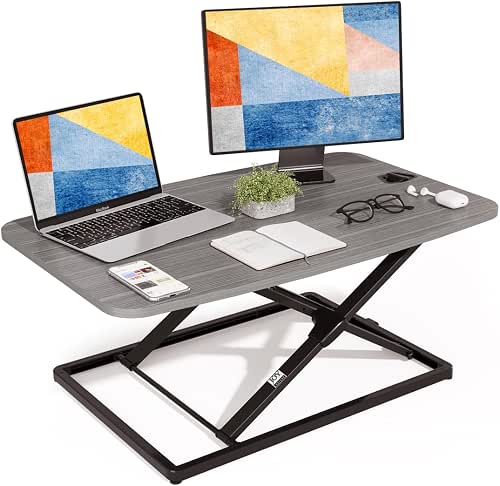
| Low-Profile Performer | Height range: 1.8″–16″ | Adjustment mechanism: Gas-spring with squeeze-handle | Work surface dimensions: 31.3″ × 19.7″ | VIEW LATEST PRICE | Read Our Analysis |
| Mobile Standing Desk on Wheels with Drawer and Storage |

| Most Versatile Mobile Desk | Height range: 27.3″–43.3″ | Adjustment mechanism: Gas-spring | Work surface dimensions: 27.6″ × 19.7″ | VIEW LATEST PRICE | Read Our Analysis |
| Mobile Standing Desk on Wheels with Drawer (Black) |

| Best Mobile Value | Height range: 27.3″–43.3″ | Adjustment mechanism: Gas-spring | Work surface dimensions: 27.6″ × 19.7″ | VIEW LATEST PRICE | Read Our Analysis |
More Details on Our Top Picks
ErGear Adjustable Electric Standing Desk Frame (Black)
In case you need a heavy-duty, electric sit-stand solution that recalls your preferred heights, the ErGear Adjustable Electric Standing Desk Frame is a strong choice: it raises from 28.3″ to 46.5″, stores four memory presets, and moves quietly with anti-collision protection, making it ideal for power users who switch positions often. You’ll fit desktops 39.4″–63.3″ long and 24″–30″ deep, with crossbars 35.4″–53.1″ and 16.2″ fixed width. The steel frame supports 176 lbs, runs at about 55 dB, and uses an intuitive control panel. It includes labeled hardware, clear instructions, a 5/2-year warranty split, and U.S. support.
- Height range:28.3″–46.5″
- Adjustment mechanism:Electric motor (control panel)
- Work surface dimensions:Compatible desktop length 39.4″–63.3″ (depth 24″–30″)
- Portability / mobility:Fixed frame (no casters) — stationary
- Load capacity:Up to 176 lbs
- Assembly / setup:Requires assembly; labeled hardware & instructions
- Additional Feature:Four memory presets
- Additional Feature:Anti-collision technology
- Additional Feature:5-year frame warranty
JOY Worker 31″ Standing Desk Converter — Grey
Should you need a compact, sturdy sit-to-stand solution for a laptop or one to two monitors, the JOY Worker 31″ is built for you—its 31.3 x 19.7-inch surface and 22 lb capacity handle typical home-office setups while the 1.8–16 inch gas-spring lift moves smoothly with a squeeze-handle for quick shifts. You’ll appreciate the low-profile 1.8-inch fully lowered height and double X-shaped heavy-duty frame that keeps wobble minimal. The gas spring’s 10,000-cycle testing suggests reliable daily use. It arrives pre-assembled, so you can start standing or sitting right away without tools or fuss.
- Height range:1.8″–16″
- Adjustment mechanism:Gas-spring with squeeze-handle
- Work surface dimensions:31.3″ × 19.7″
- Portability / mobility:Desktop converter — placed on desk (no casters)
- Load capacity:Up to 22 lbs
- Assembly / setup:No assembly; ships pre-assembled
- Additional Feature:No assembly required
- Additional Feature:Ultra low-profile design
- Additional Feature:Tested 10,000 cycles
JOY Worker 31″ Compact Height-Adjustable Standing Desk Riser
Should you want a compact, ready-to-use riser that’s built for frequent height changes, the JOY Worker 31″ delivers: its gas-spring lift lets you squeeze the handle to shift from 1.8″ to 16″ instantly and reliably, and the double X-shaped frame distributes weight evenly so your monitors stay steady up to 22 lbs. You get a 31.3 x 19.7-inch surface that fits single or dual monitor and laptop combos without hogging desk space. It ships pre-assembled, low-profile at 1.8 inches once lowered, and its gas spring is rated for 10,000 cycles, so you’ll trust it day after day.
- Height range:1.8″–16″
- Adjustment mechanism:Gas-spring with squeeze-handle
- Work surface dimensions:31.3″ × 19.7″
- Portability / mobility:Desktop converter — placed on desk (no casters)
- Load capacity:Up to 22 lbs
- Assembly / setup:No assembly; ships pre-assembled
- Additional Feature:Ships pre-assembled
- Additional Feature:Double X-frame stability
- Additional Feature:Low 1.8″ thickness
Mobile Standing Desk on Wheels with Drawer and Storage
Should you need a compact, mobile workstation that keeps essentials organized, this mobile standing desk on wheels with drawer and storage is a great pick for remote workers and small-space dwellers. You get a 27.6 × 19.7-inch wooden top for a laptop and essentials, plus a 14.4 × 8.4 × 1.3-inch drawer, cup holder, dedicated slots, and two hooks. A gas spring lifts from 27.3 to 43.3 inches, and four lockable casters glide on carpet; the low-profile 1.2-inch base tucks under furniture. The 65 × 65 mm metal frame enhances stability. Pre-drilled parts, a 20-minute setup, manuals, video, and tech support complete it.
- Height range:27.3″–43.3″
- Adjustment mechanism:Gas-spring
- Work surface dimensions:27.6″ × 19.7″
- Portability / mobility:Mobile with four lockable casters
- Load capacity:Not explicitly stated (heavy-duty metal frame)
- Assembly / setup:Quick assembly; pre-drilled, ~20 minutes
- Additional Feature:Integrated storage drawer
- Additional Feature:Cup holder & slots
- Additional Feature:Two headset/backpack hooks
Mobile Standing Desk on Wheels with Drawer (Black)
Should you need a sturdy, highly mobile workspace that doubles as storage, this mobile standing desk on wheels with a drawer is ideal — it lets you switch from sitting to standing with a smooth gas-spring lift (27.3–43.3 in) while keeping essentials organized in a 14.4 × 8.4 × 1.3 in drawer, cup holder, and dedicated slots. The 27.6 × 19.7 in eco-friendly wood desktop fits a laptop and basics. A 65 × 65 mm metal frame adds stability; low-profile 1.2 in base lets wheels tuck under furniture. Four lockable casters, two types included, aid mobility. Assembly takes about 20 minutes; manufacturer support available.
- Height range:27.3″–43.3″
- Adjustment mechanism:Gas-spring
- Work surface dimensions:27.6″ × 19.7″
- Portability / mobility:Mobile with four lockable casters
- Load capacity:Not explicitly stated (sturdy 65×65 mm frame)
- Assembly / setup:Quick assembly; pre-drilled, ~20 minutes
- Additional Feature:Two caster types included
- Additional Feature:Thick 65×65 mm frame
- Additional Feature:Detailed install video
Factors to Consider When Choosing an Adjustable Standing Desk Converter
Upon choosing a standing desk converter, you should check the height range to make sure it fits your standing and sitting postures and the weight capacity to support your monitor and accessories. Look at the adjustment mechanism and surface area to confirm smooth operation and enough workspace, and evaluate stability and build for long-term durability. These factors together determine comfort, safety, and whether the converter meets your daily needs.
Height Range
Although it’s tempting to focus on size or price, the height range is the single most vital ergonomic factor for a standing desk converter, because it determines whether your monitor and keyboard will sit at healthy positions for both sitting and standing. You should measure floor-to-eye height standing and subtract desk thickness to confirm the converter’s max height puts the monitor top at or slightly below eye level. Check the minimum height so your keyboard and wrists stay neutral while seated, avoiding upward reach. Pick a unit that covers the difference between your seated and standing elbow heights—typically 10–20 inches. Prefer models with fine incremental adjustments and lock positions, and verify the travel maintains stable viewing angles and keyboard ergonomics across the full range.
Weight Capacity
Check the converter’s maximum load rating and make sure it comfortably exceeds the combined weight of your monitor(s), laptop, docking station, and accessories—add a 20–30% safety margin to cover variable loads. Also confirm the rating at maximum extension, since many gas-spring and mechanical systems support less weight when fully raised. Watch load distribution: heavy screens or peripherals off-center can tilt or overstress the frame despite being under the total limit. Should you run dual monitors or large displays, choose converters with higher capacities and reinforced geometries (X-frame or strengthened platforms) to reduce sag and wobble. Don’t exceed the rated capacity; doing so can damage the mechanism, shorten lifespan, void warranties, and create safety hazards.
Adjustment Mechanism
Because you’ll be switching positions frequently, choose an adjustment mechanism that matches how often and how easily you want to change heights: gas-spring systems give quick, smooth manual lifts, while electric/motorized units offer push-button ease and programmable presets. Check the height range and travel distance to confirm it covers your seated and standing ergonomics—converters can be low-profile (~1.8″) or extend 16″ or more. Match lift capacity to the combined weight of monitors and accessories, and favor mechanisms rated for tens of thousands of cycles for durability. Decide between tactile manual levers or electric controls with memory presets and finer increments. Finally, verify stability at full extension; reinforced frames or dual-support designs reduce wobble once the unit’s raised to taller positions.
Surface Area
Consider how much real estate you need: pick a converter surface wide and deep enough to hold your monitors, laptop, keyboard, and any peripherals without crowding. Aim for at least 30–32 inches wide should you use a single monitor with a laptop, and 40+ inches for dual monitors. Depth should be 18–20 inches minimum so monitor stands or a laptop plus keyboard fit while keeping proper viewing distance. Match the surface’s weight capacity to your gear—many converters support 20–50+ lbs—so total monitor, stand, and dock weight won’t exceed limits. Decide between two-tier or large single-surface designs depending on whether you prefer separate keyboard placement. Look for edges, lips, or cable-routing features to keep items and cords secure during height changes.
Stability And Build
During the period you raise your converter, its build determines whether your setup stays solid or starts to wobble, so prioritize sturdy frame materials like steel, reinforced crossbars, and a mechanism rated for high cycle counts; also make sure the listed weight capacity comfortably exceeds the combined weight of your monitors, laptop, and accessories. Check that hinges or gas springs are tested for 10,000+ cycles so stability won’t degrade. Inspect base footprint and contact points—a wider base plus anti-slip pads improves steadiness on carpet or uneven floors. Verify locking mechanisms, anti-collision features, and minimal lateral movement at full height; advertised noise and wobble ratings help here. These factors keep your converter reliable and safe during daily use.
Portability And Wheels
Consider how often you’ll move or stow your converter: portability affects both daily convenience and long-term usability. Check weight and footprint—models under about 25 lbs and compact bases are far easier to lift, carry, and tuck away. See whether casters are built in or attachable; they should lock securely so the unit won’t wander during use. Inspect base clearance and wheel profile—low-profile casters with roughly 1–1.5 inches clearance let the converter slide under desks or storage spaces. Prefer quick-release, folding, or pre-assembled designs that let you transport and set up without tools. Finally, verify stability while mobile: thicker frame sections and stout wheel mounts cut wobble when you roll the converter across carpet or hard floors.
Noise And Smoothness
Once you raise or lower a converter, the adjustment mechanism determines both how quietly it operates and how smoothly it moves; electric motors tend to be the quietest and most consistent, while gas springs and manual levers can produce more noise or uneven travel. Check manufacturer noise specs or decibel ratings whenever available—a 10 dB difference sounds roughly twice as loud. Look for damped or guided lifts, anti-collision, or soft-start controls to minimize jerks and abrupt stops. Match load capacity to your monitor, laptop, and accessories; overloaded units often move slower, feel less smooth, and generate more mechanical noise. Finally, read user tests and cycle-life ratings to confirm repeatability and whether noise or roughness increases after thousands of raises and lowerings.
Warranty And Support
Noise and smoothness matter, but so does grasping who’ll support you once a mechanism fails or gets noisy after heavy use. Check warranty length and specifics—frames and mechanical parts often have different coverage—so you know what’s protected and for how long. Confirm whether labor, shipping, or replacement parts are included and provided that claim fees or return-shipping costs apply. Look for clear support channels (phone, email, chat) with stated response times so you get timely help for assembly or malfunctions. Verify conditions that void coverage, like unauthorized repairs, overloads, or improper assembly, to avoid accidental invalidation. Prefer brands that publish manuals, troubleshooting guides, and replacement-part lists and supply spare parts easily to extend grasping.
