

To maximize your desk space in 2026, consider these top keyboard drawers: HUANUO’s large tray with a drawer offers smooth sliding and ample room; VIVO’s tray lets you adjust height with extra extension; AX WABER provides a wide pull-out design; Kensington SmartFit adds ergonomic height guidance; BONTEC fits thicker desks with a sturdy clamp. Each balances space-saving with comfort. Keep exploring to uncover which features suit your setup and work style best.
| HUANUO Large Under Desk Keyboard Tray with Drawer |

| Best for Storage | Tray Dimensions (Platform Size): 25.59″ x 11.81″ | Mounting Method: Dual C-clamps (0.39″–1.57″ thick desks) | Weight Capacity: 11 lbs | VIEW LATEST PRICE | Read Our Analysis |
| VIVO Large Under Desk Keyboard and Mouse Tray |
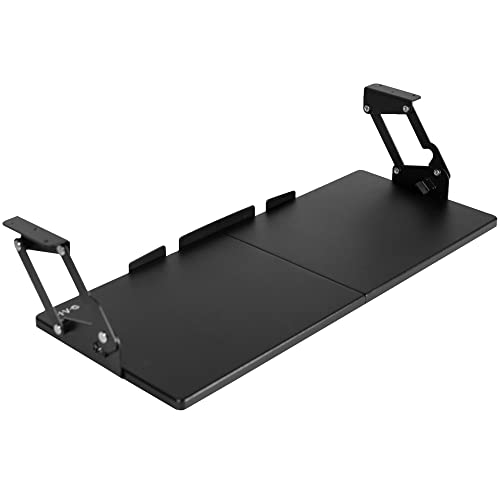
| Best Adjustable Swing | Tray Dimensions (Platform Size): 26.8″ x 11″ | Mounting Method: Under desk mount with mounting bracket (requires 4″ clearance) | Weight Capacity: 11 lbs | VIEW LATEST PRICE | Read Our Analysis |
| AX WABER Under Desk Pull-Out Keyboard Tray |

| Sturdiest Clamp Mount | Tray Dimensions (Platform Size): 27.3″ x 8.3″ | Mounting Method: Sturdy C-clamp mount (up to 1.9″ desk thickness) | Weight Capacity: 11 lbs | VIEW LATEST PRICE | Read Our Analysis |
| Kensington SmartFit Ergonomic Under Desk Keyboard Tray |

| Best Ergonomic Fit | Tray Dimensions (Platform Size): 24.5″ width x 11.75″ depth (inner tray) | Mounting Method: Under desk slide-out drawer mount | Weight Capacity: Not explicitly specified but supports keyboard, wrist rest, mouse | VIEW LATEST PRICE | Read Our Analysis |
| BONTEC KMT01 Under Desk Keyboard Tray with C-Clamp |

| Best No-Drill Installation | Tray Dimensions (Platform Size): 25.6″ x 11.8″ | Mounting Method: No-drill C-clamps (up to 1.57″ desk thickness) | Weight Capacity: 11 lbs | VIEW LATEST PRICE | Read Our Analysis |
More Details on Our Top Picks
HUANUO Large Under Desk Keyboard Tray with Drawer
Provided you need a keyboard drawer that fits desks up to 1.57 inches thick and offers both ample space and organized storage, the HUANUO Large Under Desk Keyboard Tray with Drawer is a smart choice. Its tray platform measures 25.59″ by 11.81″ and extends smoothly up to 7.76″ beyond the desk edge, providing ergonomic typing height. The dual C-clamps secure it without damaging your desk, but make certain your surface isn’t beveled or thicker than 1.57″. With an 11-pound capacity, it holds your keyboard, mouse, and accessories. The slide-out drawer keeps small items tidy, maximizing your workspace effectively.
- Tray Dimensions (Platform Size):25.59″ x 11.81″
- Mounting Method:Dual C-clamps (0.39″–1.57″ thick desks)
- Weight Capacity:11 lbs
- Compatibility with Desk Thickness:Up to 1.57″
- Ergonomic Design:Positions keyboard at ergonomic typing height, reduces wrist/shoulder strain
- Additional Storage or Features:Slide-out drawer for earbuds and small items
- Additional Feature:Compact slide-out drawer
- Additional Feature:Backstop prevents falls
- Additional Feature:Easy installation instructions
VIVO Large Under Desk Keyboard and Mouse Tray
Offering a spacious 27 × 11-inch tray, the VIVO Large Under Desk Keyboard and Mouse Tray is perfect for those who need ample room for both their keyboard and mouse without cluttering their workspace. It mounts easily under desks with at least 0.75″ thickness and 4″ clearance, supporting up to 11 lbs. The tray swings forward and backward up to 165°, extending 8.6″ without tools. You’ll appreciate the 12-step height adjustment locking system, letting you set the tray between 2.2″ and 6.5″ below your desktop. Installation is simple, making this a practical choice for maximizing desk space.
- Tray Dimensions (Platform Size):26.8″ x 11″
- Mounting Method:Under desk mount with mounting bracket (requires 4″ clearance)
- Weight Capacity:11 lbs
- Compatibility with Desk Thickness:Minimum 0.75″ (supports thicker tabletops)
- Ergonomic Design:Swinging height adjustment, 12-step locking for ergonomic positioning
- Additional Storage or Features:Platform drawer for typing accessories
- Additional Feature:165° swing range
- Additional Feature:12-step locking system
- Additional Feature:Tool-free swing operation
AX WABER Under Desk Pull-Out Keyboard Tray
In case you need a keyboard tray that fits desks up to 1.9 inches thick without causing damage, the AX WABER Under Desk Pull-Out Keyboard Tray is a solid pick. Its sturdy C-clamp system attaches securely without harming your desk, though it’s not suited for beveled edges. The tray measures 27.3″ wide and extends 5.7″ from the desk, supporting up to 11 lbs—perfect for your keyboard, mouse, and small accessories. You’ll appreciate the ergonomic slide-out design that eases wrist and shoulder strain. Plus, installation is straightforward with included hardware and clear instructions. Friendly support is available should it be necessary.
- Tray Dimensions (Platform Size):27.3″ x 8.3″
- Mounting Method:Sturdy C-clamp mount (up to 1.9″ desk thickness)
- Weight Capacity:11 lbs
- Compatibility with Desk Thickness:Up to 1.9″
- Ergonomic Design:Ergonomic typing angles, relieves wrist and shoulder stress
- Additional Storage or Features:Accommodates keyboard, mouse, small accessories
- Additional Feature:Friendly technical support
- Additional Feature:Complete assembly shipped
- Additional Feature:Maximum 5.7″ extension
Kensington SmartFit Ergonomic Under Desk Keyboard Tray
Provided that you need a keyboard drawer that easily adjusts to your ideal typing height, the Kensington SmartFit Ergonomic Under Desk Keyboard Tray is a perfect pick. Its height-adjustable feature, paired with SmartFit color guidance, lets you set the most comfortable position quickly. The extra-wide 24.5″ tray fits oversized or ergonomic keyboards, plus your mouse, wrist rest, and pad. Mounted under your desk, it slides out smoothly and keeps cables managed for a tidy workspace. Designed to fit all keyboard sizes, this black, TAA-compliant model K60004US maximizes desk space while supporting ergonomic typing for long hours.
- Tray Dimensions (Platform Size):24.5″ width x 11.75″ depth (inner tray)
- Mounting Method:Under desk slide-out drawer mount
- Weight Capacity:Not explicitly specified but supports keyboard, wrist rest, mouse
- Compatibility with Desk Thickness:Not explicitly stated
- Ergonomic Design:Height adjustable for optimal ergonomic positioning, SmartFit comfort color
- Additional Storage or Features:Cable management included; holds keyboard, wrist rest, mouse, mouse pad
- Additional Feature:SmartFit comfort colors
- Additional Feature:Cable management included
- Additional Feature:Fits oversize keyboards
BONTEC KMT01 Under Desk Keyboard Tray with C-Clamp
Should your desk has a flat, unobstructed underside and you want a secure, no-drill keyboard tray, the BONTEC KMT01 with its durable C-clamp is a smart choice. It fits desks up to 1.57″ thick and requires at least 31.3″ wide and 11.4″ deep clearance underneath. The tray measures 25.6″ by 11.8″ and supports up to 11 lbs, sliding out smoothly for easy access. It frees your desktop and promotes ergonomic typing, though it’s not suited for vertical mice or split keyboards. Just double-check your desk’s underside before ordering to make certain compatibility.
- Tray Dimensions (Platform Size):25.6″ x 11.8″
- Mounting Method:No-drill C-clamps (up to 1.57″ desk thickness)
- Weight Capacity:11 lbs
- Compatibility with Desk Thickness:Up to 1.57″
- Ergonomic Design:Ergonomic position reduces wrist strain
- Additional Storage or Features:Holds keyboard and mouse; frees desktop space
- Additional Feature:Protective clamp pads
- Additional Feature:No-drill installation
- Additional Feature:Not for vertical mice
Factors to Consider When Choosing Keyboard Drawers
Upon selecting a keyboard drawer, you’ll want to check whether it fits your desk’s size and mounting style. Consider the tray dimensions and weight capacity to make certain it handles your equipment comfortably. Don’t forget to look for ergonomic features that help you adjust the position for better comfort and productivity.
Desk Compatibility Requirements
Although choosing the right keyboard drawer might seem straightforward, ensuring it fits your desk is essential for a secure and functional setup. Initially, measure your desk’s thickness and confirm the drawer’s clamp or mounting system supports it—most clamps fit between 0.39″ and 1.9″ thick surfaces. Next, check the underside clearance so the tray slides smoothly; this usually ranges from 2.2″ to 11.3″ depending on the mechanism. Make sure the desk underside is flat and free from obstructions like crossbars or beveled edges where clamps attach, ensuring stability. Also, measure the clamp-to-clamp length and available desk width to avoid interference with drawers or legs. Lastly, verify your desk material can handle the added clamp pressure and weight without damage, and choose installation methods that suit your desk’s condition.
Tray Size And Dimensions
Picking the right tray size and dimensions makes a big difference in your keyboard drawer’s comfort and usability. Make certain the tray platform is wide and deep enough to hold your keyboard and mouse together—most range from 24 to 27 inches wide and 8 to 12 inches deep. Also, check the total installed length, including clamps or brackets, to make certain it fits under your desk without issues. Consider vertical clearance too; many trays need 2 to 6.5 inches of space between the desktop and the tray for proper adjustment. Don’t forget to verify the tray’s extension distance so your keyboard sits ergonomically without hitting the desk edge. Finally, confirm the weight capacity can handle your keyboard, mouse, and accessories for smooth, reliable use.
Mounting Mechanism Types
How do you choose the best mounting mechanism for your keyboard drawer? To start, consider your desk’s design. In case you want a no-drill option and your desk edge is flat and less than 1.9 inches thick, a C-clamp mount works well. For smooth sliding without edge clamps, under-desk rail mounts provide stability but need enough clearance underneath. Swing-arm mounts let you adjust position and height but require extra side space for movement. When you prefer a permanent, wobble-free setup and don’t mind drilling, screwed or bolt-through mounts offer strong support. Finally, quick-release mounts are great for easy installation and removal, but double-check locking security and clamping range to make certain stability. Match the mechanism to your desk and usage for the best experience.
Weight Capacity Limits
Consider the weight capacity limits carefully while choosing a keyboard drawer to make certain it supports all your gear comfortably. Check the maximum load rating—often around 11 lbs for many under-desk trays—and guarantee it exceeds the combined weight of your keyboard, mouse, wrist rest, and accessories. Recall, variable loads from typing increase stress, so pick a tray with a 20–30% safety margin above your actual load. Don’t overlook the mounting hardware capacity; clamps or brackets could limit support even when the drawer platform rates higher. Plan ahead for heavier keyboards or extra peripherals by selecting a drawer with a higher capacity. In the event you use a standing setup or frequently slide the drawer in and out, opt for stronger slides and weight ratings to prevent sagging and prolong durability.
Ergonomic Adjustment Features
Beyond weight capacity, ergonomic adjustment features play a key role in choosing a keyboard drawer that supports comfort and productivity. You’ll want trays with adjustable height ranges—ideally 2″ to 6″—so you can position your keyboard to keep your forearms parallel to the floor and wrists neutral. Look for tilt or negative-tilt adjustments (0° to -15°) to reduce wrist strain during long typing sessions. A stable locking system with multiple positions guarantees your keyboard stays firmly in place. Also, consider forward/backward travel or swing range (several inches or up to 150°) to accommodate sitting and standing postures comfortably. Finally, confirm the tray’s size and load capacity to support your keyboard, mouse, and wrist rest without sagging for consistent ergonomic alignment.
