

For 2026, the top ZigBee hubs you’ll want include the Aqara M200 for its dual-band Wi-Fi, PoE, and Matter support, plus the M100’s secure Thread and Zigbee management. Tuya’s Multi-Mode Gateway and ZigBee Bluetooth Smart Hub give broad device compatibility and voice control with Alexa and Google. The Tuya Zigbee Gateway Hub offers reliable automation and easy setup. These picks deliver strong security, local automation, and mesh stability—key for a smart home that just works smoothly. Keep exploring to find the perfect fit for your setup.
| Aqara Smart Hub M200 Matter Controller & Router |

| Most Advanced Connectivity | Wireless Protocols Supported: Aqara Zigbee, Thread, Bluetooth, Wi‑Fi, Matter | Voice Assistant Compatibility: Amazon Alexa, Apple HomeKit (via Matter), Google Home, SmartThings, Home Assistant | Device Capacity (Zigbee/Thread/Bluetooth): Up to 40 Aqara Zigbee devices, 40 Thread devices | VIEW LATEST PRICE | Read Our Analysis |
| Tuya Smart Zigbee 3.0 Multi-Mode Gateway Hub |

| Best for Large Device Networks | Wireless Protocols Supported: Zigbee 3.0, BLE, Bluetooth Mesh, Wi‑Fi (2.4 GHz only) | Voice Assistant Compatibility: Alexa, Google Assistant, Siri | Device Capacity (Zigbee/Thread/Bluetooth): Up to 128 Zigbee/Bluetooth Mesh Tuya devices, 2 concurrent BLE devices | VIEW LATEST PRICE | Read Our Analysis |
| ZigBee Bluetooth Smart Hub Gateway with Voice Control |
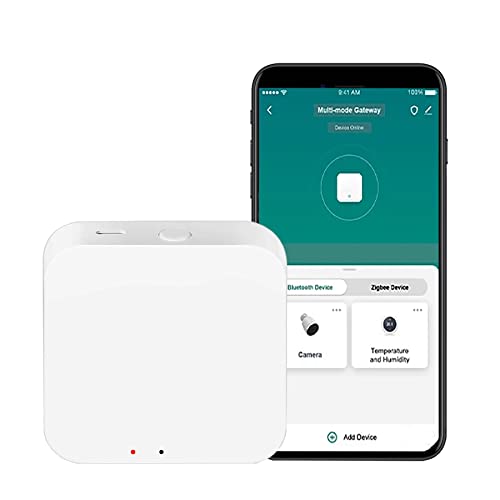
| Versatile Multi-Protocol Hub | Wireless Protocols Supported: Zigbee 3.0, Bluetooth, Bluetooth Mesh, Wi‑Fi | Voice Assistant Compatibility: Alexa Echo, Google Assistant | Device Capacity (Zigbee/Thread/Bluetooth): Up to 100 Tuya Zigbee devices or 100 Bluetooth devices; supports up to 128 devices total | VIEW LATEST PRICE | Read Our Analysis |
| Tuya Zigbee Gateway Hub for Smart Home Control |

| Reliable Zigbee Mesh Starter | Wireless Protocols Supported: Zigbee (Tuya Zigbee), Wi‑Fi | Voice Assistant Compatibility: Alexa, Google Assistant | Device Capacity (Zigbee/Thread/Bluetooth): Not explicitly stated; supports automatic network expansion with many devices | VIEW LATEST PRICE | Read Our Analysis |
| Aqara Smart Hub M100 Home Automation Controller |

| Compact & Efficient | Wireless Protocols Supported: Aqara Zigbee, Thread, Wi‑Fi (2.4 GHz Wi‑Fi 6) | Voice Assistant Compatibility: Amazon Alexa, Apple HomeKit (via Matter), Google Home, Home Assistant | Device Capacity (Zigbee/Thread/Bluetooth): Up to 20 Aqara Zigbee devices, 20 Thread devices | VIEW LATEST PRICE | Read Our Analysis |
More Details on Our Top Picks
Aqara Smart Hub M200 Matter Controller & Router
Should you’re looking to seamlessly connect a wide range of smart devices, the Aqara Smart Hub M200 Matter Controller & Router stands out through supporting up to 40 Zigbee and 40 Thread devices while bridging multiple ecosystems like Apple HomeKit, Amazon Alexa, and Google Home via Matter integration. You’ll appreciate its dual-band Wi‑Fi, PoE support, and USB-C power options, ensuring reliable connectivity. Its 360° IR blaster and AC thermostat features add versatility. Plus, local automation runs swiftly without Wi‑Fi, enhancing security and responsiveness. Compact yet powerful, the Aqara M200 is a solid choice for a future-ready smart home hub.
- Wireless Protocols Supported:Aqara Zigbee, Thread, Bluetooth, Wi‑Fi, Matter
- Voice Assistant Compatibility:Amazon Alexa, Apple HomeKit (via Matter), Google Home, SmartThings, Home Assistant
- Device Capacity (Zigbee/Thread/Bluetooth):Up to 40 Aqara Zigbee devices, 40 Thread devices
- App Ecosystem / Control Platform:Aqara Home app, Matter integration apps
- Local Automation Support:Yes, local execution for Zigbee and Matter devices, millisecond response times
- Power Input Type:USB-C power; supports Power over Ethernet (PoE); no power adapter included
- Additional Feature:360° IR blaster
- Additional Feature:Power over Ethernet (PoE)
- Additional Feature:Built-in security speaker
Tuya Smart Zigbee 3.0 Multi-Mode Gateway Hub
In case you want a versatile hub that unites Zigbee, BLE, and Bluetooth Mesh devices under one app, the Tuya Smart Zigbee 3.0 Multi-Mode Gateway Hub fits the bill perfectly. You can control up to 128 Zigbee or Bluetooth Mesh devices and two BLE devices simultaneously via the Smart Life or Tuya app. It supports voice commands through Alexa, Google Assistant, and Siri, plus IFTTT automation. This hub creates an adaptive self-organizing network for reliable performance and offers remote control, real-time data, and smart scenario setups. Its low power use and Type-C power supply make it ideal for efficient indoor smart homes.
- Wireless Protocols Supported:Zigbee 3.0, BLE, Bluetooth Mesh, Wi‑Fi (2.4 GHz only)
- Voice Assistant Compatibility:Alexa, Google Assistant, Siri
- Device Capacity (Zigbee/Thread/Bluetooth):Up to 128 Zigbee/Bluetooth Mesh Tuya devices, 2 concurrent BLE devices
- App Ecosystem / Control Platform:Smart Life / Tuya app
- Local Automation Support:Automation via cloud-based Smart Life app; no explicit local automation noted
- Power Input Type:Type-C power supply; compliant with EU regulations
- Additional Feature:Dynamic self-organizing network
- Additional Feature:Suspension mounting supported
- Additional Feature:Multiple back ventilation holes
ZigBee Bluetooth Smart Hub Gateway with Voice Control
Should you want seamless control over a large number of smart devices, the ZigBee Bluetooth Smart Hub Gateway with Voice Control is an ideal choice. This smart multi-mode hub supports ZigBee 3.0, Bluetooth, and Wi-Fi, letting you manage up to 128 devices through the Tuya Smart or Smart Life app. You can set up automation, group controls, and device sharing effortlessly. Compatible with Alexa and Google Assistant, it offers convenient voice control. Plug it in, connect via app—no Ethernet needed—and control your home remotely. Compact and reliable, this hub fits perfectly into your smart home ecosystem for streamlined management.
- Wireless Protocols Supported:Zigbee 3.0, Bluetooth, Bluetooth Mesh, Wi‑Fi
- Voice Assistant Compatibility:Alexa Echo, Google Assistant
- Device Capacity (Zigbee/Thread/Bluetooth):Up to 100 Tuya Zigbee devices or 100 Bluetooth devices; supports up to 128 devices total
- App Ecosystem / Control Platform:Tuya Smart / Smart Life app
- Local Automation Support:Supports scenario/automation creation via app; local execution not specified
- Power Input Type:DC 5V 1A via power supply cable included
- Additional Feature:Device sharing multi-user
- Additional Feature:No Ethernet required
- Additional Feature:24-month warranty included
Tuya Zigbee Gateway Hub for Smart Home Control
Provided that you’re looking to seamlessly control a variety of Tuya ZigBee devices like smart sockets, sensors, and door locks, the Tuya Zigbee Gateway Hub is your go-to smart home bridge. It connects all your Tuya ZigBee products through the Tuya Smart or Smart Life app, letting you control devices remotely and via Alexa or Google Assistant voice commands. This hub acts as a powerful WiFi bridge, enabling automation and device-to-device scenes. With a stable ZigBee connection, a 50-meter range, easy setup without cables, and automatic mesh expansion, it guarantees reliable, scalable smart home control backed by a 24-month warranty.
- Wireless Protocols Supported:Zigbee (Tuya Zigbee), Wi‑Fi
- Voice Assistant Compatibility:Alexa, Google Assistant
- Device Capacity (Zigbee/Thread/Bluetooth):Not explicitly stated; supports automatic network expansion with many devices
- App Ecosystem / Control Platform:Tuya Smart / Smart Life app
- Local Automation Support:Supports home automation and device-to-device scenes; local execution not explicitly stated
- Power Input Type:Powered via standard power adapter (details not specified)
- Additional Feature:Automatic network expansion
- Additional Feature:Up to 50 m range
- Additional Feature:No network cable needed
Aqara Smart Hub M100 Home Automation Controller
Provided you want seamless integration with both Aqara Zigbee and Thread devices while maintaining fast, local automation control, the Aqara Smart Hub M100 is a solid choice. It supports up to 20 Aqara Zigbee devices and 20 Thread devices but doesn’t work with third-party Zigbee gadgets. Thanks to its Matter Bridge, you can link Aqara products to Apple Home, Alexa, and more. Automations run locally with millisecond response times, even without Wi-Fi. With Wi-Fi 6 support and WPA3 security, it’s reliable and secure. The adjustable design fits various setups, though it needs continuous power via USB-A.
- Wireless Protocols Supported:Aqara Zigbee, Thread, Wi‑Fi (2.4 GHz Wi‑Fi 6)
- Voice Assistant Compatibility:Amazon Alexa, Apple HomeKit (via Matter), Google Home, Home Assistant
- Device Capacity (Zigbee/Thread/Bluetooth):Up to 20 Aqara Zigbee devices, 20 Thread devices
- App Ecosystem / Control Platform:Aqara Home app, Matter integration apps
- Local Automation Support:Yes, local execution for Zigbee and Matter devices with millisecond response times
- Power Input Type:USB-A 5V⎓0.5A (adapter not included)
- Additional Feature:Adjustable shaft placement
- Additional Feature:USB-A power & data
- Additional Feature:Wi-Fi 6 support
Factors to Consider When Choosing ZigBee Home Automation Hubs
While selecting a ZigBee home automation hub, you’ll want to check whether it’s compatible with your devices and supports multiple protocols for flexibility. Consider whether it allows local automation to keep things running smoothly without relying on the cloud. Also, contemplate the network range, stability, and power options to guarantee reliable performance throughout your home.
Compatibility With Devices
How do you know whether a ZigBee home automation hub will work seamlessly with your devices? Start by checking which ZigBee device types and profiles the hub supports—sensors, locks, thermostats, lights—since not all hubs expose every device class or advanced feature. Verify whether the hub allows pairing with third-party ZigBee devices or restricts you to the manufacturer’s ecosystem. Also, confirm the maximum number of ZigBee devices the hub can handle to avoid network congestion as your system grows. Make certain the hub fully exposes device functions to the smart-home platforms you use—like voice assistants or HomeKit— so you can control everything effortlessly. Keeping these compatibility factors in mind guarantees your hub integrates smoothly with your current and future smart devices.
Supported Protocols Variety
Although ZigBee remains a core protocol for many smart home setups, you should consider hubs that support multiple wireless standards like Thread, BLE, Wi-Fi, or Bluetooth Mesh to maximize device compatibility and integration options. Multi-protocol hubs bridge devices across ecosystems, giving you more flexibility. Check whether the hub acts as a Thread border router or Matter controller to enable native Thread device routing and unified Matter interoperability. Confirm ZigBee profile compatibility, such as ZigBee 3.0, to avoid pairing issues and guarantee scalability. Also, verify device limits and whether the hub supports secure transport and authentication like WPA3 for Wi-Fi and modern BLE security. Prioritize hubs that handle each protocol securely to maintain network integrity across your smart home ecosystem.
Local Automation Capabilities
Since local automation guarantees faster responses and uninterrupted control during internet outages, you should prioritize ZigBee hubs that execute automations on-device or within your LAN. Check whether the hub supports local execution not just for ZigBee but also for other protocols like Thread or Matter, so you don’t get forced into cloud dependencies. Look for documented low-latency performance and native support for complex automations such as schedules, scenes, and conditional logic. Also, verify the hub’s local automation capacity limits; large setups shouldn’t suffer performance drops or offload to the cloud. Finally, confirm critical functions like security alerts and locks reliably operate offline, and be aware which features—like push notifications or remote access—still require cloud services. This guarantees your system stays responsive and secure even whenever internet connectivity fails.
Network Range And Stability
Whenever setting up a ZigBee home automation hub, you’ll want to focus on maximizing network range and stability to make certain reliable device communication throughout your space. Since ZigBee forms a mesh network, powered mains devices act as routers, extending coverage across tens of meters indoors. Battery-powered devices won’t relay signals, so placing enough routers strategically is key. Avoid interference by selecting clear 2.4 GHz channels and positioning your hub away from Wi-Fi and Bluetooth sources. Physical barriers like concrete or metal can weaken signals, so aim for central, raised hub placement with line-of-sight whenever possible. Also, keep your network responsive by limiting traffic-heavy devices and updating firmware regularly; hubs supporting self-healing mesh behavior recover quickly from node failures, ensuring long-term stability.
Power Supply Options
Maximizing network range and stability depends not just on device placement but also on how you power your ZigBee home automation hub. Check whether the hub supports USB-C, USB-A, or DC barrel inputs and confirm the required voltage and current—commonly 5V at 1–2A—to guarantee compatibility with your adapters. In case you lack nearby outlets, prefer hubs offering Power over Ethernet (PoE) for a single-cable network and power solution. For uninterrupted operation, choose hubs with internal batteries, mini-UPS, or external power bank support to keep your mesh active during outages. Verify whether the hub maintains wireless functions and local automations without Wi-Fi. Also, consider cord length, placement constraints, and in case a specific power adapter is needed but not included, so you can plan cable management or buy the right adapter beforehand.
Integration With Voice Assistants
Choosing a ZigBee home automation hub means considering how well it integrates with your preferred voice assistants like Amazon Alexa, Google Assistant, or Siri. You want native support to make certain smooth device discovery, routine setup, and status reporting without complicated workarounds. Check whether the integration is local or cloud-based—local setups offer lower latency and keep working during internet outages, unlike cloud-dependent ones. Also, verify which device types and automations the voice assistant can control, since some hubs limit access to certain features like locks or scenes. Confirm the hub supports multi-user voice control with appropriate permissions so everyone in your household can securely manage devices. Finally, look for common voice features like scene activation, device state queries, and two-way feedback for natural, reliable interactions every time you use voice commands.
Device Capacity Limits
Since your home automation setup will grow over time, you need to pay close attention to the device capacity limits of a ZigBee hub. Check the maximum number of end devices it supports—typically between 20 and 128—to make certain it can handle your current and future sensors, bulbs, and switches. Keep in mind that capacity often varies by protocol, so verify limits for ZigBee endpoints separately from Thread or Bluetooth devices. Also, consider how many routed devices (like smart plugs) your network requires, as mesh performance depends on sufficient repeaters. Be aware that hubs near their device limit could slow down or drop transient device joins. To avoid this, leave 20–50% spare capacity for future expansions, firmware updates, and occasional device flapping without overloading the hub.
Security And Privacy Features
Beyond managing the number of devices your ZigBee hub can support, you’ll want to focus on how it protects your data and privacy. Make sure your hub uses strong wireless security standards like WPA3 for Wi-Fi and ZigBee’s AES-128 encryption to safeguard communications from eavesdropping or spoofing. Prefer hubs performing local automation and edge processing to keep sensitive routines off the cloud. Look for authenticated device pairing methods—such as device-specific keys or QR codes—and role-based access controls to prevent unauthorized control. Verify the vendor’s firmware update policies, favoring those offering signed, over-the-air updates for quick vulnerability patches. Finally, review the hub’s data handling practices, including what telemetry it collects, data retention, and whether cloud data stays encrypted both in transit and at rest.
