

You want a label maker that’s durable, customizable, and portable to keep things organized effortlessly. The DYMO LabelManager 160 offers smart keys and multiple font options with long battery life. Brother’s PTD210 and PTH110BP models give you tons of fonts and symbols plus laminated, water-resistant tapes. Vixic D210S prints on tough, waterproof labels with a quick start. The DYMO LetraTag 100H Plus has clear previews, while the SUPVAN E11 uses an app and inkless printing. Check out these top picks for your perfect match.
| DYMO LabelManager 160 Portable Label Maker Bundle |

| Best for Portability | Keyboard Type: QWERTY keyboard | Tape Compatibility / Widths Supported: DYMO Label Tapes in 1/4, 3/8, 1/2 inch widths | Portability / Power Source: Portable, battery-powered with automatic power-off | VIEW LATEST PRICE | Read Our Analysis |
| Brother P-Touch PTD210 Label Maker Bundle White |

| Most Feature-Rich | Keyboard Type: Push button keyboard with one-touch keys | Tape Compatibility / Widths Supported: Brother TZe laminated tapes in 3.5mm, 6mm, 9mm, 12mm widths | Portability / Power Source: Portable, battery-powered (6×AAA) or optional AC adapter | VIEW LATEST PRICE | Read Our Analysis |
| Vixic D210S Label Maker with Waterproof Tapes |

| Best Durability | Keyboard Type: Soft QWERTY keyboard, push-button controller | Tape Compatibility / Widths Supported: Laminated tapes 12mm, 9mm, 6mm compatible (Vixic BZ tapes) | Portability / Power Source: Portable, USB-C powered or optional 6×AAA batteries | VIEW LATEST PRICE | Read Our Analysis |
| DYMO LetraTag 100H Plus Handheld Label Maker for Office or Home |
| Best Compact Design | Keyboard Type: Handheld keyboard (not specified as QWERTY) | Tape Compatibility / Widths Supported: DYMO LetraTag LT labels 1/2 inch width | Portability / Power Source: Portable, handheld, powered by 2 AAA batteries | VIEW LATEST PRICE | Read Our Analysis |
| Brother P-Touch PTH110BP Portable Label Maker Bundle |

| Best for Everyday Use | Keyboard Type: QWERTY keyboard | Tape Compatibility / Widths Supported: Brother TZe tapes 3.5mm to 12mm widths | Portability / Power Source: Portable, powered by 6 AAA batteries or optional AC adapter | VIEW LATEST PRICE | Read Our Analysis |
| SUPVAN E11 Bluetooth Inkless Label Maker with App |
| Best Wireless Connectivity | Keyboard Type: Fast keyboard printing | Tape Compatibility / Widths Supported: Continuous and fixed-size labels, cable labels (no specific width stated) | Portability / Power Source: Portable, rechargeable 1200 mAh battery | VIEW LATEST PRICE | Read Our Analysis |
More Details on Our Top Picks
DYMO LabelManager 160 Portable Label Maker Bundle
At the moment you need a label maker that fits right in your hand and lets you label on the go, the DYMO LabelManager 160 Portable Label Maker Bundle is a perfect pick. You get a compact, easy-to-carry device with a QWERTY keyboard and one-touch smart keys to speed up text input and editing. Its large display helps you see your work clearly. You can customize labels with over 20 text formats and 200+ symbols. The bundle includes three durable D1 label cassettes, and with extended battery life plus automatic power-off, it’s great for home and office use.
- Keyboard Type:QWERTY keyboard
- Tape Compatibility / Widths Supported:DYMO Label Tapes in 1/4, 3/8, 1/2 inch widths
- Portability / Power Source:Portable, battery-powered with automatic power-off
- Print Color:Black print only
- Label Durability:Best with genuine DYMO tapes; durable professional labels
- Display / Preview Capability:Large display for text input and editing
- Additional Feature:One-touch smart keys
- Additional Feature:Automatic power-off function
- Additional Feature:Includes 3 label cassettes
Brother P-Touch PTD210 Label Maker Bundle White
Should you need a versatile and portable label maker for home or office use, the Brother P-Touch PTD210 Label Maker Bundle offers an impressive array of fonts, symbols, and templates to customize your labels with ease. You get 14 fonts, 600+ symbols, and 27 patterned templates, all previewed on a clear display before printing. It uses durable, water-resistant laminated tapes that withstand freezer and dishwasher conditions. Powered via six AAA batteries or an optional AC adapter, it’s perfect for labeling files, cables, clothing, and more. Lightweight and compact, this bundle includes four tapes and a user guide, ensuring you’re ready to organize efficiently.
- Keyboard Type:Push button keyboard with one-touch keys
- Tape Compatibility / Widths Supported:Brother TZe laminated tapes in 3.5mm, 6mm, 9mm, 12mm widths
- Portability / Power Source:Portable, battery-powered (6×AAA) or optional AC adapter
- Print Color:Black print only
- Label Durability:Water-resistant, fade-resistant laminated tapes; freezer, microwave, dishwasher safe
- Display / Preview Capability:Preview on display before printing
- Additional Feature:27 label templates included
- Additional Feature:USB connectivity port
- Additional Feature:Optional protective carrying case
Vixic D210S Label Maker with Waterproof Tapes
You’ll appreciate the Vixic D210S Label Maker provided you need durable, waterproof labels that stand up to tough conditions. It prints black-on-white laminated tapes with seven-layer protection, making them fade-, abrasion-, and temperature-resistant. The device supports up to four lines of text, 16 fonts, and offers 800+ symbols, all editable without an app. Its soft QWERTY keyboard and clear screen enhance usability. Powered via USB-C or optional AAA batteries, it’s ready within 20 seconds. Compact and lightweight, it’s ideal for home, office, and small business use. Each tape roll yields around 264 labels, saving tape with chain printing.
- Keyboard Type:Soft QWERTY keyboard, push-button controller
- Tape Compatibility / Widths Supported:Laminated tapes 12mm, 9mm, 6mm compatible (Vixic BZ tapes)
- Portability / Power Source:Portable, USB-C powered or optional 6×AAA batteries
- Print Color:Black print only
- Label Durability:Waterproof, fade-resistant, abrasion-resistant, temperature-resistant laminated tapes
- Display / Preview Capability:German-imported screen with 25% increased clarity
- Additional Feature:7-layer lamination technology
- Additional Feature:Chain print reduces waste
- Additional Feature:German-imported high-clarity screen
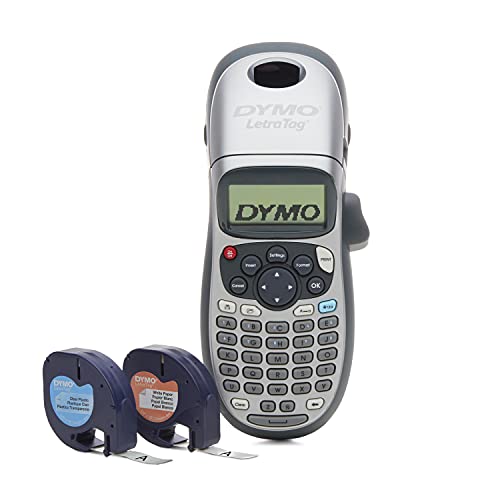
DYMO LetraTag 100H Plus Handheld Label Maker for Office or Home
The DYMO LetraTag 100H Plus Handheld Label Maker fits perfectly provided you need a compact, portable device that delivers clear, custom labels for both office and home use. You’ll enjoy five font sizes, seven print styles, and eight box styles, all previewed on a graphical WYSIWYG display before printing. It’s lightweight, battery-powered, and includes a magnetic holder for convenience. Using authentic DYMO 1/2-inch LetraTag LT labels, you can print on various colors and materials. With a 4.6-star rating from over 44,000 users, it’s a reliable, easy-to-use tool that helps you stay organized effortlessly.
- Keyboard Type:Handheld keyboard (not specified as QWERTY)
- Tape Compatibility / Widths Supported:DYMO LetraTag LT labels 1/2 inch width
- Portability / Power Source:Portable, handheld, powered by 2 AAA batteries
- Print Color:Black print only
- Label Durability:Variety of materials and colors; durability depends on label type
- Display / Preview Capability:Graphical WYSIWYG display to preview font effects
- Additional Feature:Graphical WYSIWYG display
- Additional Feature:Magnetic holder included
- Additional Feature:5 font sizes & styles
Brother P-Touch PTH110BP Portable Label Maker Bundle
In case you need a compact label maker that fits right in your hand and offers quick, easy labeling on the go, the Brother P-Touch PTH110BP Portable Label Maker Bundle is a smart pick. It features a QWERTY keyboard and an easy-view display, letting you create two-line labels up to 12 mm wide with three fonts, 14 frames, and 250+ symbols. You can save up to 15 labels for quick reprinting. Using durable Brother TZe laminated tapes, your labels resist water, fading, and extreme temperatures. Plus, it’s lightweight and portable, powered via batteries or an optional AC adapter.
- Keyboard Type:QWERTY keyboard
- Tape Compatibility / Widths Supported:Brother TZe tapes 3.5mm to 12mm widths
- Portability / Power Source:Portable, powered by 6 AAA batteries or optional AC adapter
- Print Color:Black print only
- Label Durability:Water-resistant, fade-resistant, peel-resistant laminated tapes; withstand extreme temps
- Display / Preview Capability:Preview/easy-view display
- Additional Feature:Stores 15 labels in memory
- Additional Feature:Built-in cable labeling feature
- Additional Feature:Supports 3.5 mm to 12 mm tapes
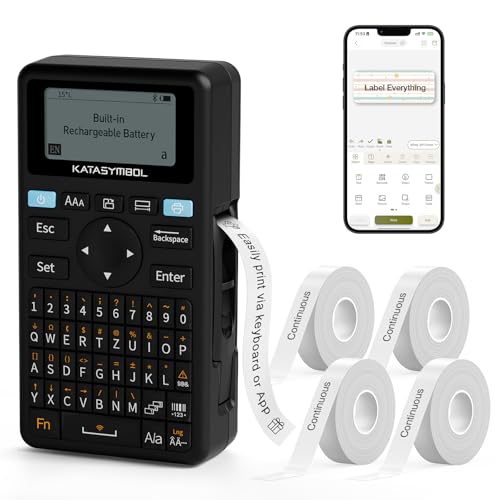
SUPVAN E11 Bluetooth Inkless Label Maker with App
At the point you need a label maker that blends fast keyboard input with the versatility of Bluetooth app customization, the SUPVAN E11 is an ideal choice. You can quickly print labels using its keyboard or design personalized ones via the app, which offers 40 fonts, 50 frames, and over 650 icons. It supports continuous, fixed-size, and cable labels, perfect for batch printing or cable identification. With a minimal 0.2 mm margin, it saves label material efficiently. Lightweight and compact, it runs up to a month on a single charge, making it perfect for organizing homes, offices, or schools with ease.
- Keyboard Type:Fast keyboard printing
- Tape Compatibility / Widths Supported:Continuous and fixed-size labels, cable labels (no specific width stated)
- Portability / Power Source:Portable, rechargeable 1200 mAh battery
- Print Color:Black print only
- Label Durability:Not explicitly stated; uses inkless printing on compatible label types
- Display / Preview Capability:App-based preview and editing via Bluetooth; no standalone display mentioned
- Additional Feature:Bluetooth app with 650+ icons
- Additional Feature:Minimal 0.2 mm margin printing
- Additional Feature:Rechargeable 1,200 mAh battery
Factors to Consider When Choosing Label Makers
While selecting a label maker, you’ll want to consider about how portable it is and the type of keyboard it offers for ease of use. Consider the customization features available, as well as the compatibility and durability of the tape it uses. Don’t forget to check what power sources it supports to guarantee it fits your workflow.
Label Maker Portability
Considering label maker portability means evaluating several key factors that affect how easily you can use the device on the go. Initially, check the power options—battery-powered or rechargeable models let you work cordless, while AC-only units restrict mobility. Next, compare size and weight; compact, lightweight devices (around 0.5–1.1 lb) fit comfortably in your hand or pocket. Make sure the keyboard is comfortable and the display is easy to read to speed up label creation without fatigue. Also, verify that the tapes or cartridges use common sizes so you don’t have to carry extra supplies. Ultimately, look for connectivity like USB-C or Bluetooth so you can power up via portable chargers and print directly from your phone or laptop whenever away from your desk.
Keyboard Type Options
Portability matters, but the keyboard type you choose also shapes how efficiently you create labels. In the event you type frequently or need longer labels, a QWERTY keyboard feels familiar and speeds up multi-character entry. Numeric or multi-function keyboards save space but often slow you down since they require mode switches or multiple presses per character. Dedicated one-touch keys for symbols or common words can enhance speed during repetitive tasks and reduce menu digging. Consider key feel, too: soft chiclet keys offer quiet, low-profile typing, great for on-the-go use, while raised tactile keys provide better feedback for accuracy in busy environments. Finally, check whether the keyboard layout supports your language or industry-specific symbols, especially in the event you need multilingual or specialized labeling.
Label Customization Features
Because label customization shapes how well your labels communicate, you’ll want a device that offers a variety of fonts, styles, and frames to suit different needs. Look for label makers with double-digit font options and hundreds of symbols to give your designs flexibility. Multi-line printing and adjustable font sizes let you create compact labels or bold headers depending on the task. Built-in templates and extensive symbol libraries speed up labeling cables, folders, or storage bins with consistent style. A preview screen or companion app helps you avoid tape waste allowing you to edit before printing. Also, check whether the device supports custom templates and saved label memory so you can quickly reprint frequently used designs without hassle.
Tape Compatibility & Durability
You’ll want to guarantee your label maker works with the right tape widths and types to match your labeling needs. Check which tape widths—commonly 3.5 mm, 6 mm, 9 mm, or 12 mm—your device accepts to make certain you can print the label sizes you want. Opt for laminated or multi-layer tapes provided durability matters; these resist water, fading, abrasion, and temperature changes, making them ideal for indoor and outdoor use. Whenever labeling items exposed to extreme conditions like freezers or dishwashers, choose tapes rated for temperature and waterproof resistance. In case you need specialty labels, look for cables, iron-on, or photo-safe tapes designed for specific uses. Also, check tape roll length and label yield to reduce downtime and save on costs.
Power Source Choices
Choosing the right tape is just one piece of the labeling puzzle; power source options can greatly impact how and where you use your label maker. Battery-powered models, whether using AA/AAA or built-in rechargeable packs, give you true portability. Rechargeables often last weeks per charge, but disposable batteries mean carrying spares. AC or adaptor-powered label makers are ideal for high-volume or stationary use, providing continuous operation without interruptions. Some devices offer USB-C or micro-USB power, letting you run them from a computer or power bank—combining portability with longer sessions while plugged in. For maximum flexibility, pick a label maker with both battery and AC/USB options. Also, look for energy-saving features like auto-off and sleep modes to extend battery life and keep your labeling efficient.
Print Quality & Resolution
Whenever you zero in on print quality and resolution, you make sure your labels come out sharp and easy to read. Aim for at least 180–300 dpi to get crisp text and fine lines, especially whenever printing small fonts. Thermal transfer and laminated tape technologies offer smudge- and fade-resistant labels, keeping them legible over time. Consider the print width and maximum media size, as wider print heads let you fit larger fonts and multiple lines without crowding. Contrast plays a huge role too—choose dark print on light tape for the best readability. In case you plan to print barcodes or small symbols, double-check the device’s resolution and supported sizes; low dpi could make barcodes unreadable by scanners, defeating the purpose of your labels.
User Interface Simplicity
Often, the ease of using a label maker determines how smoothly your labeling tasks go. Look for a clear, easy-to-read display—larger screens with graphical WYSIWYG previews help you avoid misprints and wasted labels. A QWERTY-style keyboard or well-spaced keys speeds up text entry and reduces typos, unlike cramped or non-QWERTY layouts. One-touch smart keys for common functions like font, size, cut, and symbols let you format labels quickly without digging through menus. Built-in templates, frames, and symbol menus simplify common designs, so you won’t need extra software. Should you frequently reprint the same labels, consider memory and quick-recall features to save your templates and cut repetitive input time. Prioritizing these interface features makes labeling efficient and stress-free.
Additional Connectivity Options
As you connect a label maker to other devices, your labeling options multiply considerably. USB ports let you link directly to your PC for firmware updates, desktop printing, or importing contact lists. Bluetooth enables wireless printing from your smartphone or tablet, often opening app-based templates and cloud-saved label libraries. Wi-Fi support allows multiple users to print remotely on the same network, making it ideal for office environments. NFC or peer-to-peer pairing simplifies quick mobile connections without manual Bluetooth setup, speeding occasional label jobs. Some models offer USB-C ports or optional AC adapters that combine data transfer and continuous power, perfect for high-volume desktop use. Choosing a label maker with versatile connectivity guarantees you can adapt seamlessly to your workflow and device preferences.
